
Last Updated On : 12-Oct-2026
Total 43 Questions
When deleting a user account on FortiSOAR, you must enter the user ID in which file on FortiSOAR?
A. userDelete.txt.
B. config_yml
C. scripts
D. usersToDelete.txt
Explanation
When performing administrative user deletion via the FortiSOAR CLI, the process requires interaction with the /opt/cyops/scripts/ directory. The administrator must list the unique user IDs intended for removal within a specific text file. Once this list is complete, a corresponding system script is executed. This script reads the input file and subsequently deletes all specified user accounts from the FortiSOAR database permanently.
✅ Correct Option: D. usersToDelete.txt
The process for deleting users through the CLI requires a file named usersToDelete.txt. This file acts as a manifest, listing the unique user ID for each account to be deleted. An administrator uses a script, such as userDelete.py or a similar utility, to read the content of this file and initiate the irreversible removal of all listed users from the FortiSOAR system, streamlining bulk deletion tasks.
❌ Incorrect Option: A. userDelete.txt.
This option is similar to the correct filename but misses the plural and context-specific naming convention used by FortiSOAR. While a script like userDelete.py or userDelete.sh.x is run to perform the deletion, the input file containing the list of IDs is consistently named with the plural form and the to delete context, which is usersToDelete.txt.
❌ Incorrect Option: B. config_yml
The config_yml file is used for managing various system and service configurations within FortiSOAR, such as database settings, service connection details, or general application parameters. It is an internal configuration file and is not the designated file for supplying a list of user IDs for the administrative deletion procedure.
❌ Incorrect Option: C. scripts
The scripts option refers to the directory, specifically /opt/cyops/scripts/, where the deletion script (the program that performs the action) is located. This directory contains the executable logic, but the actual file used to pass the list of target user IDs to the script is a text file within this directory, which is usersToDelete.txt.
Summary
To delete a user account from FortiSOAR using the administrative CLI method, you must first create or edit a file named usersToDelete.txt. This file, located in the /opt/cyops/scripts/ directory, must contain the specific user IDs of the accounts you wish to remove. A corresponding deletion script then reads this list to perform the permanent removal of those users.
Reference
How to delete FortiSOAR Users - Fortinet Community
An administrator wants to collect and review all FortiSOAR log tiles to troubleshoot an issue. Which two methods can they use to accomplish this? (Choose two.)
A. Enter the csacta services —status command, and then copy the output.
B. Download the logs from the GUI.
C. Enter the caacta log —collect directory command.
D. Review the contents of /var/log/messages.
Explanation:
This question tests your knowledge of the official log collection methods in FortiSOAR. Administrators need two reliable ways to gather logs—one through the user interface for convenience, and another via command line for cases where the GUI might be partially inaccessible. The question specifically asks for methods that collect all FortiSOAR log files (often called "log tiles") for comprehensive troubleshooting.
✔️ Correct Options:
✔️ B. Download the logs from the GUI – From the FortiSOAR web interface, click the @ symbol in the bottom-left corner, then click the Download Logs button. This packages all relevant logs into a compressed file for download . This is the standard GUI-based collection method.
✔️ C. Enter the csadm log --collect [directory] command – From the CLI (as csadmin user), run sudo csadm log --collect /path/to/save. This command collects all FortiSOAR logs and saves them to the specified directory . This method works even if the GUI is unavailable.
❌ Incorrect options:
❌ A. Enter the csadm services --status command, and then copy the output – This command shows the running status of FortiSOAR services (e.g., which services are active or stopped) . It does not collect or export any log files.
❌ D. Review the contents of /var/log/messages – This file contains CentOS operating system level errors . While useful for OS-level troubleshooting, it does not contain FortiSOAR application logs (which reside in /var/log/cyops/). Reviewing this single file is not a method to collect all FortiSOAR log tiles.
🔧 Reference:
→ Fortinet Knowledge Base - How to collect full logs from FortiSOAR
– Official article confirming both the GUI download method and the csadm log --collect CLI command for comprehensive log collection.
→ Fortinet Administration Guide - Debugging and Troubleshooting – Confirms that /var/log/messages is for CentOS OS-level errors (not FortiSOAR logs) and that csadm services --status checks service health, not log collection.
Refer to the exhibit.
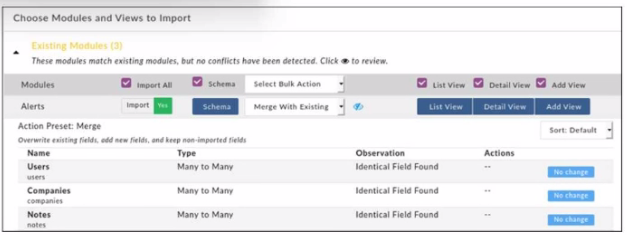
When importing modules to FortiSOAR using the configuration wizard, what actions are
applied to fields it you select Merge with Existing as the Bulk action?
A. Existing fields are kept, new fields are added, and non-imported fields are deleted.
B. Existing Holds are overwritten, now fields are added, and non-imported fields are deleted.
C. Existing fields are kept, new fields are added, and non-imported fields are kept.
D. Existing fields are overwritten, new fields are added, and non-Imported fields are kept.
Explanation:
The question tests what the “Merge With Existing” bulk action does in the FortiSOAR Configuration Wizard during module/schema import. The UI shows the preset: “Overwrite existing fields, add new fields, and keep non-imported fields.” You must differentiate this from Replace (deletes non-imported) and Append (keeps existing unchanged).
✔️ Correct Option (D):
Merge updates the target module by overwriting any fields that exist in both the current and imported schema, adds any new fields that only exist in the import package, and preserves fields that are present in the existing module but not included in the import. Fortinet docs phrase it exactly as: “merge overwrites existing fields, adds new fields, and keeps non-imported fields.”
❌ Incorrect options:
A. Existing fields are kept, new fields are added, and non-imported fields are deleted.
This matches Replace, not Merge. Replace overwrites existing fields, adds new ones, and removes any fields that are not part of the imported package.
B. Existing Holds are overwritten, now fields are added, and non-imported fields are deleted.
The wording is inaccurate (“Holds” isn’t a concept here) and the behavior (delete non-imported fields) belongs to Replace, not Merge.
C. Existing fields are kept, new fields are added, and non-imported fields are kept.
This describes Append, which leaves existing fields untouched, adds new fields from the import, and keeps non-imported fields. Merge differs by overwriting existing fields.
🔧 Reference:
→ Application Editor | FortiSOAR 7.0.0 | Fortinet Document Library – Confirms: “Merge… overwrites existing fields, adds new fields, and keeps non-imported fields,” and contrasts Replace (deletes non-imported) and Append (keeps existing).
Which log file contains license synchronization logs on FortiSOAR?
A. fdn.log
B. beat.log
C. celery.log
D. falcon.log
Explanation:
This question tests your knowledge of FortiSOAR log files and their specific purposes, particularly for troubleshooting licensing-related activities. FortiSOAR maintains detailed logs in the /var/log/cyops directory to help administrators diagnose system issues.
✔️ Correct Option:
A. fdn.log
The fdn.log file, located under cyops-auth/, records all activities related to license synchronization with the FortiGuard Distribution Network (FDN). It captures events, errors, and communication details during license validation, updates, or sync processes, making it the primary source for troubleshooting license issues.
❌ Incorrect options:
B. beat.log
This log belongs to the FortiSOAR scheduler (cyops-workflow/beat.log) and tracks scheduled tasks and playbook execution timing. It does not contain license synchronization information.
C. celery.log
The celery.log (or celeryd.log) handles playbook runtime, task queuing, and workflow execution issues. It is unrelated to license management or FDN synchronization.
D. falcon.log
This file is used for Elasticsearch search and indexing operations (cyops-search/falcon.log). It helps troubleshoot module publishing or search problems, not licensing activities.
🔧 Reference:
→ Debugging, Troubleshooting, and Optimizing FortiSOAR
Confirms that cyops-auth/fdn.log is used for troubleshooting FortiSOAR license synchronization issues with FortiGuard Distribution Network (FDN).
→ Licensing FortiSOAR | Deployment Guide
Recommends monitoring the fdn.log file when facing license-related problems.
Which service on FortiSOAR is the playbook scheduler?
A. cyops-torccat
B. colcrybeatd
C. celeryd
D. uwsgi
Explanation:
This question identifies the specific system service responsible for managing and triggering scheduled tasks within FortiSOAR. It tests your understanding of the back-end architecture and how the platform automates playbooks at defined intervals.
✅ Correct Option:
B. colcrybeatd
The colcrybeatd service (a customized version of Celery Beat) acts as the central scheduler for FortiSOAR. It monitors the database for playbooks or system tasks that are configured to run on a specific schedule or cron expression. Once the scheduled time is reached, this service sends a message to the task queue so that a worker can execute the playbook.
❌ Incorrect options:
A. cyops-torccat
The cyops-torccat service is typically associated with the search and indexing capabilities of the platform, specifically handling the communication with Elasticsearch. It ensures that record data is searchable across the modules but does not have any role in the timing or scheduling of playbook executions.
C. celeryd
The celeryd service represents the worker process that actually executes the tasks. While it is part of the same task-processing ecosystem as the scheduler, it does not manage the "when" of a task; it simply consumes tasks from the queue and processes them once they have been triggered by the scheduler.
D. uwsgi
The uwsgi service serves as the web server interface that connects the web front-end with the Python application logic. It handles the processing of user requests via the browser and API calls, rather than managing the internal automation clock or the scheduling of background playbooks.
🔧 Reference:
→ FortiSOAR Services and Troubleshooting
This official guide confirms that colcrybeatd is the service responsible for scheduling playbooks and managing periodic tasks.
Select two statements that are true about FortiSOAR themes. (Choose two.)
A. There are three theme options available: Dark, Light, and Sky.
B. Non-administrator users can change the theme by editing their user profile.
C. FortiSOAR theme can be configured to apply to all users on the system.
D. Selecting Revert Theme allows the user to revert the user profile theme.
Explanation
This question tests your knowledge of FortiSOAR's theming functionality, focusing on administrative control versus user personalization. The theme settings in FortiSOAR are managed in two places: the System Configuration for administrators and the individual User Profile for personal preferences. Understanding this dual-layer configuration is key for system administration and user support tasks.
✅ Correct Options:
B. Non-administrator users can change the theme by editing their user profile.
The User Profile page provides personalization settings for all users. From here, any authenticated user can select their preferred theme, which overrides the system default for their session only.
C. FortiSOAR theme can be configured to apply to all users on the system.
An administrator can set a global default theme via Settings > System Configuration > General. This defines the baseline appearance for all users who have not selected a personal preference in their own profile.
❌ Incorrect Options:
A. There are three theme options available: Dark, Light, and Sky.
The official documentation does not specify named theme options. While "Dark" and "Light" are standard, the inclusion of a "Sky" theme is not mentioned in the current FortiSOAR guides and is therefore incorrect.
D. Selecting Revert Theme allows the user to revert the user profile theme.
The Revert button on the System Configuration page is a function for administrators. It discards unsaved changes to the system-wide default settings, not to an individual user's saved profile theme.
Summary:
Administrators can set a system-wide default theme, while individual users can personalize their own theme via their profile. The "Revert" function applies to system settings, not user preferences.
Reference:
Fortinet Documentation - FortiSOAR 7.6 Administration Guide, "System Configuration" and "User Profile" sections.
Which three roles are defined as SAML roles? (Choose three.)
A. Service provider
B. Role
C. Identity provider
D. Attribute map
E. Principal
Explanation:
This question checks if you know the three SAML roles recognized in FortiSOAR’s SAML configuration. FortiSOAR documentation explicitly defines Principal (user), Identity Provider (IdP), and Service Provider (SP) as the roles that participate in the SAML authentication workflow. These are required to configure SSO properly.
🟢 Correct Options:
A. Service provider
The Service Provider (SP) is the entity that receives and validates SAML assertions from the Identity Provider to control access to applications such as FortiSOAR. It is listed directly in Fortinet’s official SAML documentation as one of the defined SAML roles.
C. Identity provider
The Identity Provider (IdP) authenticates the user and issues assertions about the user’s identity. Fortinet’s documentation lists Identity Provider as one of the three SAML roles.
E. Principal
The Principal generally refers to the user or entity requesting access. Fortinet’s SAML principles section names the Principal as the third role in SAML.
🔴 Incorrect Options:
B. Role
“Role” here is a generic access control concept within FortiSOAR, not a defined SAML role. Fortinet’s documentation does not list “Role” as a SAML role.
D. Attribute map
Attribute mapping is a feature that maps IdP attributes to SP attributes but is not defined as a SAML role. Fortinet’s docs cover it separately under SAML configuration, not in the SAML roles section.
🔧 Reference:
→ Official Fortinet documentation — SAML Configuration Roles
— Confirms Principal, Identity Provider (IdP), and Service Provider (SP) as the three SAML roles.
| Page 2 out of 7 Pages |
| 1234 |
| NSE6_FSR-7.3 Practice Test Home |
The Fortinet NSE 6 - FortiSOAR 7.3 Administrator exam is notoriously tough. It doesn't test memorization. It forces you to make complex decisions under time pressure. A weak prep strategy risks a costly failure and wasted effort. Our NSE6_FSR-7.3 practice tests are built to be your definitive bridge to a passing score.

Copyright © - All Rights Reserved