
Last Updated On : 12-Oct-2026
Total 43 Questions
Refer to the exhibit.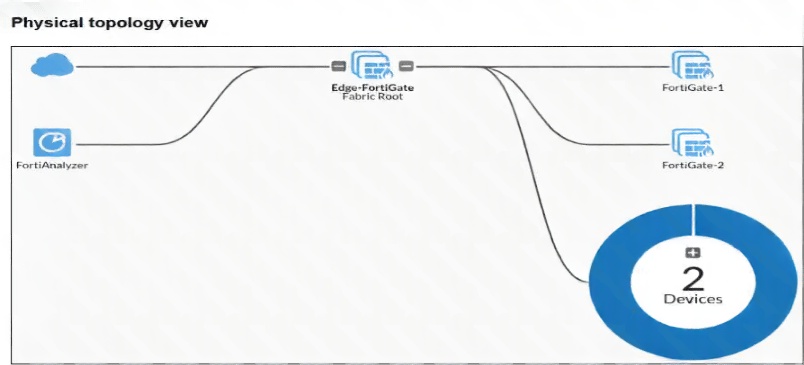
Why is the OT View tab not available in the Asset Identity Center section of the FortiGate-1 device? (Choose one answer)
You must enable the Purdue Levels feature on the FortiGate-1 device. B. Device Detection is not enabled on the FortiGate-1 interface. C. The OT View tab is only available on the root FortiGate. D. You must enable Security Fabric Connection on the interfaces of the FortiGate-1 device.
Refer to the exhibits.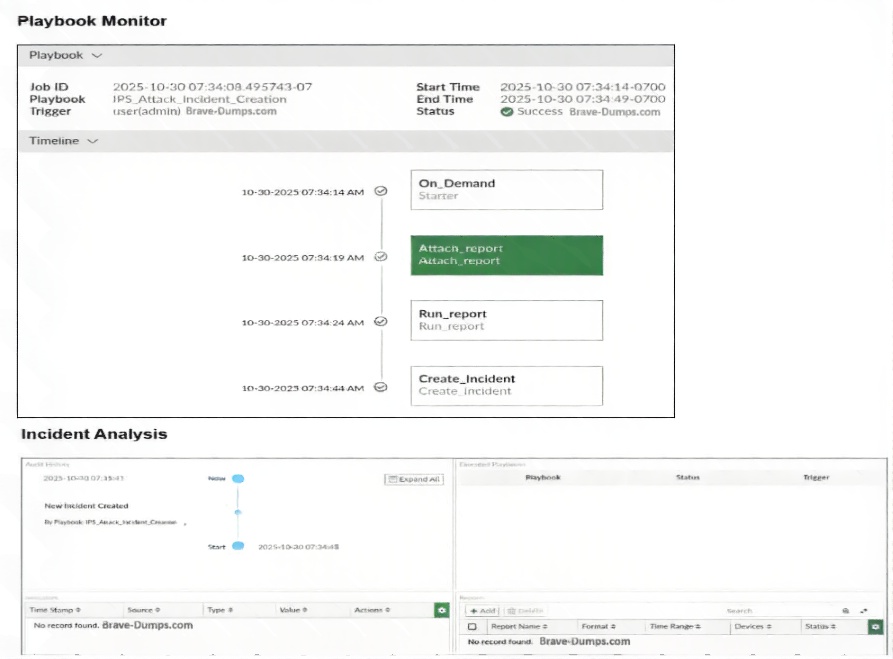
The Playbook Monitor dashboard and the analysis of the corresponding incident analysis are shown. You created the playbook with the objective of automatically attaching the report to the incident that was created. Which two statements are correct? (Choose two answers)
A. You must wait for the report to be generated and attached to the incident.
B. Only the Create_Incident task was executed.
C. The tasks in the playbook must be reordered.
D. The playbook was triggered manually.
Explanation:
The Playbook Monitor timeline shows that Run_report and Attach_report tasks appear after Create_Incident, but the incident analysis shows "New Incident Created" at 07:34:14 while report tasks run later (07:34:24-44). To attach a report to the incident being created, Create_Incident should be last. Additionally, the timeline shows On_Demand Starter, indicating manual (user-initiated) trigger.
Correct Option:
C. The tasks in the playbook must be reordered.
The timeline shows Create_Incident executing before Run_report and Attach_report. To attach a report to the same incident being created, Create_Incident should execute after the report is generated and ready for attachment. Reordering tasks (Run_report → Attach_report → Create_Incident) is necessary.
D. The playbook was triggered manually.
The timeline explicitly shows On_Demand Starter as the trigger type. In FortiEDR, On_Demand indicates manual execution by a user (administrator) rather than automated triggers such as scheduled time, incident creation, or event handler triggers.
Incorrect Options:
A. You must wait for the report to be generated and attached to the incident.
Waiting is not required; the issue is task ordering. With correct sequencing (report generation → attach → create incident), the attachment happens automatically. The problem is design, not timing.
B. Only the Create_Incident task was executed.
The timeline clearly shows Run_report and Attach_report tasks were also executed (though possibly after the incident was created). Multiple tasks executed, not just Create_Incident.
Reference:
FortiEDR Administration Guide, "Playbooks → Task Ordering and Incident Creation"; Fortinet NSE6_EDR_AD-7.0 Study Guide, "Playbook Triggers (On-Demand vs Automated)."
In the Purdue model, at which level are physical assets like the Industrial Internet of Things (IIoT) placed? (Choose one answer)
A. At Level 5 only
B. At Level 1 only
C. Above Level 4
D. Below Level 3.5
Explanation:
In the Purdue Enterprise Reference Architecture (PERA) model for OT networks, physical assets like IIoT devices are placed at Level 0 (physical process) or Level 1 (basic control). The option "Below Level 3.5" correctly indicates that IIoT devices reside below Level 3.5 (which represents the demilitarized zone or industrial DMZ separating IT and OT).
Correct Option:
D. Below Level 3.5
The Purdue model defines Levels 0-5: Level 0 (physical process), Level 1 (local controllers/IIoT), Level 2 (supervisory control), Level 3 (operations management), Level 3.5 (industrial DMZ), Level 4 (enterprise IT), Level 5 (corporate network). IIoT physical assets belong at Levels 0-1, which are below Level 3.5 (the security boundary).
Incorrect Options:
A. At Level 5 only
Level 5 is the corporate/enterprise network (e.g., email, web servers). IIoT devices are physical process sensors/actuators, not enterprise IT assets.
B. At Level 1 only
IIoT devices can appear at Level 1 (controllers) but also at Level 0 (sensors/actuators). "Only Level 1" is too restrictive. Option D (below Level 3.5) correctly encompasses both Level 0 and Level 1.
C. Above Level 4
Levels above 4 are enterprise/corporate networks. IIoT devices are never placed above Level 3.5 as they belong in the OT zone, not the IT zone.
Reference:
Purdue Enterprise Reference Architecture (PERA) Model; Fortinet NSE6_EDR_AD-7.0 Study Guide, "Purdue Model Levels and IIoT Placement."
Refer to the exhibits.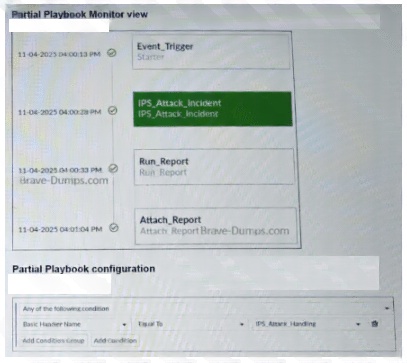
A partial view of the Playbook Monitor page and the corresponding playbook configuration are shown. Based on the monitor page and the configuration of the playbook, what has triggered the Run_Report task? (Choose one answer)
A. An IPS_Attack_Handling event
B. An IPS incident creation
C. An Event_Trigger log
D. An IPS_Attack_Incident log
Explanation:
The Playbook Monitor timeline shows Event_Trigger first, then IPS_Auxck_Incidient (typo for IPS_Attack_Incident?), then Run_Report. The playbook configuration shows condition "IPS_Auxck_Handing" (likely IPS_Attack_Handling). This indicates the playbook was triggered by an IPS_Attack_Handling event, which then executed Run_Report after matching the condition.
Correct Option:
A. An IPS_Attack_Handling event
The playbook configuration explicitly includes a condition referencing "IPS_Auxck_Handing" (interpreted as IPS_Attack_Handling). The monitor shows Event_Trigger with state change, followed by Run_Report. This means the event handler or trigger condition IPS_Attack_Handling fired, initiating the playbook and subsequently the Run_Report task.
Incorrect Options:
B. An IPS incident creation
Run_Report appears after IPS_Auxck_Incidient in the timeline, but the condition in the config is IPS_Attack_Handling, not incident creation. Incident creation is a potential outcome, not the trigger for Run_Report.
C. An Event_Trigger log
Event_Trigger appears in the monitor timeline, but this is the first step showing the trigger firing, not the specific condition that caused Run_Report. Event_Trigger is generic; the specific condition is IPS_Attack_Handling.
D. An IPS_Attack_Incident log
The monitor shows IPS_Auxck_Incidient (typo for IPS_Attack_Incident), but this appears before Run_Report. The playbook configuration condition references IPS_Attack_Handling, not IPS_Attack_Incident. They are separate event types.
Reference:
FortiEDR Administration Guide, "Playbook Monitor → Understanding Trigger Conditions"; Fortinet NSE6_EDR_AD-7.0 Study Guide, "Event Triggers and Task Execution."
You want to automate some tasks in your OT network. Which three configurations are directly available in a new basic event handler on FortiAnalyzer? (Choose three answers)
A. Send alert email
B. Create a report
C. Quarantine an attacker
D. Automatically create an incident
E. Automation stitch
Explanation:
A basic event handler on FortiAnalyzer can be configured with several automated actions. Send alert email, automatically create an incident, and automation stitch are all directly available configuration options within the basic event handler interface. These provide notification, incident management, and cross-platform automation capabilities.
Correct Options:
A. Send alert email
Basic event handlers include an email notification action. When the event handler conditions are met (e.g., specific log type, severity threshold), FortiAnalyzer can send an alert email to configured recipients directly from the event handler configuration.
D. Automatically create an incident
Event handlers can be configured to automatically create an incident in FortiAnalyzer's incident management system. The incident captures the relevant logs, timestamp, and severity, enabling structured tracking and response workflows.
E. Automation stitch
An automation stitch is directly selectable as an action in FortiAnalyzer basic event handlers. The stitch can trigger FortiGate automation workflows (e.g., block IP, run CLI script) to extend response beyond FortiAnalyzer.
Incorrect Options:
B. Create a report
Creating a report is not a direct action within a basic event handler. Reports are generated via scheduled tasks or the Run_report playbook action in FortiEDR, not directly from FortiAnalyzer basic event handlers.
C. Quarantine an attacker
Quarantine is not a native action in FortiAnalyzer event handlers. Quarantine (e.g., isolating an endpoint or blocking an IP) would require an automation stitch to FortiGate or FortiEDR, not direct quarantine configuration.
Reference:
FortiAnalyzer Administration Guide, "Event Handlers → Basic Event Handler Actions"; Fortinet NSE6_EDR_AD-7.0 Study Guide, "FortiAnalyzer Automation Capabilities."
Refer to the exhibit.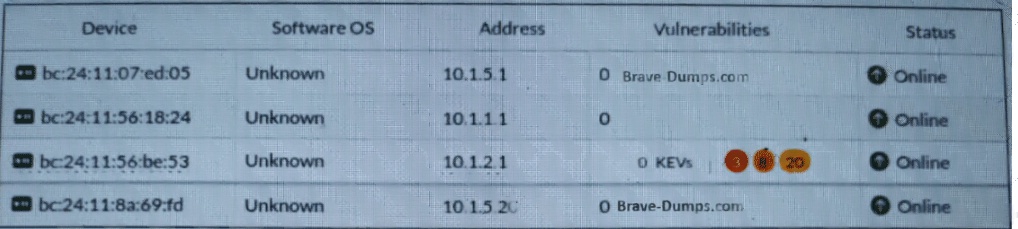
Which statement about this partial Asset Identity List page is correct? (Choose one answer)
A. A firewall policy has an Antivirus security profile applied to it.
B. A firewall policy has a Virtual Patching security profile applied to it.
C. A firewall policy has an Intrusion Prevention security profile applied to it.
D. A firewall policy has an Application Control security profile applied to it.
Explanation:
The Asset Identity List shows "Vulnerabilities" column with "OKEVs" (likely a typo for CVEs) and "Brave-Dumps.com" entries. In FortiGate, virtual patching is a security profile that protects vulnerable devices (especially OT/IoT) by blocking exploits based on vulnerability signatures rather than malware patterns. The display of vulnerability-specific data indicates virtual patching is applied.
Correct Option:
B. A firewall policy has a Virtual Patching security profile applied to it.
Virtual patching profiles in FortiGate use IPS signatures mapped to specific vulnerabilities (CVEs). When applied to a firewall policy, the asset identity list shows vulnerability status for protected devices. The presence of vulnerability indicators (e.g., "OKEVs") in the exhibit directly correlates with virtual patching enforcement.
Incorrect Options:
A. A firewall policy has an Antivirus security profile applied to it.
Antivirus profiles detect malware in files and protocols, but they do not produce vulnerability listings in the Asset Identity List. Antivirus would show virus detections, not CVE or vulnerability status.
C. A firewall policy has an Intrusion Prevention security profile applied to it.
While virtual patching uses IPS technology, a standard IPS profile without virtual patching features does not display vulnerability status in the Asset Identity List. The exhibit specifically shows vulnerability data, which is characteristic of virtual patching.
D. A firewall policy has an Application Control security profile applied to it.
Application Control identifies and controls applications (e.g., Facebook, BitTorrent). It does not track or display device vulnerabilities. Application Control would show application usage, not vulnerability status.
Reference:
FortiGate Administration Guide, "Virtual Patching for OT/IoT Devices"; Fortinet NSE6_EDR_AD-7.0 Study Guide, "Asset Identity List and Virtual Patching Integration."
Refer to the exhibit.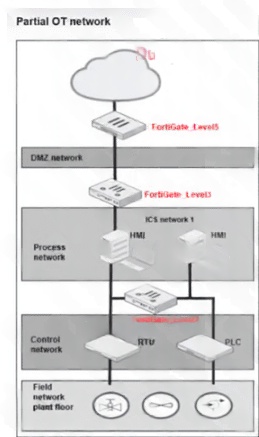
A partial OT network is shown. In this OT network, you must add additional security measures to detect OT protocols and, therefore, increase the traffic visibility. Which security sensor must you implement to detect the OT protocols in this network? (Choose one answer)
A. Device detection on all the FortiGate interfaces.
B. Inline IDS on FortiGate_Level3.
C. Application sensor set to monitor on all the FortiGate devices.
D. IPS sensor on FortiGate_Level5.
Explanation:
In an OT network with multiple levels (field, control, process, DMZ), detecting OT protocols (e.g., Modbus, DNP3, PROFINET) requires an Application Control security profile. An application sensor configured to monitor OT protocols provides traffic visibility across all FortiGate devices, identifying industrial protocol usage regardless of network level.
Correct Option:
C. Application sensor set to monitor on all the FortiGate devices.
Application Control (application sensor) profiles include OT/ICS protocol signatures. By enabling monitoring on all FortiGate devices across network levels (Level 1-3), you gain visibility into OT protocol traffic traversing between field, control, and process networks. This provides comprehensive detection without blocking.
Incorrect Options:
A. Device detection on all the FortiGate interfaces.
Device detection identifies OS and device types via passive methods, not OT protocols. It does not inspect or identify industrial protocols within traffic payloads. Device detection focuses on endpoint inventory, not protocol visibility.
B. Inline IDS on FortiGate_Level3.
Inline IDS (Intrusion Prevention in IDS mode) at Level 3 alone misses OT protocol detection on Level 1 (field) and Level 2 (control) networks. OT protocols often stay within lower levels. Limited deployment reduces visibility.
D. IPS sensor on FortiGate_Level5.
Level 5 typically represents enterprise/IT networks. OT protocols rarely traverse to Level 5. Deploying IPS sensor only at Level 5 would miss nearly all OT protocol traffic confined to lower levels.
Reference:
Fortinet NSE6_EDR_AD-7.0 Study Guide, "OT Network Visibility and Segmentation"; FortiGate Administration Guide, "Application Control for OT Protocol Detection."
| Page 2 out of 7 Pages |
| 1234 |
| NSE6_OTS_AR-7.6 Practice Test Home |
The Fortinet NSE 6 OT Security 7.6 Architect exam is notoriously tough. It doesn't test memorization. It forces you to make complex decisions under time pressure. A weak prep strategy risks a costly failure and wasted effort. Our NSE6_OTS_AR-7.6 practice tests are built to be your definitive bridge to a passing score.

Copyright © - All Rights Reserved