
Last Updated On : 12-Oct-2026
Total 43 Questions
The difference between a near pass and a confident pass isn't just knowing the material, it's mastering the Fortinet NSE 6 OT Security 7.6 Architect exam experience. Our Fortinet NSE6_OTS_AR-7.6 practice test is engineered to close the gap between your current knowledge and the 2026 exam's demands. With every question, you receive detailed, expert verified explanations that break down not just the correct answer, but also the reasoning behind every incorrect option.
Don't just study. Practice NSE6_OTS_AR-7.6 with purpose. Start your journey to a first-time pass today.
By replicating the exact style, complexity, and format of the real Fortinet NSE 6 OT Security 7.6 Architect exam questions, we ensure you walk into the exam with complete confidence.
Refer to the exhibit.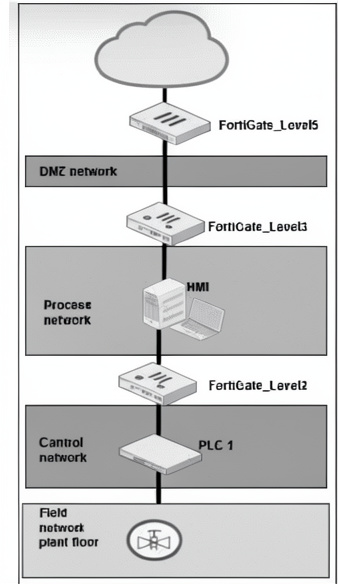
A simplified OT network is shown. You want to optimize the protection of this OT network. Which two controls must you implement? (Choose two answers)
A. Offline IDS on FortiGate_Level3.
B. IPS on FortiGate_Level5.
C. Virtual patching on FortiGate_Level2.
D. OT signature on FortiGate_Level5.
Explanation:
The OT network shows multiple levels. IPS on FortiGate_Level5 (connecting to DMZ/Process network) protects against external threats entering the OT zone. Virtual patching on FortiGate_Level2 (protecting Control network and PLCs) shields vulnerable OT devices (PLCs, HMIs) from exploits without requiring firmware updates.
Correct Options:
B. IPS on FortiGate_Level5.
FortiGate_Level5 is positioned between the Process network and DMZ, likely facing less trusted zones. Intrusion Prevention System (IPS) at this level detects and blocks known attacks, exploits, and reconnaissance attempts targeting OT protocols and services.
C. Virtual patching on FortiGate_Level2.
FortiGate_Level2 sits between the Control network (containing PLCs) and upper levels. Virtual patching protects vulnerable OT devices by blocking exploit attempts based on vulnerability signatures, without patching the devices themselves. This is ideal for PLCs that cannot be easily updated.
Incorrect Options:
A. Offline IDS on FortiGate_Level3.
Offline IDS (passive monitoring) does not actively block threats. For optimization, inline IPS or virtual patching is preferred. Level3 between HMI and Process network would benefit from active protection, not offline.
D. OT signature on FortiGate_Level5.
OT signatures are typically enabled within Application Control or IPS profiles. "OT signature" alone is not a control; it is a component of other features. IPS already includes OT signatures. Virtual patching and IPS are the recommended controls at their respective levels.
Reference:
Fortinet NSE6_EDR_AD-7.0 Study Guide, "OT Network Protection with IPS and Virtual Patching"; FortiGate OT Security Guide, "Layered Defense for Purdue Model."
Refer to the exhibit. A partial OT network is shown. You must improve the security of this OT network and implement internal segmentation between network 1 and network 2. How can you achieve the segmentation? (Choose one answer)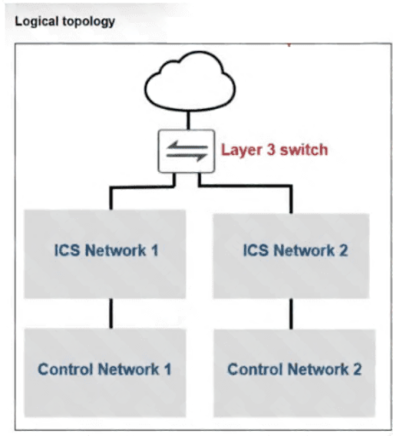
A. You can configure universal ZTNA.
B. You can configure one traffic VDOM.
C. You can configure an explicit software switch.
D. You can configure forward domain IDs for each network.
Explanation:
The exhibit shows an OT (Operational Technology) network with multiple ICS and Control networks. To implement internal segmentation between Network 1 and Network 2, you can configure forward domain IDs. In OT environments using FortiGate or FortiSwitch, forward domain IDs logically separate broadcast domains and enforce traffic segmentation without physical separation.
Correct Option:
D. You can configure forward domain IDs for each network.
Forward domain IDs are used in OT networks (especially with FortiSwitch in industrial environments) to create isolated Layer 2 broadcast domains. By assigning unique forward domain IDs to ICS Network 1 and ICS Network 2, traffic is segmented internally, preventing cross-network communication while allowing controlled routing through Layer 3 when needed.
Incorrect Options:
A. You can configure universal ZTNA.
Universal ZTNA (Zero Trust Network Access) is designed for remote access to applications, not for internal OT network segmentation between ICS networks. ZTNA focuses on user-to-application access, not network-to-network isolation.
B. You can configure one traffic VDOM.
One traffic VDOM would not create segmentation; it would consolidate traffic. Multiple VDOMs (Virtual Domains) can provide segmentation, but "one traffic VDOM" does not separate Network 1 and Network 2. VDOMs are for administrative and traffic separation, requiring at least two VDOMs.
C. You can configure an explicit software switch.
An explicit software switch typically forwards traffic between interfaces, which would combine networks rather than segment them. Software switching does not inherently provide segmentation between two distinct networks.
Reference:
Fortinet NSE6_EDR_AD-7.0 Study Guide, "OT Security and Segmentation"; FortiSwitch Industrial Switch Guide, "Forward Domain IDs for OT Network Segmentation."
Refer to the exhibit.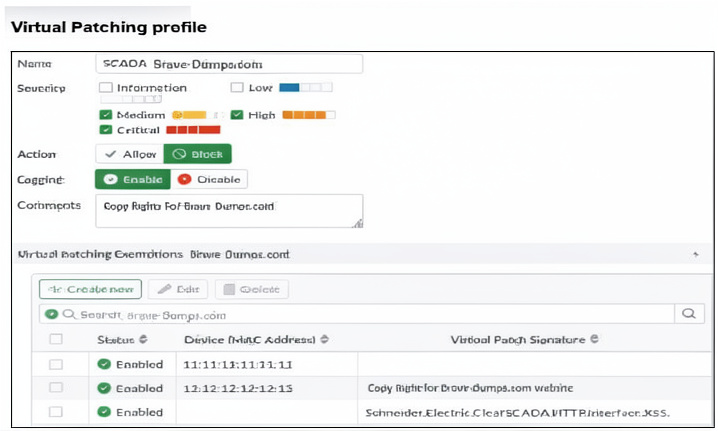
A Virtual Patching profile is shown. You have recently updated your SCADA system and would like to apply the SCADA virtual patching profile. Which two statements about this profile are correct? (Choose two answers)
A. Only the vulnerability Schneider.Electric.ClearSCADA.HTTP.Interface.XSS is still present.
B. Low severity signatures are not blocked for the device with the MAC address 12:12:12:12:12.
C. This profile blocks critical severity signatures for all the devices.
D. The device with the MAC address 11:11:11:11:11 is considered to have no vulnerabilities.
Explanation:
The Virtual Patching profile shows severity options (Information, Medium, Critical) with Action set to "Block" for Critical, and Medium/Information not selected for blocking. For device MAC 12:12:12:12:12, low severity (Information) signatures are not blocked. The device with MAC 11:11:11:11:11 has no vulnerability exemptions listed, implying it has no tracked vulnerabilities.
Correct Option:
B. Low severity signatures are not blocked for the device with the MAC address 12:12:12:12:12.
The profile's severity selection includes only Critical (action Block). Medium and Information (Low) are not selected for blocking. Since the profile applies to MAC 12:12:12:12:12, low severity signatures will be allowed, not blocked.
D. The device with the MAC address 11:11:11:11:11 is considered to have no vulnerabilities.
The Virtual Patching Exemptions table lists vulnerabilities per device. For MAC 11:11:11:11:11, no specific vulnerability exemptions are listed (the table shows blank under vulnerability column for that row). This indicates no tracked vulnerabilities are present for that device.
Incorrect Options:
A. Only the vulnerability Schneider.Electric.ClearSCADA.HTTP.Interface.XSS is still present.
This appears as a vulnerability entry under MAC 12:12:12:12:12. The phrase "still present" is subjective. The exhibit does not indicate that other vulnerabilities were previously present or resolved.
C. This profile blocks critical severity signatures for all the devices.
The profile blocks Critical severity signatures, but this applies only to devices to which the profile is assigned. The exhibit does not confirm that the profile is assigned to "all devices." It shows three devices with the profile applied, not all devices in the environment.
Reference:
FortiGate Administration Guide, "Virtual Patching Profile Configuration and Exemptions"; Fortinet NSE6_EDR_AD-7.0 Study Guide, "OT Virtual Patching and Severity-Based Blocking."
During layer 2 polling , which two pieces of information are gathered by FortiNAC to identify a device? (Choose two answers)
A. Where it was learned
B. The MAC-to-IP correlation learned
C. The system name learned
D. The time it was learned
Explanation:
FortiNAC performs Layer 2 polling by querying network devices (switches, routers) to learn about connected endpoints. During this process, it captures two key pieces of information per device: where it was learned (the specific switch and port) and the time it was learned (timestamp). These help track device location and persistency.
Correct Options:
A. Where it was learned
FortiNAC records the network location where a device was discovered, including the specific switch IP address, port number, and VLAN. This information is critical for enforcing network access policies and locating devices for quarantine or remediation.
D. The time it was learned
FortiNAC timestamps each discovery event (Layer 2 polling cycle). The timestamp helps determine device first-seen and last-seen times, aids in stale entry cleanup, and supports forensic investigations by establishing when a device joined the network.
Incorrect Options:
B. The MAC-to-IP correlation learned
While FortiNAC does learn MAC-to-IP correlations, this typically comes from DHCP snooping or ARP inspection, not directly from standard Layer 2 polling (which primarily reads CAM tables). Layer 2 polling focuses on MAC addresses and switch ports, not IP correlation.
C. The system name learned
System name (hostname) is not obtained through Layer 2 polling. It requires Layer 3 or Layer 7 methods such as DNS reverse lookup, NetBIOS, or DHCP option 12. Layer 2 polling only sees MAC addresses and interface information.
Reference:
FortiNAC Administration Guide, "Layer 2 Polling and Device Discovery"; Fortinet NSE6_EDR_AD-7.0 Study Guide, "FortiNAC Integration and Network Visibility."
According to the IEC 62443 standard, your security level is 4 . What is your OT environment defending against? (Choose one answer)
A. Intentional cyberthreats posed by skilled malicious users
B. An intentional attack with low resources
C. A syndicate of cyber extortion with extensive resources
D. A casual exposure
Explanation:
IEC 62443 defines Security Levels (SL) from 1 to 4. Security Level 4 (SL4) protects against intentional cyberthreats using sophisticated tools and extensive resources, such as nation-state actors or organized criminal syndicates. This is the highest level, requiring advanced defenses against coordinated, well-funded attacks.
Correct Option:
C. A syndicate of cyber extortion with extensive resources
IEC 62443 SL4 is designed to defend against adversaries with extensive resources, high skill levels, and motivation to conduct sophisticated, persistent attacks. This includes organized crime syndicates (e.g., ransomware groups), nation-state actors, or terrorist organizations capable of complex, multi-stage attacks.
Incorrect Options:
A. Intentional cyberthreats posed by skilled malicious users
This describes SL3 (protection against skilled adversaries with moderate resources). SL4 requires defense against even more sophisticated, resource-rich attackers beyond individual skilled malicious users.
B. An intentional attack with low resources
This describes SL1 or SL2, which defend against casual or opportunistic attackers with minimal resources. SL4 is far beyond this level.
D. A casual exposure
This describes SL1, which protects against unintentional or casual exposure (e.g., accidental misconfiguration). SL4 is for intentional, targeted attacks, not casual exposures.
Reference:
IEC 62443-3-3 Standard, "Security Levels Definition"; Fortinet NSE6_EDR_AD-7.0 Study Guide, "OT Security Standards and IEC 62443 Compliance."
Refer to the exhibit.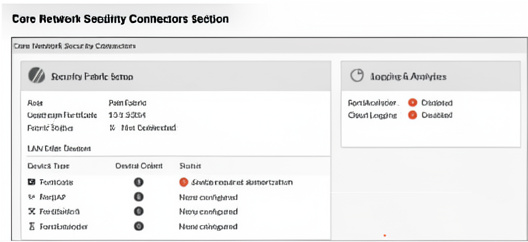
The Core Network Security Connectors page of the FortiGate-2 device is shown. Which statement is correct? (Choose one answer)
A. FortiGate-2 serves as Fabric Root.
B. You must enable Security Fabric Connection on the FortiGate-2 interface.
C. You must configure the FortiAnalyzer settings on FortiGate-2.
D. FortiGate-2 is not authorized on the root FortiGate.
Explanation:
The Core Network Security Connectors page shows Fabric Status as "Not Connected" and shows "device requires authorization" under Status. This indicates FortiGate-2 has attempted to join the Security Fabric but has not yet been authorized by the upstream root FortiGate. Authorization is required for downstream FortiGates to be fully integrated.
Correct Option:
D. FortiGate-2 is not authorized on the root FortiGate.
The exhibit explicitly shows "Status: ○ device requires authorization" under the Security Fabric Setup section. This means FortiGate-2 has been detected by the root FortiGate but requires manual authorization (approval) before it can fully join the Security Fabric and share telemetry.
Incorrect Options:
A. FortiGate-2 serves as Fabric Root.
The presence of "Upstream FortiGate" with an IP address (10.1.2.254) indicates FortiGate-2 has an upstream device, meaning it is a downstream (child) FortiGate, not the Fabric Root. The root has no upstream FortiGate configured.
B. You must enable Security Fabric Connection on the FortiGate-2 interface.
Security Fabric Connection is typically enabled on the upstream (root) FortiGate interface. The exhibit shows a connection attempt is already made ("Not Connected" and "requires authorization"), so enabling on FortiGate-2 interface is not the immediate missing step.
C. You must configure the FortiAnalyzer settings on FortiGate-2.
FortiAnalyzer configuration is for logging and analytics, not for Security Fabric authorization. The issue shown is Fabric authorization, not FortiAnalyzer connectivity.
Reference:
FortiGate Administration Guide, "Security Fabric → Downstream Device Authorization"; Fortinet NSE6_EDR_AD-7.0 Study Guide, "Fabric Authorization Process."
As the first step in your OT network protection plan, you must identify the OT protocols that the FortiGate device supports. Which two configurations must you implement on this FortiGate device? (Choose two answers)
A. You must enable Device detection on all the interfaces.
B. You must implement an Application Control security profile that monitors OT.
C. You must enable the OT signatures.
D. You must implement an Intrusion Prevention security profile that monitors OT.
Explanation:
To identify OT protocols supported by FortiGate, you need to enable OT-specific signature detection. An Application Control security profile with OT protocol monitoring identifies and allows/denies OT application traffic (e.g., Modbus, DNP3). Enabling OT signatures within IPS (Intrusion Prevention) or Application Control provides the actual protocol identification and inspection capabilities.
Correct Options:
B. You must implement an Application Control security profile that monitors OT.
Application Control profiles in FortiGate include signature categories for OT protocols (e.g., SCADA, ICS). By enabling OT application monitoring, FortiGate can identify OT traffic such as Modbus, PROFINET, or S7comm, allowing you to see which protocols are present on the network.
C. You must enable the OT signatures.
OT signatures are specific detection rules for industrial protocols and vulnerabilities. These can be enabled within IPS or Application Control databases. Enabling OT signatures activates FortiGate’s ability to inspect, identify, and protect against OT-specific threats and protocol anomalies.
Incorrect Options:
A. You must enable Device detection on all the interfaces.
Device detection discovers endpoint operating systems and host names via passive methods (e.g., DHCP fingerprinting). It does not identify OT protocols. Device detection is useful for inventory but not for protocol identification.
D. You must implement an Intrusion Prevention security profile that monitors OT.
While IPS can inspect OT protocols, the question specifically asks about identifying which OT protocols the FortiGate supports. Application Control is the primary feature for protocol identification. IPS is for threat prevention, not initial discovery. Some OT signatures reside in IPS, but Application Control is the correct first-step configuration for protocol identification.
Reference:
FortiGate Administration Guide, "OT Security → Application Control for ICS/SCADA"; Fortinet NSE6_EDR_AD-7.0 Study Guide, "OT Protocol Identification on FortiGate."
| Page 1 out of 7 Pages |
| 1234 |
The Fortinet NSE 6 OT Security 7.6 Architect exam is notoriously tough. It doesn't test memorization. It forces you to make complex decisions under time pressure. A weak prep strategy risks a costly failure and wasted effort. Our NSE6_OTS_AR-7.6 practice tests are built to be your definitive bridge to a passing score.

Copyright © - All Rights Reserved