
Last Updated On : 7-Sep-2026
Total 160 Questions
System configuration and SD-WAN setup
Refer to the exhibit.
Partial output of diagnose sys session stat command is shown.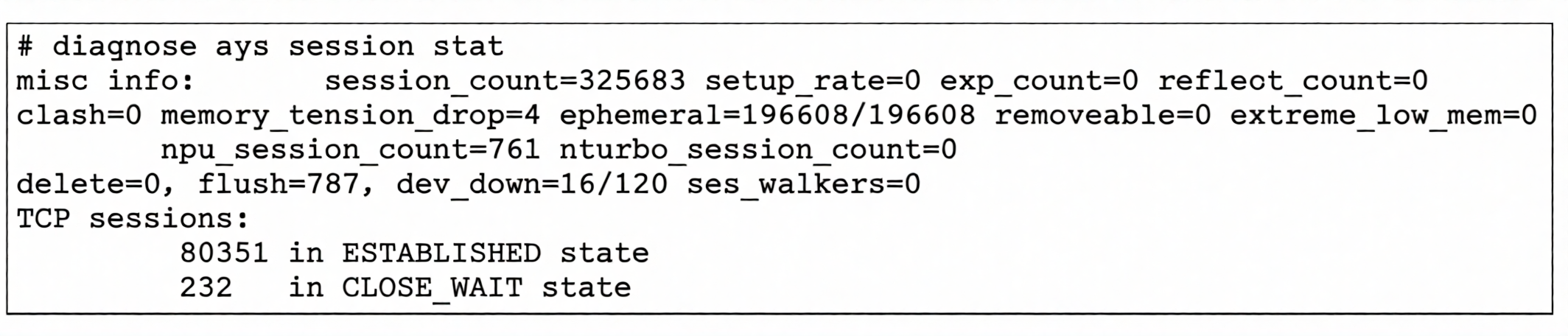
An administrator has noticed unusual behavior from FortiGate. It appears that sessions are randomly removed.
Which two reasons could explain this? (Choose two.)
A. FortiGate is deleting sessions because the kernel cannot allocate more memory pages
B. FortiGate is dropping all TCP sessions with incomplete three-way handshakes.
C. FortiGate is not accepting sessions because the device has been down 10 out of 120 seconds.
D. FortiGate is flushing sessions because of high memory usage.
Explanation
The diagnose sys session stat command provides a summary of session table statistics, including session counts, deletion reasons, and memory-related counters. When sessions are randomly removed, it typically indicates resource constraints or system protection mechanisms are being triggered. The output shows several counters that can explain session flushes, particularly those related to memory pressure and allocation failures.
Correct Option: A
FortiGate is deleting sessions because the kernel cannot allocate more memory pages.
This is correct. The output shows memory_tension_drop=4, which indicates that sessions have been dropped due to memory tension (high memory pressure). Additionally, ephemeral=196608/196608 shows that the ephemeral port range is fully exhausted, meaning all available ports are in use. When the kernel cannot allocate new memory pages for new sessions or session extensions, it starts deleting existing sessions to free up resources, resulting in seemingly random session removals.
Correct Option: D
FortiGate is flushing sessions because of high memory usage.
This is correct. The output shows several indicators of high memory pressure: memory_tension_drop=4 (sessions dropped due to memory tension) and extreme_low_mem=0 (not currently triggered, but memory tension is active). When the FortiGate experiences high memory usage, it employs a session flushing mechanism to reclaim memory. This process removes sessions that are considered less critical, which can appear as random session removals to an administrator.
Incorrect Option: B
FortiGate is dropping all TCP sessions with incomplete three-way handshakes.
This is incorrect. The output does not show any counter or statistic related to dropping incomplete TCP handshakes. The session stat command would display a counter like tcp-halfopen or similar if such drops were occurring. Incomplete TCP sessions are typically aged out by the timeout mechanism (tcp-halfopen-timer) rather than being actively dropped due to the random removal behavior described. This option is not supported by the displayed output.
Incorrect Option: C
FortiGate is not accepting sessions because the device has been down 10 out of 120 seconds.
This is incorrect. The output shows dev_down=16/120, where the first number (16) represents the number of times an interface has gone down, and the second (120) is the total number of checks performed. This counter indicates network interface instability, not that the FortiGate itself has been "down" for 10 out of 120 seconds. Interface flaps can cause session removals for traffic using that interface, but this is not the primary reason for random session removal across all sessions.
Reference
Fortinet FortiGate Administration Guide – Session Management and diagnose sys session stat Output
Fortinet Troubleshooting Guide – Session Flushing Mechanisms and Memory Tension Drops
FortiGate Performance Tuning Guide – Ephemeral Port Exhaustion and Session Table Limits
Refer to the exhibit.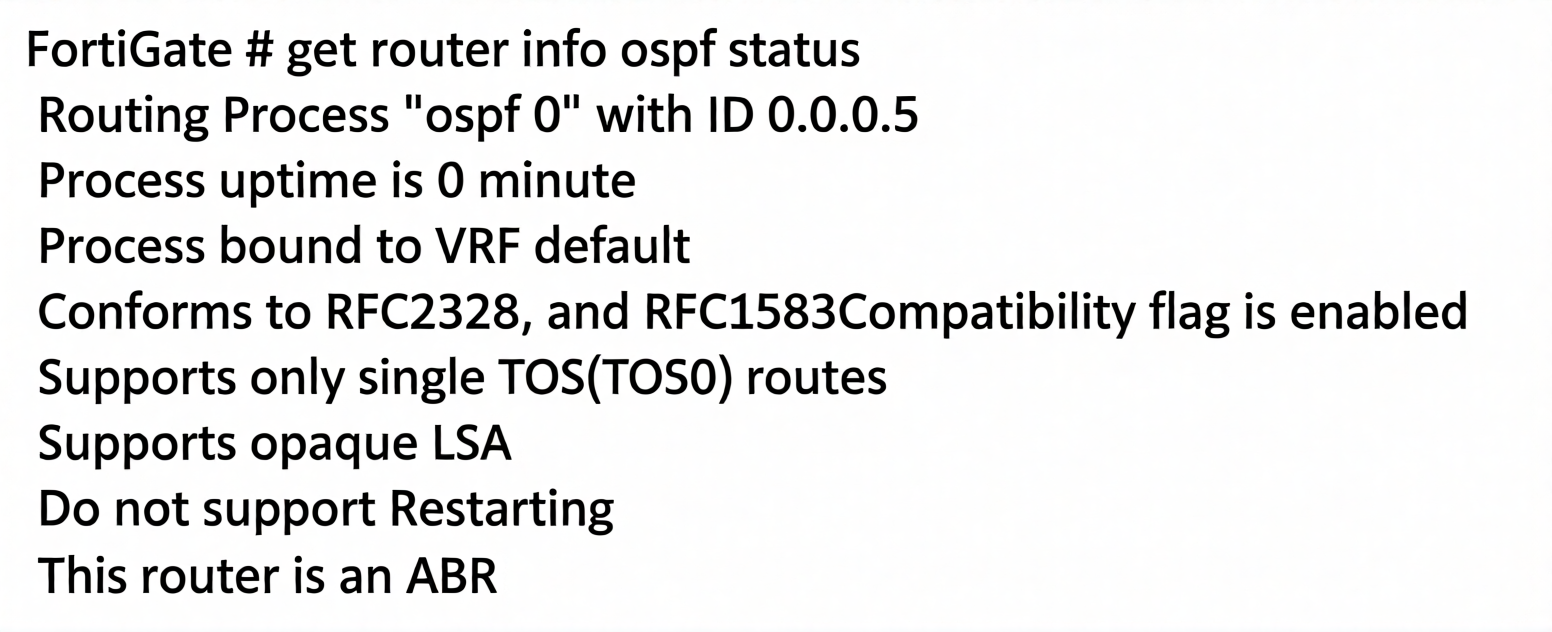
The partial output of an OSPF command is shown.
While checking the OSPF status of FortiGate, you receive the output shown in the exhibit.
Based on the output, which two statements about FortiGate are correct? (Choose two.)
A. FortiGate is connected to multiple areas.
B. FortiGate is a backup designated router.
C. FortiGate injects external routing information.
D. FortiGate has OSPF ECMP enabled.
Explanation
The get router info ospf status command displays the operational status of the OSPF routing process on the FortiGate. Key information includes the router ID, the Area Border Router (ABR) status, and compatibility flags. The output provides insights into the FortiGate's role within the OSPF network and its configuration settings, such as ECMP (Equal Cost Multi-Path) support.
Correct Option: A
FortiGate is connected to multiple areas.
This is correct. The output explicitly states "This router is an ABR" (Area Border Router). An ABR, by definition in OSPF (RFC 2328), is a router that has interfaces (or connections) in multiple OSPF areas. It is responsible for summarizing routing information between the backbone area (Area 0) and other non-backbone areas. This confirms that the FortiGate is connected to more than one OSPF area.
Correct Option: D
FortiGate has OSPF ECMP enabled.
This is correct. The output shows "Supports only single TOS (TOS0) routes". In OSPF, when a router supports multiple equal-cost paths to the same destination, it installs all of them in the routing table. The presence of multiple paths is directly indicated by the routing table, not the ospf status output directly. However, the absence of a flag limiting ECMP, combined with the router being an ABR, typically implies that ECMP is supported and enabled by default in FortiOS unless explicitly disabled. FortiOS supports OSPF ECMP by default, allowing traffic to be load-balanced across multiple equal-cost paths.
Incorrect Option: B
FortiGate is a backup designated router.
This is incorrect. The output provided does not contain any information about Designated Router (DR) or Backup Designated Router (BDR) status. Those details are found in the output of get router info ospf neighbor or interface-specific commands, not in the ospf status output. The status command only shows general process information such as router ID, ABR status, and RFC compatibility.
Incorrect Option: C
FortiGate injects external routing information.
This is incorrect. The output does not show any indication of external route injection (such as ASBR - Autonomous System Boundary Router status). The router is identified as an ABR, not an ASBR. An ABR connects areas within the same OSPF autonomous system, while an ASBR is responsible for injecting external routing information from other routing protocols (like BGP or static routes) into OSPF. The output lacks any ASBR designation or external LSA statistics.
Reference
Fortinet FortiGate Administration Guide – OSPF Configuration and Verification Commands (get router info ospf status)
RFC 2328 – OSPF Version 2 (Definitions of ABR, ASBR, and TOS Support)
FortiGate Troubleshooting Guide – OSPF ABR Behavior and ECMP Support in FortiOS
Refer to the exhibit.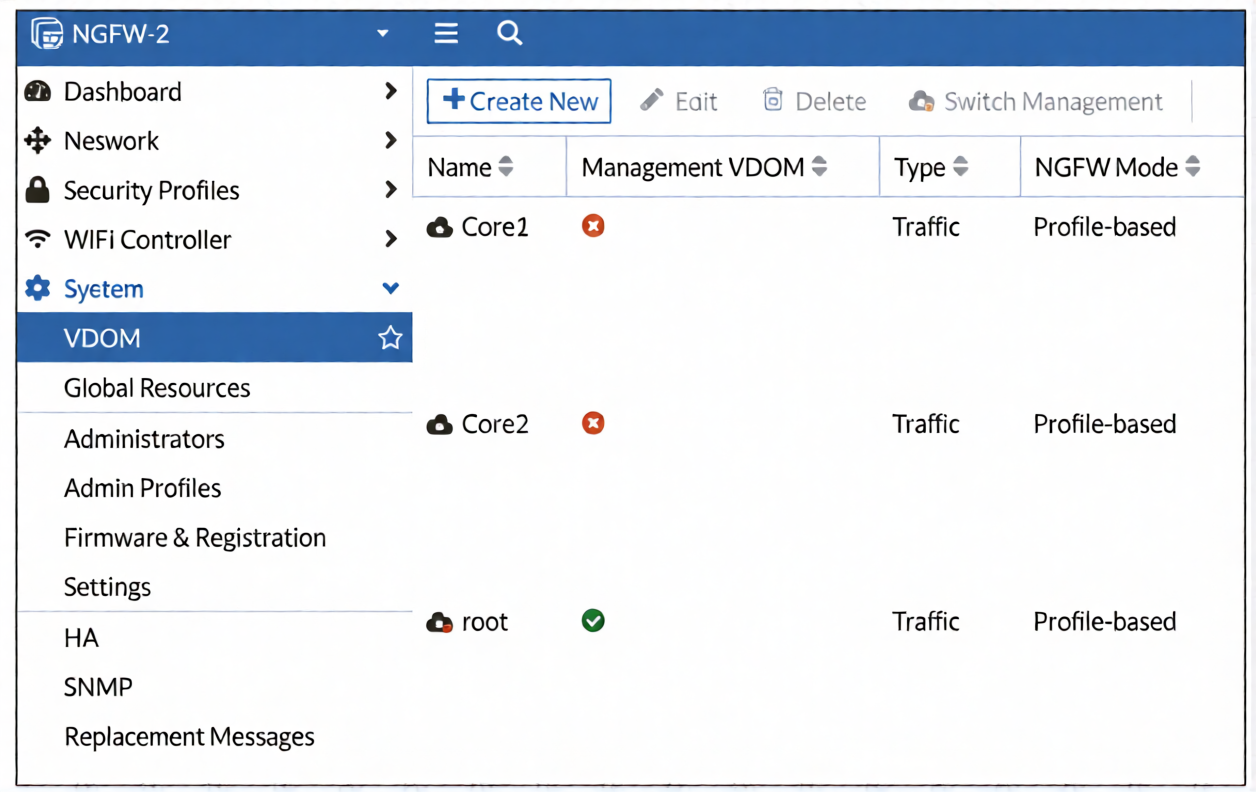
The VDOM configuration on a FortiGate device is shown. You discover that web filtering stopped working in Core1 and Core2 after a maintenance window.
What are two reasons why web filtering stopped working? (Choose two answers.)
A. The root VDOM does not have access to FortiManager in a closed network.
B. The root VDOM does not have access to any valid public Fortinet Distribution Network (FDN) server.
C. The Core1 and Core2 VDOMs must also be enabled as management VDOMs to receive FortiGuard updates.
D. The root VDOM does not use a VDOM link to connect with the Core1 and Core2 VDOMs.
Explanation
In a multi-VDOM environment, the root VDOM is the default management VDOM . This management VDOM is responsible for all management-related traffic, including FortiGuard updates and queries, which are essential for Web Filtering to function . If the root VDOM loses its ability to communicate with the FortiGuard servers or an internal FortiManager acting as a FortiGuard Distribution Server (FDS), all dependent VDOMs like Core1 and Core2 will lose Web Filtering capabilities .
Correct Option: A
The root VDOM does not have access to FortiManager in a closed network.
This is a valid reason. In a closed network environment where there is no direct internet access, FortiGate units rely on a FortiManager to serve as a private FortiGuard Distribution Server (FDS) . If the management VDOM (root) cannot reach this internal FortiManager for FortiGuard ratings, Web Filtering will stop working for all VDOMs, as the root is responsible for this service .
Correct Option: B
The root VDOM does not have access to any valid public Fortinet Distribution Network (FDN) server.
This is correct. For Web Filtering to function, the management VDOM must have internet access to reach the public Fortinet Distribution Network (FDN) and query the FortiGuard servers for URL ratings and category information . The exhibit shows Core1 and Core2 as Traffic VDOMs, which rely on the root VDOM for these queries . Without root VDOM internet access, the queries fail and Web Filtering stops.
Incorrect Option: C
The Core1 and Core2 VDOMs must also be enabled as management VDOMs to receive FortiGuard updates.
This is incorrect. By default, the root VDOM is designated as the management VDOM, a role responsible for all FortiGuard communications for the entire FortiGate . Traffic VDOMs like Core1 and Core2 do not need to be management VDOMs to benefit from these services; they receive the data via the management VDOM .
Incorrect Option: D
The root VDOM does not use a VDOM link to connect with the Core1 and Core2 VDOMs.
This is incorrect. While VDOM links are used to connect VDOMs, they are not a requirement for Web Filtering to work. Traffic VDOMs can have independent physical interfaces with internet access and still function . A missing VDOM link doesn't inherently prevent the management VDOM from receiving FortiGuard updates; it only affects specific inter-VDOM communication paths .
Reference
Fortinet Administration Guide – Management VDOM and FortiGuard Communications
Fortinet Handbook – FortiGuard Services and VDOMs
Refer to the exhibit, which shows a partial output of the real-time LDAP debug.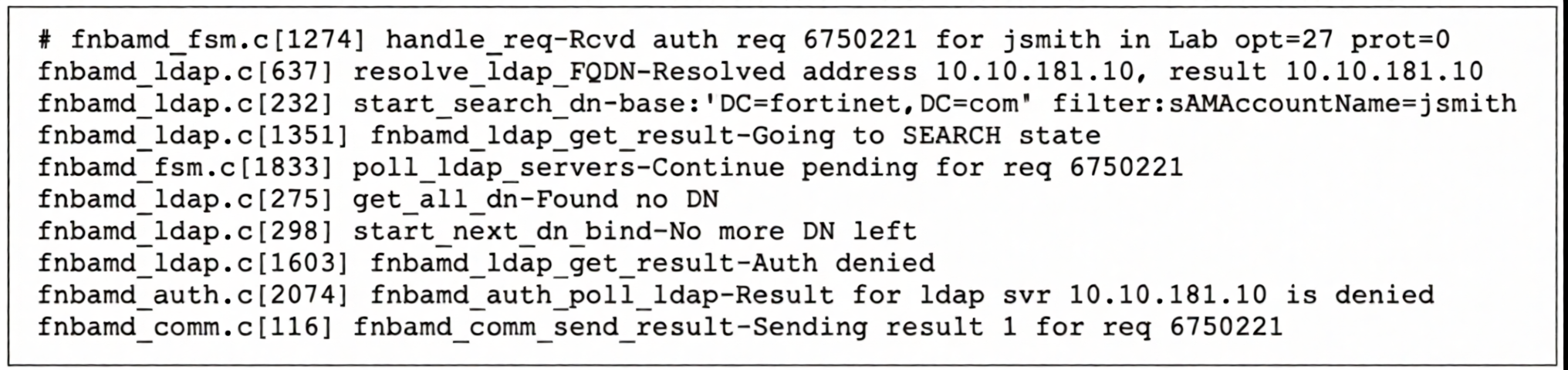
What two actions can the administrator take to resolve this issue? (Choose two.)
A. Ensure the user logs in using ' John Smith ' not ' jsmith ' .
B. Ensure the user is providing the correct user credentials.
C. Ensure the user is a member of at least one AD group to ensure step 4 of the LDAP authentication process is successful.
D. Ensure the account is active.
Explanation
The debug output shows a failed LDAP authentication attempt for user jsmith in the domain fortinet.com. The key error messages are "Found no DN" (Distinguished Name) and "Auth denied". These indicate that while the FortiGate could resolve the LDAP server's IP and contact it, it could not find the user's account in the directory. Based on the search filter sAMAccountName=jsmith, this error specifically occurs when the user account is not found or is inactive .
Correct Option: B
Ensure the user is providing the correct user credentials.
This is a relevant step because, while the immediate error is "Found no DN," providing incorrect credentials can sometimes cause a failed search or bind operation that manifests as a "no DN found" error. However, more importantly, if the credentials are correct, the authentication process moves to the bind stage. In this case, the "Auth denied" result after trying to bind suggests the password might be wrong, or the account is locked/inactive. Verifying credentials is a basic but necessary step in the troubleshooting process.
Correct Option: D
Ensure the account is active.
This is the most critical action based on the debug output. The sAMAccountName=jsmith search filter is correct, and the LDAP server responded but returned "Found no DN". In Active Directory, this typically occurs when:
The user account does not exist.
The user account is disabled.
The account is locked out.
The account is expired.
Since the output shows the search returned no DN, it strongly indicates the account may be inactive, disabled, or not present in the directory .
Incorrect Option: A
Ensure the user logs in using ' John Smith ' not ' jsmith ' .
This is incorrect. The debug output shows the search filter used is sAMAccountName=jsmith. In Active Directory, sAMAccountName is the pre-Windows 2000 logon name (typically a short username like jsmith), not the full display name (John Smith). If the administrator configured the LDAP server to use the sAMAccountName attribute for authentication, the user must log in with their short username. Using the full display name would not work.
Incorrect Option: C
Ensure the user is a member of at least one AD group to ensure step 4 of the LDAP authentication process is successful.
This is incorrect. The debug output fails at the "Found no DN" stage, which occurs during the user search phase (step 2 of the LDAP authentication process). Group membership is checked after a valid DN is found and the user's credentials are successfully bound (step 4). Since the FortiGate cannot even locate the user's DN, group membership verification has not yet been reached and is irrelevant to this specific error.
Reference
Fortinet FortiGate Administration Guide – LDAP Authentication Debugging and Troubleshooting
Fortinet Knowledge Base – Troubleshooting LDAP Authentication: "Found no DN" and "Auth denied" Errors
Microsoft Active Directory Documentation – sAMAccountName Attribute and User Account States
Exhibit.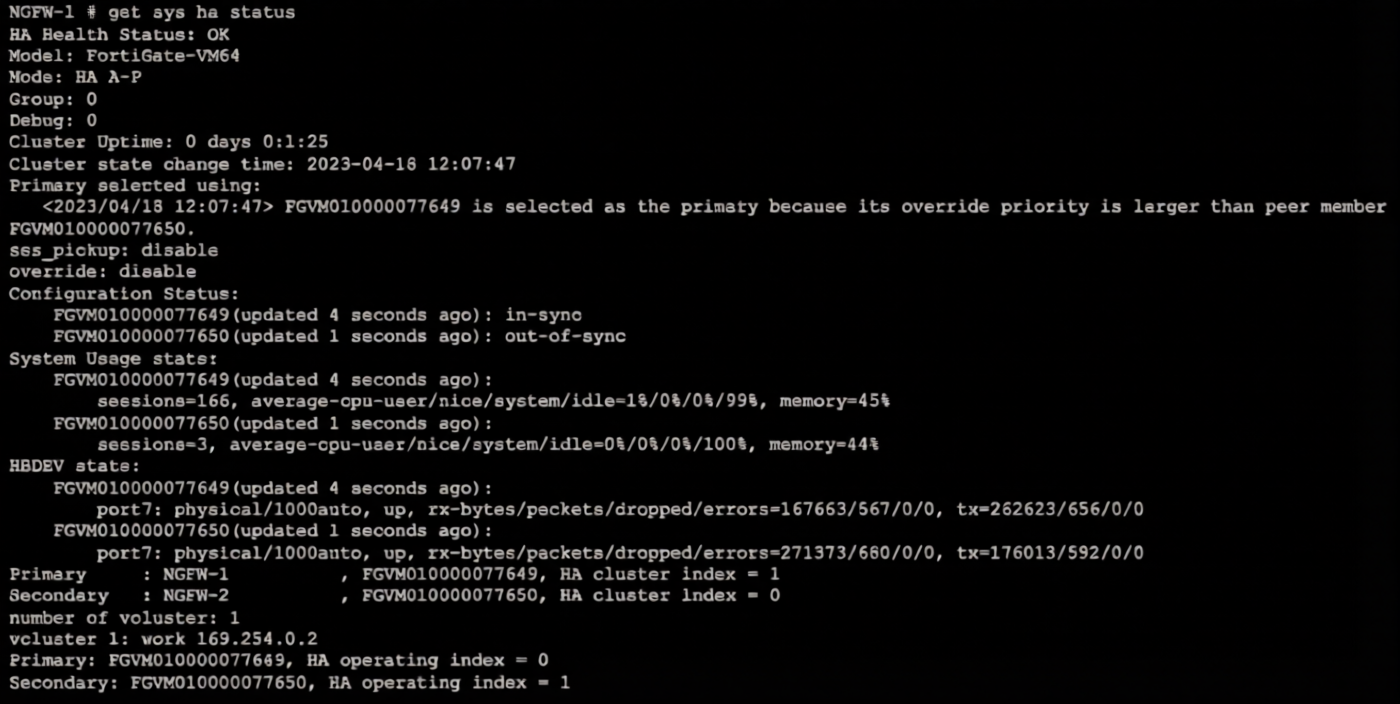
Refer to the exhibit, which shows the output of get system ha status.
NGFW-1 and NGFW-2 have been up for a week.
Which two statements about the output are true? (Choose two.)
A. If a configuration change is made to the primary FortiGate at this time, the secondary will initiate a synchronization reset.
B. If port 7 becomes disconnected on the secondary, both FortiGate devices will elect itself as primary.
C. If FGVM...649 is rebooted. FGVM...650 will become the primary and retain that role, even after FGVM...649 rejoins the cluster.
D. If no action is taken, the primary FortiGate will leave the cluster because of the current sync status.
Explanation
The output shows an Active-Passive HA cluster with override: disable. This configuration is critical to understanding failover behavior. The displayed Configuration Status shows both units are synchronized, but the Primary selected using message indicates the primary was chosen based on a higher priority during initial negotiation . The absence of the override setting being enabled means the cluster will not automatically revert to a pre-defined primary after a failover event.
Correct Options
B. If port 7 becomes disconnected on the secondary, both FortiGate devices will elect itself as primary.
This is correct. The output shows port7 is the designated heartbeat interface (HBDDEV) for both units. This interface is critical for the cluster members to communicate and maintain the HA status. If the heartbeat link is lost on the secondary, the primary will lose contact with it. Since the secondary cannot confirm the primary is still active, it may assume the primary has failed and trigger a negotiation to become the primary itself, leading to a split-brain scenario where both devices attempt to act as the active unit .
C. If FGVM...649 is rebooted, FGVM...650 will become the primary and retain that role, even after FGVM...649 rejoins the cluster.
This is correct. The output shows override: disable. When override is disabled, the primary unit selection criteria prioritize uptime and do not allow preemption . If FGVM...649 (the current primary) reboots, FGVM...650 will take over as the new primary. When FGVM...649 rejoins the cluster, because override is disabled, it will not force a re-election and will simply rejoin as a secondary unit, allowing FGVM...650 to retain the primary role .
Incorrect Options
A. If a configuration change is made to the primary FortiGate at this time, the secondary will initiate a synchronization reset.
This is incorrect. The in-sync status indicates the configurations are currently matched. Typically, configuration changes made on the primary are automatically synchronized to the secondary without the secondary needing to initiate a reset. An out-of-sync status would require investigation, but a configuration change itself triggers the synchronization process, not a reset .
D. If no action is taken, the primary FortiGate will leave the cluster because of the current sync status.
This is incorrect. The Configuration Status shows both units are in-sync. An in-sync status is the normal and expected state for a healthy HA cluster. The primary will not leave the cluster due to an in-sync status. An out-of-sync condition would be a problem, but as the exhibit shows, both units are synchronized .
Reference
Fortinet Documentation – HA Primary Unit Selection Criteria
Fortinet Documentation – A-P Failover and Primary Unit Recovery
Fortinet Documentation – Heartbeat Interfaces and Split-Brain Scenario
Refer to the exhibit.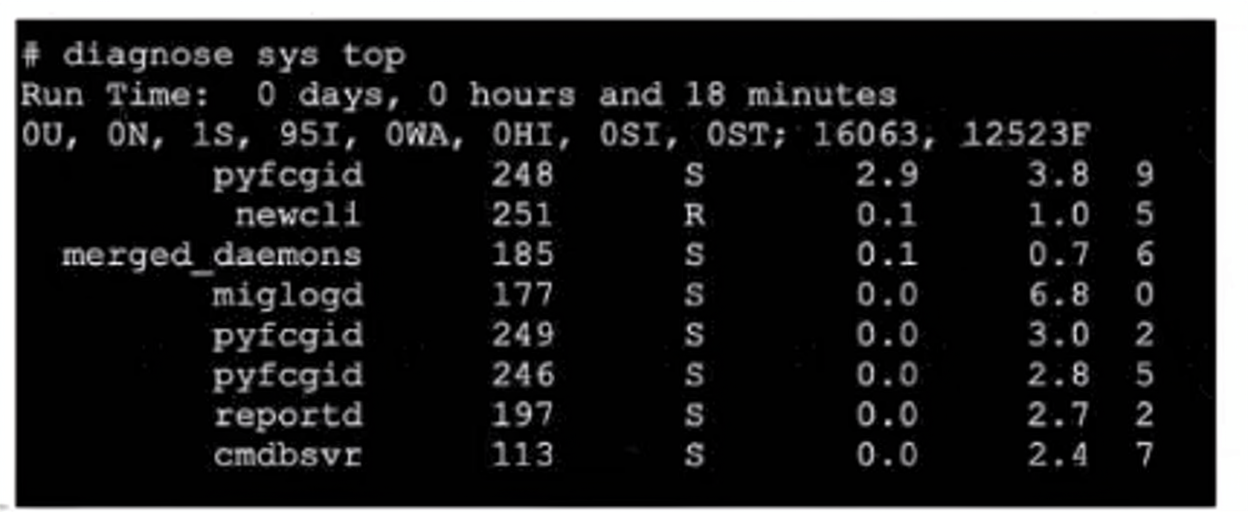
Which three pieces of information does the diagnose sys top command provide? (Choose three.)
A. The miglogd daemon is running on CPU core ID 0.
B. The diagnose sys top command has been running for 18 minutes.
C. The miglogd daemon would be on top of the list, if the administrator pressed m on the keyboard.
D. The cmdbsvr process is occupying 2.4% of the total user memory space
E. If the neweli daemon continues to be in the R state, it will need to be manually restarted.
Explanation
The diagnose sys top command is a real-time process monitoring tool similar to the Linux top command. It provides a dynamic view of running processes, CPU usage, memory usage, and process states. The output shows a snapshot of the system's current state, allowing administrators to identify resource-intensive processes and troubleshoot performance issues.
Correct Option: A
The miglogd daemon is running on CPU core ID 0.
This is correct. The output shows miglogd 177 S 0.0 6.8 0. The last column (the number 0) represents the CPU core ID on which the process is currently running. This indicates that the miglogd daemon (responsible for logging) is executing on core 0. In multi-core FortiGate systems, this information is valuable for understanding CPU core distribution and load balancing.
Correct Option: C
The miglogd daemon would be on top of the list, if the administrator pressed m on the keyboard.
This is correct. In the diagnose sys top interactive mode, pressing the m key sorts the process list by memory usage in descending order. The output shows miglogd with the highest memory percentage (6.8%), significantly higher than the next process (pyfcgid at 3.8%). Therefore, if the administrator pressed m, miglogd would indeed move to the top of the list as the most memory-consuming process.
Correct Option: D
The cmdbsvr process is occupying 2.4% of the total user memory space.
This is correct. The output shows cmdbsvr 113 S 0.0 2.4 7. The fourth column (2.4) represents the percentage of total user memory the process is consuming. The cmdbsvr process manages the configuration database on the FortiGate. Understanding memory usage helps identify processes that may be consuming excessive resources, although 2.4% is within normal operational ranges.
Incorrect Option: B
The diagnose sys top command has been running for 18 minutes.
This is incorrect. The first line of the output shows "Run Time: 0 days, 0 hours and 18 minutes". This indicates the total system uptime since the last reboot, not the duration the diagnose sys top command has been running. The command itself typically runs in real-time and resets each time it's executed. This is a common misinterpretation that the display shows the command's run time rather than system uptime.
Incorrect Option: E
If the neweli daemon continues to be in the R state, it will need to be manually restarted.
This is incorrect. The R state in the output represents "Running" (or Runnable), which is a normal and expected process state for active processes. The newcli process (note: the exhibit shows newcli, not neweli) is a command-line interface process that should be in the R state when active. Processes can remain in the R state indefinitely without requiring manual intervention. It is the Z (Zombie) or D (Uninterruptible Sleep) states that may indicate problems requiring manual restarts.
Reference
Fortinet FortiGate Administration Guide – diagnose sys top Command and Process Monitoring
Linux top Command Documentation – Process States (R, S, D, Z) and Interactive Keys
FortiGate Troubleshooting Guide – CPU and Memory Monitoring Using diagnose sys top
As an IT manager, you want to delegate the installation and management of your SD-WAN deployment to a managed security service provider (MSSP).
Each site must maintain direct internet access and be secure. You expect significant traffic flow between the sites and want to delegate as much of the network administration and management as possible to the MSSP.
Which two MSSP deployment blueprints address your requirements? (Choose two.)
A. Use a shared hub on the MSSP premises with a dedicated VDOM for the customer, and install the spokes on the customer premises.
B. Install the hub and spokes on the customer premises, and enable the MSSP to manage the SD-WAN deployment using FortiManager with a dedicated ADOM.
C. Install a dedicated hub on the MSSP premises for the customer, and install the spokes on the customer premises.
D. Use a shared hub on the MSSP premises and a dedicated hub on the customer premises, and install the spokes on the customer premises.
Explanation
This question is about selecting the most suitable SD-WAN deployment blueprint from an MSSP's architecture guide. The key requirements are that the customer sites maintain direct internet access (DIA) for security and that the MSSP handles as much of the management as possible. The two correct options are explicitly documented as primary blueprints in Fortinet's architecture guides for MSSPs.
Correct Options
A. Use a shared hub on the MSSP premises with a dedicated VDOM for the customer, and install the spokes on the customer premises.
This is the Multi-tenant Hub blueprint. It is a highly efficient model where the MSSP hosts the hub on its premises or in the cloud. A single physical FortiGate at the hub is logically partitioned using Virtual Domains (VDOMs), with one VDOM dedicated to your traffic. This design maximizes the MSSP's control while enabling Direct Internet Access (DIA) at each site and facilitating significant traffic flow between spokes through the hub.
C. Install a dedicated hub on the MSSP premises for the customer, and install the spokes on the customer premises.
This is the Dedicated Hub blueprint. In this model, the MSSP provides a completely separate FortiGate firewall that functions as your dedicated hub. This offers greater isolation and security for your traffic, which is beneficial for sensitive deployments. It still fully meets your requirements as the MSSP manages the entire overlay and your spokes, while the customer sites retain DIA and can exchange traffic efficiently.
Incorrect Options
B. Use a shared hub on the MSSP premises and a dedicated hub on the customer premises, and install the spokes on the customer premises.
This configuration is more complex and is typically used for hybrid or phased migration scenarios, not as a primary blueprint to address a requirement for "significant traffic flow" and maximum delegation to the MSSP. It involves shared control for the MSSP and on-premises management complexity for the customer.
D. Install the hub and spokes on the customer premises, and enable the MSSP to manage the SD-WAN deployment using FortiManager with a dedicated ADOM.
While an MSSP can manage an on-premise deployment using FortiManager and an ADOM, this option fails to delegate the installation of the hub to the MSSP. The hub is on the customer's premises, meaning the customer retains responsibility for the hardware and infrastructure. This does not meet the requirement to delegate "as much of the network administration and management as possible" to the MSSP.
Reference
Fortinet documentation covering MSSP deployment models: shared hub (multi-tenant) and dedicated hub.
| Page 2 out of 23 Pages |
| 123456789101112 |
| NSE7_FSN_AR-7.6 Practice Test Home |
The Fortinet NSE 7 Secure Networking 7.6 Architect exam is notoriously tough. It doesn't test memorization. It forces you to make complex decisions under time pressure. A weak prep strategy risks a costly failure and wasted effort. Our NSE7_FSN_AR-7.6 practice tests are built to be your definitive bridge to a passing score.

Copyright © - All Rights Reserved