
Last Updated On : 7-Sep-2026
Total 160 Questions
The difference between a near pass and a confident pass isn't just knowing the material, it's mastering the Fortinet NSE 7 Secure Networking 7.6 Architect exam experience. Our Fortinet NSE7_FSN_AR-7.6 practice test is engineered to close the gap between your current knowledge and the 2026 exam's demands. With every question, you receive detailed, expert verified explanations that break down not just the correct answer, but also the reasoning behind every incorrect option.
Don't just study. Practice NSE7_FSN_AR-7.6 with purpose. Start your journey to a first-time pass today.
By replicating the exact style, complexity, and format of the real Fortinet NSE 7 Secure Networking 7.6 Architect exam questions, we ensure you walk into the exam with complete confidence.
Rules and routing
Which three factors about service-level agreement (SLA) targets and SD-WAN rules should you consider when configuring SD-WAN rules? (Choose three.)
A. Best performance SD-WAN rules cannot use SLA targets.
B. Member metrics are measured when an SLA target references them.
C. When configuring an SD-WAN rule, you can select multiple SLA targets from the same performance SLA.
D. SLA targets are used only by SD-WAN rules that are configured with a lowest cost (SLA) strategy.
Explanation
Understanding the relationship between SLA targets and SD-WAN rule strategies is crucial for configuring effective traffic steering. The key is that SLA targets define the performance requirements that links must meet to be eligible for specific SD-WAN rules. However, how these targets are used differs depending on the strategy chosen for the SD-WAN rule.
Correct Options
A. Best performance SD-WAN rules cannot use SLA targets.
This is correct. The "Best Quality" strategy (referred to here as "Best performance") does not use SLA targets. Instead, it selects the best link by directly comparing measured metrics like latency, jitter, or packet loss to choose the optimal path. SLA targets are not part of this selection logic.
D. SLA targets are used only by SD-WAN rules that are configured with a lowest cost (SLA) strategy.
This is correct. In FortiOS, SLA targets are specifically implemented to enforce performance checks for rules using the Lowest Cost (SLA) strategy. When this strategy is used, only links that meet the defined SLA targets (e.g., latency < 100ms) are considered eligible, and the lowest-cost link among those is selected to forward traffic.
E. When configuring an SD-WAN rule, you can select only one SLA target from a performance SLA.
This is correct. While a Performance SLA can have multiple SLA targets defined with different thresholds, a single SD-WAN rule can only reference one SLA target from that Performance SLA. This allows you to create strict and lenient targets within the same health check and assign them to different rules for different applications.
Incorrect Options
B. Member metrics are measured when an SLA target references them.
This statement is incorrect. Member metrics are continuously measured by the Performance SLA (health check) as long as the SLA is configured and active, regardless of whether a rule uses or references them. The metrics are collected to have them available for any rule that might need them.
C. When configuring an SD-WAN rule, you can select multiple SLA targets from the same performance SLA.
This is incorrect. A single SD-WAN rule can only be configured with one SLA target. Selecting a specific SLA target from a Performance SLA determines the quality thresholds that must be met for links to be considered compliant. It is not possible to bind multiple targets from a single SLA to one rule.
Reference
Fortinet Administration Guide: SLA targets example
Fortinet Administration Guide: Lowest cost (SLA) strategy
Fortinet Administration Guide: Best quality strategy
Fortinet SD-WAN Study Guide for FortiOS 7.2: Performance SLA and SD-WAN Rules
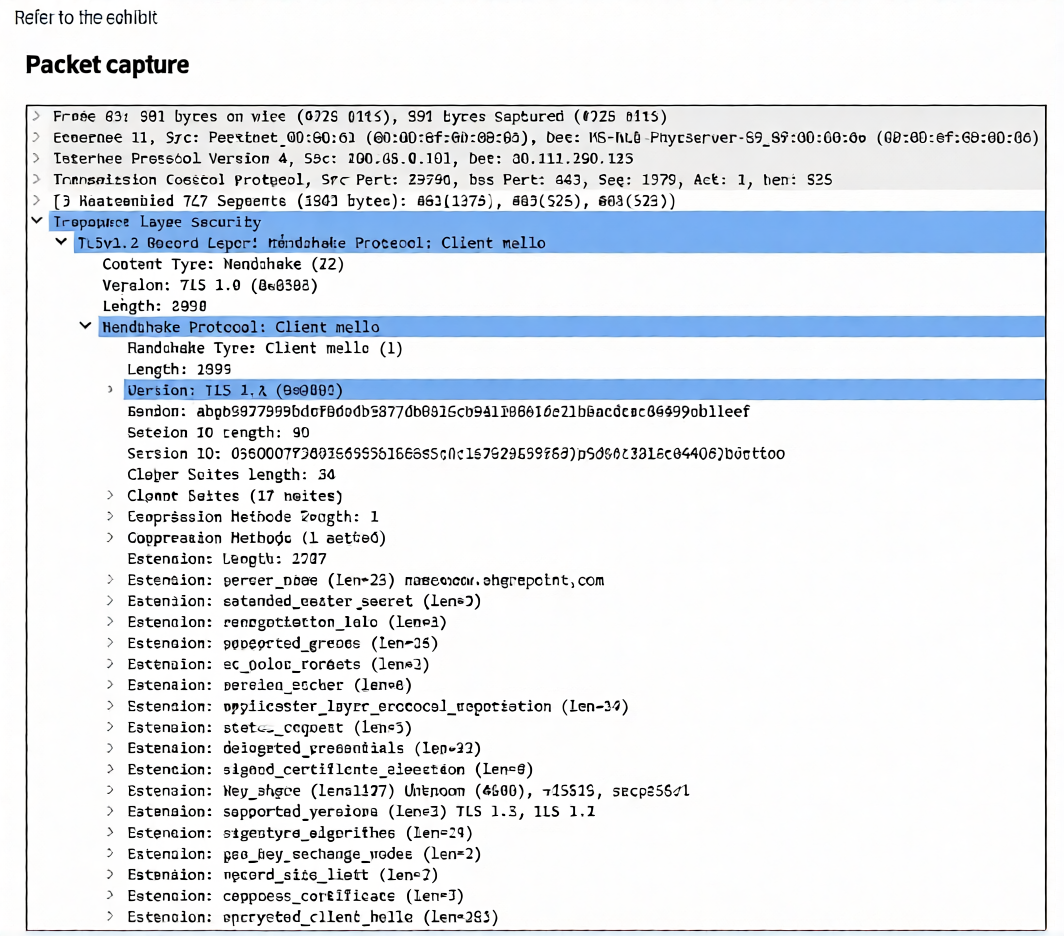
The packet capture output of a ClientHello message is shown.
You are updating a firewall policy that includes SSL certificate inspection. You are capturing packets from traffic passing through this firewall policy.
Which two statements about the packet capture are correct? (Choose two.)
A. You can effectively apply an antivirus security profile to this traffic.
B. You can effectively apply a web filtering profile to this traffic.
C. The subject alternative name (SAN) is necessary to apply security profiles.
D. The client supports only TLS versions 1.2 and 1.3.
Explanation
The provided packet capture shows a TLS 1.3 Client Hello message. This is the first handshake message sent by the client to the server. Crucially, for a firewall performing SSL/TLS inspection (like FortiGate's certificate inspection), this is the point where the initial visibility into the connection is established. However, the actual content of the traffic is still encrypted. Security profiles that rely on inspecting the decrypted payload (like Antivirus) cannot be applied effectively at this stage, while profiles that inspect the initial handshake metadata (like Web Filtering) can be applied .
Correct Option: B
You can effectively apply a web filtering profile to this traffic.
This is correct. A Web Filtering profile can be applied based on the Server Name Indication (SNI) extension present in the Client Hello. In this capture, the SNI extension clearly shows the destination is www.sharepoint.com . The firewall can use this information to apply web filtering policies and categorize the traffic without needing to decrypt the entire payload. This allows for policy enforcement based on the intended destination domain.
Correct Option: D
The client supports only TLS versions 1.2 and 1.3.
This is correct. The packet capture contains a supported_versions extension within the Client Hello. The length of this extension is 5, which indicates it offers two versions. The listed versions are TLS 1.3 and TLS 1.2. The client explicitly states its support for these two protocol versions, confirming that it does not support older, less secure versions like TLS 1.1 or 1.0 .
Incorrect Option: A
You can effectively apply an antivirus security profile to this traffic.
This is incorrect. For an Antivirus profile to be effective, the firewall must perform full SSL/TLS decryption (deep inspection) to see the actual application payload (e.g., HTTP data or file transfers). With only certificate inspection, the firewall is looking at the encrypted handshake but does not decrypt the data. Therefore, it cannot inspect the content for viruses or malware patterns, making this statement false.
Incorrect Option: C
The subject alternative name (SAN) is necessary to apply security profiles.
This is incorrect. The SAN is a field used in the server's certificate, which is sent later in the handshake (in the Certificate message). In the Client Hello shown here, the SAN is not present and is not necessary for applying Web Filtering. The Web Filtering profile uses the SNI extension from the Client Hello to identify the destination, not the SAN. The SAN is used for validating a certificate, not for applying security policies.
Reference
Fortinet SSL/TLS Inspection Documentation
Refer to the exhibit, which shows the partial output of command diagnose debug rating.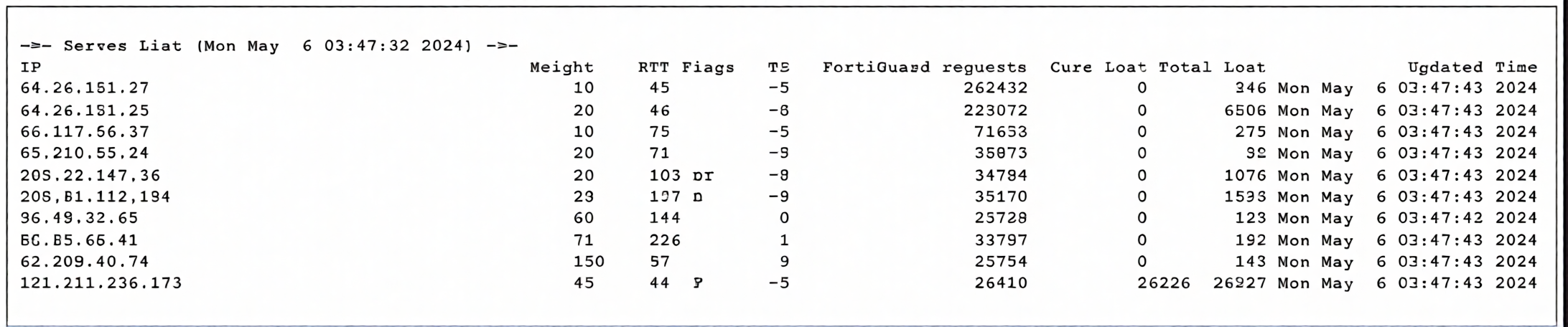
In this exhibit, which FDS server will the FortiGate algorithm choose?
A. 66.117.56.37
B. 208.91.112.194
C. 209.22.147.36
D. 64.26.151.37
Explanation
The diagnose debug rating command displays the status of FortiGuard servers that the FortiGate uses for web filtering and antivirus rating queries. The FortiGate selects the "best" server using a proprietary algorithm that considers multiple factors. Key metrics include Round Trip Time (RT) , Weight, and Total Lost packets. The algorithm prioritizes servers with the lowest overall score, balancing low latency and high reliability (fewer lost packets) .
Correct Option: D (64.26.151.37)
This is the correct choice based on FortiGate's selection logic. This server has the lowest Round Trip Time (RT = 45 ms) among all listed servers. It also has a high Weight (10) and zero current losses, indicating a stable and responsive connection. The FortiGuard selection algorithm heavily favors the server with the lowest latency (RTT) as long as its loss rate remains within acceptable thresholds . Therefore, 64.26.151.37 is the optimal choice.
Incorrect Option: A (66.117.56.37)
While this server has a low RT of 75 ms and a Weight of 10, its latency is higher than that of 64.26.151.37 (45 ms) and 64.26.151.35 (46 ms). The FortiGate algorithm prioritizes the server with the lowest Round Trip Time to ensure the fastest response for rating queries, making this server less preferred despite being relatively fast .
Incorrect Option: B (208.91.112.194)
This server has a Weight of 20 and an RT of 107 ms. While its weight is higher than servers with Weight 10, the RT is significantly higher than the top-performing servers. The algorithm gives more importance to low latency for responsiveness, so this server would not be the primary choice unless all lower-latency servers were unavailable .
Incorrect Option: C (209.22.147.36)
Similar to option B, this server has a Weight of 20 and an RT of 103 ms. Although its "Total Lost" count (107) is lower than some others (e.g., 121.111.236.179 has 26227 losses), its latency is more than double that of the 64.26.151.37 server. The selection algorithm favors the lowest RT combination, making this a secondary or backup choice .
Reference
Fortinet FortiGate Administration Guide – FortiGuard Server Selection Algorithm (diagnose debug rating)
FortiGate Troubleshooting Guide – Understanding diagnose debug rating Output (RTT and Weight Metrics)
Exhibit.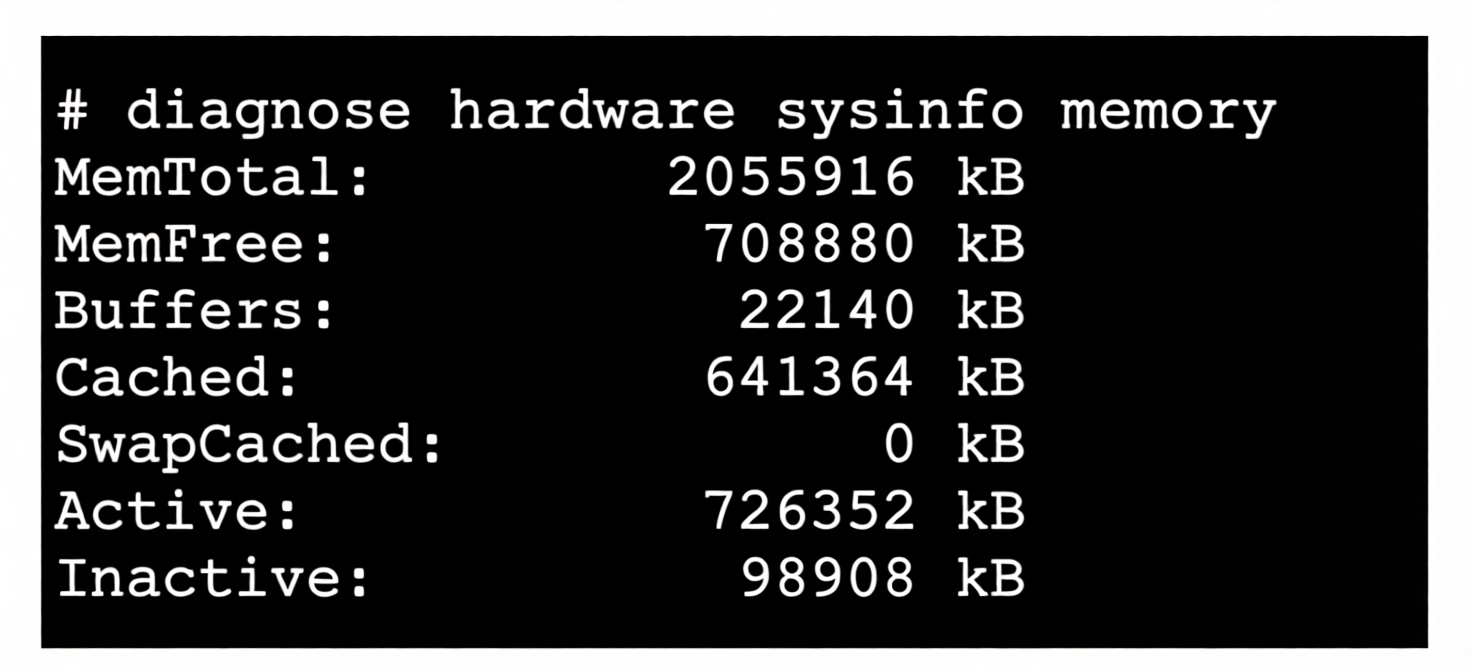
Refer to the exhibit, which shows a partial output of diagnose hardware aysinfo memory.
Which two statements about the output are true? (Choose two.)
A. There are 98908 kB of memory that will never be used.
B. The user space has 708880 kB of physical memory that is not used by the system.
C. The I/O cache, which has 641364 kB of memory allocated to it.
D. The value indicated next to the inactive heading represents the currently unused cache page.
Explanation
The diagnose hardware sysinfo memory command displays the FortiGate's memory usage statistics, similar to the Linux /proc/meminfo output. Understanding these fields is crucial for troubleshooting memory-related performance issues. The output shows total physical memory (MemTotal), free memory (MemFree), and various caches (Buffers, Cached). The key distinction lies in understanding what "free" memory means versus memory that is actively cached or buffered .
Correct Option: B
The user space has 708880 kB of physical memory that is not used by the system.
This is correct. The MemFree value (708,880 kB) represents physical RAM that is completely unused and available for any process or the kernel to allocate. This memory is not being used by the system's kernel, drivers, or running applications. It is truly "free" and can be immediately allocated to user-space processes when needed. Low MemFree values may indicate memory pressure on the system.
Correct Option: D
The value indicated next to the inactive heading represents the currently unused cache page.
This is correct. The Inactive value (98,908 kB) represents cache memory pages (file cache) that have not been accessed recently. These pages are considered "cold" and are eligible to be reclaimed by the kernel if memory is needed elsewhere. While they still contain cached data, they are effectively unused from the application's perspective and can be dropped and reused without performance impact.
Incorrect Option: A
There are 98908 kB of memory that will never be used.
This is incorrect. The Inactive memory (98,908 kB) is not "never used" memory; it is cache that is currently holding data but is available for reclamation. The kernel will actively reuse these pages when memory is requested by applications. This memory is not permanently reserved and will be used again for caching when the system reads new files, making this statement fundamentally wrong.
Incorrect Option: C
The I/O cache, which has 641364 kB of memory allocated to it.
This is incorrect. The Cached value (641,364 kB) represents the page cache, which includes memory used for file system caching, not specifically I/O cache. The Buffers value (22,140 kB) is what represents I/O buffers (block device caching). The statement confuses these two distinct memory caches. Buffers are used for metadata and block I/O, while Cached is used for file content caching.
Reference
Fortinet FortiGate Administration Guide – Memory Management and Diagnostics (diagnose hardware sysinfo memory)
Linux /proc/meminfo Documentation – Understanding MemFree, Cached, Buffers, and Inactive Memory
FortiGate Troubleshooting Guide – Memory Usage and Performance Monitoring
Refer to the exhibit.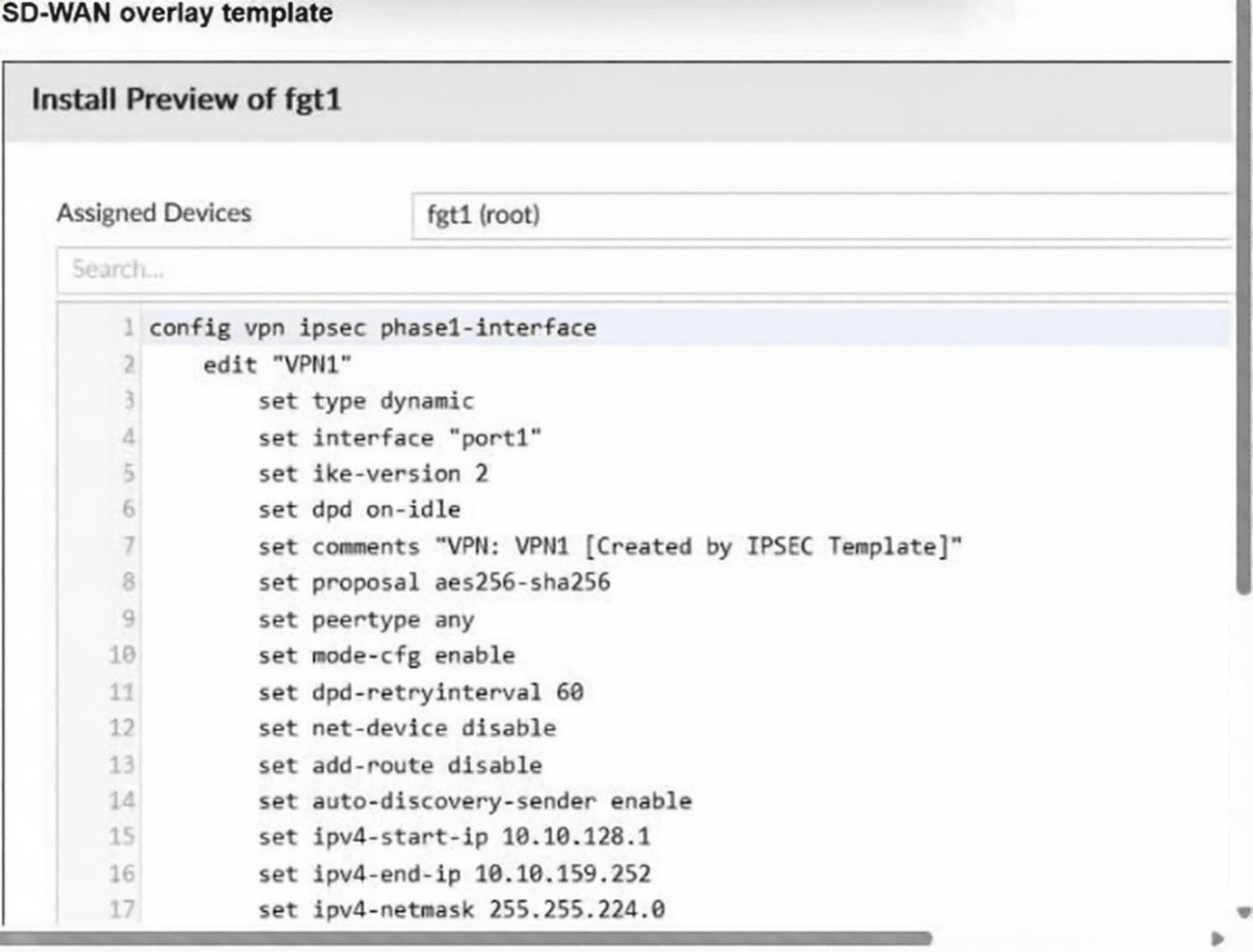
You used the SD-WAN overlay orchestrator to prepare an IPsec tunnel configuration for a hub-and-spoke SDWAN topology. The exhibit shows the FortiManager installation preview for one FortiGate device.
Based on the exhibit, which statement correctly describes the configuration applied to the FortiGate device?
A. It is a spoke device that establishes dynamic IPsec tunnels to the hub. The local subnet range is 10.10.128.0/23.
B. It is a hub device. It will automatically discover the spoke devices and add them to the SD-WAN topology.
C. It is a hub device. It can send ADVPN shortcut offer
D. It is a spoke device that establishes dynamic IPsec tunnels to the hub. It can send ADVPN shortcut requests.
Explanation
The configuration preview shows an IPsec phase1-interface configured with type dynamic, auto-discovery-sender enable, and a pool of IP addresses (ipv4-start-ip to ipv4-end-ip) for client assignment. These settings are characteristic of a hub device in an SD-WAN overlay topology. The hub uses dynamic IPsec to accept connections from spokes and leverages ADVPN (Auto-Discovery VPN) to facilitate shortcut tunnels between spokes, with the hub acting as the sender of shortcut offers.
Correct Option: C
It is a hub device. It can send ADVPN shortcut offers.
This is correct. The configuration includes set auto-discovery-sender enable, which explicitly enables the device to act as an ADVPN shortcut sender. In an ADVPN topology, the hub is configured as the sender, meaning it can send shortcut offers to spokes when it detects that two spokes are communicating through the hub. Additionally, the type dynamic and mode-cfg enable (with a DHCP-like IP pool) are classic hub configurations that accept dynamic connections from multiple spokes.
Incorrect Option: A
It is a spoke device that establishes dynamic IPsec tunnels to the hub. The local subnet range is 10.10.128.0/23.
This is incorrect. Spoke devices typically use type static (not dynamic) to establish tunnels to the hub. Furthermore, the IP pool (10.10.128.1 to 10.10.159.252 with netmask 255.255.224.0/19) is used for assigning IPs to spokes, not defining a local subnet. The /23 subnet mentioned is incorrect; the netmask is /19. This configuration is not typical for a spoke.
Incorrect Option: B
It is a hub device. It will automatically discover the spoke devices and add them to the SD-WAN topology.
This is incorrect. While this is a hub device, hubs do not "automatically discover" spokes. Spokes initiate the connection to the hub using their pre-configured peer IPs. The hub accepts these incoming connections dynamically (due to type dynamic), but it does not actively discover or probe for spokes. The auto-discovery features (auto-discovery-sender) are for ADVPN shortcuts, not for discovering spokes themselves.
Incorrect Option: D
It is a spoke device that establishes dynamic IPsec tunnels to the hub. It can send ADVPN shortcut requests.
This is incorrect. As established, this is a hub, not a spoke. Additionally, in ADVPN, spokes are configured as auto-discovery-receiver and send shortcut requests (not offers), while the hub is the sender that offers shortcuts. The configuration shows auto-discovery-sender enable, which is the hub's role. A spoke would use auto-discovery-receiver enable.
Reference
Fortinet SD-WAN Administration Guide – ADVPN Configuration and Hub/Spoke Roles
FortiManager Administration Guide – SD-WAN Overlay Orchestrator Templates and Installation Preview
Fortinet NSE 7 SD-WAN Study Guide – IPsec Phase1 Parameters for Hub and Spoke (type dynamic vs static, auto-discovery-sender vs receiver)
You want to harden the SSL/SSH inspection profile for access to HTTPS web servers.
Which two configuration changes allow you to remove vulnerabilities? (Choose two answers.)
A. Set unsupported-ssl-version to block.
B. Set Server certificate SNI check to Enable.
C. Set Untrusted SSL certificates to Ignore.
D. Set min-allowed-ssl-version to ssl-3.0.
Explanation:
To harden an SSL/SSH inspection profile and remove vulnerabilities for HTTPS web server access, you should implement the configuration changes described in options A and B. The reasoning is as follows:
Correct Option: A
Set unsupported-ssl-version to block.
This is a direct measure to eliminate weak cryptographic protocol support. By setting this parameter to block, the FortiGate will terminate any SSL/TLS session that attempts to use a protocol version considered obsolete or weak, such as SSL 3.0 or TLS 1.0 . Blocking these protocols prevents attackers from exploiting known vulnerabilities (e.g., POODLE) that rely on forcing connections to downgrade to these outdated versions.
Correct Option: B
Set Server certificate SNI check to Enable.
Enabling the Server Name Indication (SNI) check enhances the firewall's ability to verify the server's identity and enforce correct policies. When set to Enable, the FortiGate compares the SNI in the Client Hello with the Common Name (CN) or Subject Alternative Name (SAN) in the returned server certificate . If a mismatch is found, it uses the certificate's CN for URL filtering, ensuring that the traffic is correctly identified and policy is applied. This prevents attackers from using mismatched certificates to bypass web-filtering policies.
Incorrect Option: C
Set Untrusted SSL certificates to Ignore.
This is a dangerous action for hardening a profile. The "Ignore" option for untrusted certificates is typically used only for Full SSL Inspection in very specific troubleshooting scenarios, where the FortiGate re-signs the certificate to force trust . For a security-hardening objective, ignoring an untrusted certificate completely defeats the purpose of certificate validation, as it silently allows potentially malicious or misconfigured servers to establish connections without any warning or block.
Incorrect Option: D
Set min-allowed-ssl-version to ssl-3.0.
This configuration would have a counterproductive and insecure effect. The min-allowed-ssl-version parameter sets the lowest protocol version that the FortiGate will accept . Setting this to ssl-3.0 explicitly permits SSL 3.0 connections. Since SSL 3.0 is notoriously insecure and deprecated, allowing it introduces a significant vulnerability, the exact opposite of the hardening goal.
Refer to the exhibit..jpeg)
The output of diagnose sys session list command is shown.
If the HA ID for the primary device is 9, what happens if the primary fails and the secondary becomes the primary?
A. The session is synchronized with the secondary device, however, because application control is applied. the session is marked dirty and has to be reevaluated after failover.
B. The session will be removed from the session table of the secondary device because the TCP session is not yet fully established.
C. The session continues to permit traffic on the new primary device after failover. without requiring the client to restart the session with the server.
D. The session state is preserved but the kernel will re-evaluate the session because the routing information will be flushed
Explanation
The session output shows ha_id=0 and state=may_dirty synced. In a FortiGate HA cluster, sessions are synchronized from the primary to the secondary devices. The ha_id field indicates which cluster unit originally created the session. When the primary fails and a secondary takes over, the behavior depends on the session's synchronization state and whether any "dirty" flags are set, which would require re-evaluation.
Correct Option: C
The session continues to permit traffic on the new primary device after failover, without requiring the client to restart the session with the server.
This is correct. The session output shows state=may_dirty synced, which indicates the session has been successfully synchronized to the secondary device. The synced flag confirms that the session table entry exists on the secondary. When the primary fails and the secondary becomes the new primary, this synchronized session is already present in the kernel session table. As a result, traffic for this session will continue to be permitted seamlessly, and the client does not need to re-establish the TCP connection with the server.
Incorrect Option: A
The session is synchronized with the secondary device, however, because application control is applied, the session is marked dirty and has to be reevaluated after failover.
This is incorrect. While the session is indeed synchronized (synced flag), the output does not show any application control (app-list or app-id) being applied to this session (app=0). The may_dirty state is a normal flag for sessions that may need re-evaluation, but it does not automatically force a full re-evaluation upon failover. This option incorrectly assumes application control is applied and that re-evaluation is mandatory.
Incorrect Option: B
The session will be removed from the session table of the secondary device because the TCP session is not yet fully established.
This is incorrect. The session shows proto_state=01, which corresponds to TCP TCP_SYN_SENT state, meaning the three-way handshake is in progress. However, FortiGate synchronizes sessions to the secondary from the very first packet (SYN). The secondary retains this session in its table even before the handshake completes. It is not removed simply because the TCP session is not yet fully established; synchronization happens proactively for all new sessions.
Incorrect Option: D
The session state is preserved but the kernel will re-evaluate the session because the routing information will be flushed.
This is incorrect. While session state is preserved, routing information is not "flushed" upon failover. The secondary device already has the routing table and session table synchronized. The kernel does not need to re-evaluate the session due to routing changes unless the outgoing interface or next-hop is no longer available. In this case, the session is synchronized and will continue to pass traffic without requiring kernel re-evaluation solely for routing purposes.
Reference
Fortinet FortiGate Administration Guide – High Availability (HA) Session Synchronization and Failover Behavior
Fortinet Troubleshooting Guide – diagnose sys session list Output Interpretation (ha_id, state, synced flags)
Fortinet NSE 7 Enterprise Firewall Study Guide – HA Session Failover and TCP State Handling
| Page 1 out of 23 Pages |
| 123456789101112 |
The Fortinet NSE 7 Secure Networking 7.6 Architect exam is notoriously tough. It doesn't test memorization. It forces you to make complex decisions under time pressure. A weak prep strategy risks a costly failure and wasted effort. Our NSE7_FSN_AR-7.6 practice tests are built to be your definitive bridge to a passing score.

Copyright © - All Rights Reserved