
Last Updated On : 7-Sep-2026
Total 160 Questions
Security profiles
Refer to the exhibit, which shows the output of a real-time debug. Which statement about this output is true? (Choose one answer)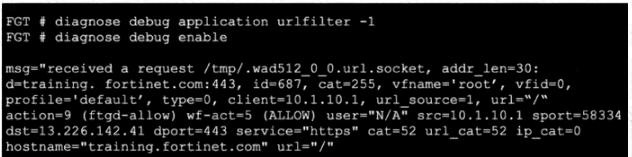
A. The server hostname was extracted from the SNI in the client request, or from the CN in the server certificate.
B. FortiGate found the requested URL in its local cache.
C. This web request was inspected using the ftgd-allow web filter profile.
D. The requested URL belongs to category ID 255.
Explanation
The debug output shows an HTTPS request to training.fortinet.com:443 . Since this is TLS-encrypted traffic, the FortiGate must obtain the destination hostname to perform URL filtering. It extracts the hostname either from the Server Name Indication (SNI) extension in the Client Hello message, or if the SNI is absent, from the Common Name (CN) in the server certificate . This mechanism is required for HTTPS traffic and is a standard function of FortiGate's SSL/TLS inspection (certificate inspection) .
Correct Option: A
The server hostname was extracted from the SNI in the client request, or from the CN in the server certificate.
This is correct. The urlfilter debug shows hostname="training.fortinet.com" . Because the traffic is HTTPS (port 443), the FortiGate cannot read the unencrypted host header. It relies on the SNI during the TLS handshake, or uses the CN (or SAN) from the server certificate, to obtain the hostname . This is a standard feature of FortiGate's SSL/TLS inspection .
Incorrect Options
B. FortiGate found the requested URL in its local cache.
This is incorrect. The output shows cat=255 in one field and cat=52 in another. The cat=255 indicates a miss in the local cache, meaning the URL category was not found locally and FortiGate queried the FortiGuard service for a rating.
C. This web request was inspected using the ftgd-allow web filter profile.
This is incorrect. The debug shows profile='default', which is the name of the web filter profile being used, not ftgd-allow. ftgd-allow is the action taken by the FortiGuard service, indicating the rating was allowed.
D. The requested URL belongs to category ID 255.
This is incorrect. The output shows cat=255 as an initial value, but later shows cat=52. The correct category ID for training.fortinet.com is 52 (which corresponds to "Fortinet" itself). The cat=255 is a placeholder or temporary value used before the rating is retrieved and should not be interpreted as the final category.
Reference
Fortinet FortiGate Web Filtering Debug Output Interpretation
FortiGate SSL/TLS Inspection Documentation – SNI and CN Extraction for Hostname
FortiGuard Category ID Reference (Category 52 = Fortinet)
A FortiGate administrator is troubleshooting a VPN that is failing to establish.
As a first step, the administrator is attempting to sniff the traffic using the command:
# diagnose sniffer packet any ‘’udp port 500 or udp port 4500 or esp’’ 4
After several minutes there is still no output. What is the most Likely reason for this?
A. The VPN is configured to use IKE over TCP
B. esp is not a valid sniffer argument.
C. The ISP is blocking all VPN traffic.
D. Mismatched IKE versions are detected on the VPN peers
Explanation
The diagnose sniffer packet any 'udp port 500 or udp port 4500 or esp' 4 command is designed to capture the standard UDP-based IKE and ESP traffic. If the sniffer shows no output, the most likely reason is that the VPN is not using these standard protocols. For an IPsec VPN configured to use TCP transport (which is supported with IKEv2 ), all IKE and ESP packets are encapsulated within TCP headers on a configured port (the default is port 4500 or 443) . Therefore, the sniffer command filtering only on UDP ports 500, 4500, and protocol 50 (ESP) will see no relevant traffic. This is a known troubleshooting scenario where the traffic is present but is hidden by the TCP encapsulation .
Correct Option: A
The VPN is configured to use IKE over TCP.
This is the correct explanation. IPsec VPNs can be configured to operate over TCP to traverse firewalls that block UDP traffic . When transport {udp-fallback-tcp | tcp} is configured, the IKE and ESP packets are encapsulated within TCP . Consequently, a standard sniffer filter for UDP 500, UDP 4500, and ESP will not capture the VPN's negotiation or data packets.
Incorrect Options
B. esp is not a valid sniffer argument.
This is incorrect. In FortiOS, esp is a valid filter argument for the diagnose sniffer packet command, used to capture Encapsulating Security Payload packets that are not encapsulated in UDP (i.e., when NAT-T is not used) .
C. The ISP is blocking all VPN traffic.
This is incorrect. While an ISP blocking traffic is a possible cause for a failed VPN, it would not be the most likely reason for the sniffer showing no output. If traffic was reaching the FortiGate, the sniffer would likely display the blocked or dropped packets. The absence of output points to a more fundamental mismatch between the sniffer filter and the traffic pattern.
D. Mismatched IKE versions are detected on the VPN peers.
This is incorrect. A mismatch in IKE versions would prevent the VPN from establishing, and the IKE debug would likely show an error. However, the IKE negotiation packets would still be sent (either over UDP or TCP) and would be captured by a correctly configured sniffer. The issue is that the standard UDP sniffer is not looking at the correct port or protocol, not that no packets are being transmitted.
You manage an SD-WAN topology and you will soon deploy 50 new branches.
Which two tasks can you do in advance to simplify this deployment? (Choose two.)
A. Create a zero-touch provisioning (ZTP) template.
B. Create a policy blueprint.
C. Define metadata variable values for each device.
D. Create model devices.
Explanation
Deploying 50 new branches requires a scalable, efficient approach. FortiManager provides the tools to prepare configurations in advance, minimizing manual work during the actual deployment. Two essential pre-deployment tasks are creating offline model devices to represent the new branch FortiGates and defining their unique metadata variables, which are used to customize the standard templates for each specific site .
Correct Options
C. Define metadata variable values for each device.
This is a critical step for successful automation. SD-WAN overlay templates use metadata variables (like branch_id or branch_hostname) to uniquely configure each device . Defining these values in advance—either manually or by importing a CSV file—ensures that when the model device comes online, its configuration is applied correctly and without errors .
D. Create model devices.
Creating model devices is the primary method for preparing for a large-scale deployment. A model device is an offline placeholder in FortiManager that represents a physical FortiGate that has not yet been connected . By creating these model devices in advance and assigning them to a device blueprint, you can pre-configure settings like device groups, policy packages, and provisioning templates . This simplifies the onboarding process significantly, as the devices will automatically pull their configurations when they connect .
Incorrect Options
A. Create a zero-touch provisioning (ZTP) template.
Zero-Touch Provisioning (ZTP) is a feature that uses the device blueprint itself to apply configurations automatically . The template is not created separately; instead, the blueprint you create for the model devices acts as the mechanism for ZTP. Therefore, creating a ZTP template is not a separate task from creating model devices and their blueprints.
B. Create a policy blueprint.
This is not a standard FortiManager term. While you can create policy packages and device blueprints, a "policy blueprint" does not exist as a distinct object in FortiManager's workflow for SD-WAN onboarding. The correct approach is to assign an existing policy package to the device blueprint .
Reference
FortiManager Administration Guide: Using device blueprints for model devices
FortiManager Administration Guide: Onboarding new branch devices
FortiManager New Features: Metadata Variables
FortiManager Administration Guide: SD-WAN Overlay Template and Branch ID assignment
In which order does FortiGate consider the following elements during the route lookup process?
A. Policy routes, SD-WAN rules, Internet Service Database (ISDB) routes, BGP routes.
B. SD-WAN rules, ISDB routes, policy routes, BGP routes.
C. SD-WAN rules, policy routes, static routes, ISDB routes.
D. Policy routes, ISDB routes, SD-WAN rules, static routes.
Explanation
FortiGate's route lookup process follows a strict hierarchical order. It begins with the most specific and policy-driven rules, only falling back to the general routing table if no match is found . The process identifies the best route for traffic by examining these elements in a specific sequence .
Correct Option
D. Policy routes, ISDB routes, SD-WAN rules, static routes.
This correctly represents the sequential order in which FortiGate considers these elements during the route lookup process .
Policy Routes: These are the first to be checked and take the highest precedence. They are user-defined rules that can match traffic based on more than just the destination IP, such as source, protocol, or port .
ISDB Routes: Next in line are routes created using the Internet Service Database (ISDB). While configured like static routes, these are treated as policy routes and are evaluated after user-defined policy routes .
SD-WAN Rules: Following ISDB routes, FortiGate evaluates SD-WAN rules, which also function as policy routes to steer traffic based on criteria like link quality .
Static Routes: Finally, FortiGate falls back to the standard routing table entries, which include static and dynamic routes (like BGP, OSPF) .
Reference
Fortinet Documentation and study guides clearly outline the route lookup process, confirming the order: Policy Routes -> ISDB Routes -> SD-WAN Rules -> Routing Table/Static Routes .
What are three key routing principles of SD-WAN? (Choose three.)
A. SD-WAN rules are skipped if the best route to the destination is a static route.
B. SD-WAN members are skipped if they do not have a valid route to the destination.
C. Internet Service Database (ISDB) routes have precedence over SD-WAN rules.
D. SD-WAN rules are skipped if the best route to the destination is not an SD-WAN member.
E. Routes to directly connected subnets always have precedence over SD-WAN rules.
Explanation
The key routing principles governing SD-WAN in FortiOS define a clear hierarchy and behavior for how traffic is directed. SD-WAN rules operate within the broader routing framework and are subject to specific logical conditions. The core principles are that policy routes and ISDB routes take precedence over SD-WAN rules, and SD-WAN members are not considered if they lack a valid route to the destination.
Correct Options
B. SD-WAN members are skipped if they do not have a valid route to the destination.
This is a fundamental principle of routing logic. For a FortiGate to forward traffic out of an SD-WAN member interface, that interface must have a valid route to the destination network in the routing table . If no such route exists, that member is not considered a valid candidate path for the SD-WAN rule.
C. Internet Service Database (ISDB) routes have precedence over SD-WAN rules.
This is correct. ISDB routes are treated as policy routes and are evaluated after regular, user-defined policy routes, but they take precedence over SD-WAN rules . This is part of the route lookup order: Policy Routes -> ISDB Routes -> SD-WAN Rules -> Route Cache -> FIB/Routing Table .
D. SD-WAN rules are skipped if the best route to the destination is not an SD-WAN member.
This is correct. For an SD-WAN rule to be applied, the outgoing interface selected by the rule must also be the best route (the most specific match) in the routing table for the destination . If the best route is via a non-SD-WAN member interface, the SD-WAN rule is skipped in favor of that route.
Incorrect Option
A. SD-WAN rules are skipped if the best route to the destination is a static route.
This statement is incorrect as a general principle. Static routes are part of the routing table (FIB) and do not inherently cause SD-WAN rules to be skipped . SD-WAN rules are considered after ISDB routes but before the standard routing table (which includes static routes) . A static route is only considered if no SD-WAN rule matches the traffic.
Reference
Fortinet FortiOS Administration Guide: Route lookup order and route types
Fortinet SD-WAN Study Guide: SD-WAN rule matching and routing table interaction
Which authentication option can you not configure under config user radius on FortiOS?
A. mschap
B. pap
C. mschap2
D. eap
Explanation
FortiGate's RADIUS server configuration supports several standard authentication protocols for communication between the FortiGate and the RADIUS server. However, EAP (Extensible Authentication Protocol) is not a configurable authentication method in this specific context because it is an encapsulation framework, not a single authentication protocol.
Correct Option: D
eap
While EAP is used extensively in FortiOS for scenarios like IPsec VPNs with IKEv2 and 802.1X network access control, these are separate features that leverage EAP as a framework . The config user radius section for defining a RADIUS server object does not list eap as an option for the auth-type setting .
Incorrect Options
A. mschap
MSCHAP is a standard authentication method supported by FortiGate RADIUS server configurations .
B. pap
PAP is a standard authentication method supported by FortiGate RADIUS server configurations .
C. mschap2
MS-CHAPv2 is a standard authentication method supported by FortiGate RADIUS server configurations .
Reference
Fortinet Document Library: RADIUS server configuration options include pap, chap, ms_chap, and ms_chap_v2 for the auth-type setting .
Pulumi Registry: FortiManager API documentation lists valid authType values for the ObjectUserRadius resource as pap, chap, ms_chap, ms_chap_v2, and auto .
Fortinet Community: EAP is used as a framework within IPsec VPN configurations, not as a direct auth-type setting within a RADIUS server object .
You have a FortiGate configuration with three user-defined SD-WAN zones and two members in each of these zones. One SD-WAN member is no longer in use in health-check and SD-WAN rules. You want to delete it.
What happens if you delete the SD-WAN member from the FortiGate GUI?
A. FortiGate accepts the deletion and places the member in the default SD-WAN zone.
B. FortiGate displays an error message. SD-WAN zones must contain at least two members.
C. FortiGate accepts the SD-WAN member deletion with no further action.
Explanation
Deleting an SD-WAN member from the GUI is a straightforward configuration change. FortiGate does not enforce a minimum number of members for a zone, nor does it automatically relocate the deleted member or clean up any related static routes . The operation is simply removing the member from the zone configuration.
Correct Option: C
FortiGate accepts the deletion with no further action.
This is the correct behavior. The FortiGate GUI will delete the selected member without displaying an error message. An SD-WAN zone can exist with one member, multiple members, or even no members at all, so removing a member does not violate any operational rule . No automatic changes are made to static routes that might have referenced the interface . There is no concept of a "default" SD-WAN zone for moved members .
Incorrect Options
A. FortiGate displays an error message. SD-WAN zones must contain at least two members.
This is incorrect because FortiGate does not require an SD-WAN zone to contain a minimum number of members. A zone can be configured with a single member or be empty .
B. FortiGate accepts the deletion and removes static routes as required.
This is incorrect. Deleting an SD-WAN member does not automatically remove static routes that were using that interface as an outgoing interface . Those routes would need to be manually cleaned up to avoid routing issues.
D. FortiGate accepts the deletion and places the member in the default SD-WAN zone.
This is incorrect. There is no automatic relocation of a deleted member to a default SD-WAN zone. The deletion operation simply removes it from the zone it was in .
Reference
Exam discussion noting that FortiGate zones do not have a member requirement and that no static routes are automatically removed .
Official documentation explaining that deleting an SD-WAN member is a straightforward configuration change without automatic side effects .
| Page 6 out of 23 Pages |
| 123456789101112 |
| NSE7_FSN_AR-7.6 Practice Test Home |
The Fortinet NSE 7 Secure Networking 7.6 Architect exam is notoriously tough. It doesn't test memorization. It forces you to make complex decisions under time pressure. A weak prep strategy risks a costly failure and wasted effort. Our NSE7_FSN_AR-7.6 practice tests are built to be your definitive bridge to a passing score.

Copyright © - All Rights Reserved