
Last Updated On : 7-Sep-2026
Total 160 Questions
Security profiles
While troubleshooting a FortiGate web filter issue, users report that they cannot access any websites, even though those sites are not explicitly blocked by any web filter profiles that are applied to firewall policies.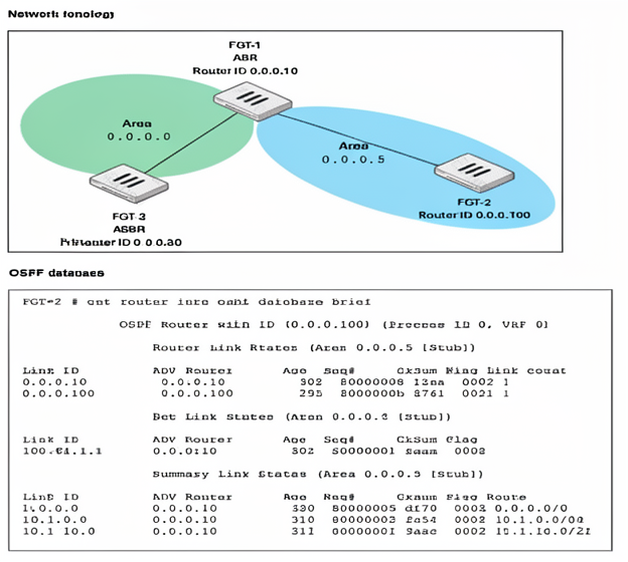
What are the three most likely reasons for this behavior? (Choose three answers)
A. The web filter cache has been cleared causing all websites to take longer to be rated.
B. The SSL/TLS deep inspection was configured but the browsers do not have the FortiGate certificate installed.
C. The webfilter-force-off setting has been enabled under config system fortiguard.
D. The DNS server is unreachable, preventing URL resolution.
E. The FortiGuard Web Filtering license has expired, causing FortiGate to apply the default block action.
Explanation
Web filtering on a FortiGate relies on the FortiGuard service to categorize URLs. If users cannot access websites that aren't explicitly blocked, the core issue is often that the FortiGate cannot successfully query the FortiGuard service for a rating. This can happen due to a communication failure (like a blocked protocol or unreachable DNS) or a licensing issue that forces an action on unrated sites. Additionally, SSL/TLS deep inspection can prevent access if the client browser does not trust the FortiGate's certificate.
Correct Option: B
The SSL/TLS deep inspection was configured but the browsers do not have the FortiGate certificate installed.
This is a very common cause. When full SSL/TLS deep inspection is enabled, the FortiGate acts as a "man-in-the-middle" to decrypt and inspect encrypted traffic. It re-encrypts the traffic using a certificate from the FortiGate itself. If this certificate is not installed as a trusted root CA on the client's browser, the browser will display a certificate error and often prevent the user from accessing the website entirely.
Correct Option: D
The DNS server is unreachable, preventing URL resolution.
For the FortiGate to contact FortiGuard servers, it needs to resolve the domain names for its services. If the configured DNS servers are unreachable, the FortiGate cannot resolve service.fortiguard.net and thus cannot send web filtering queries to get URL ratings. This is a common and widely documented cause of web filter failures.
Correct Option: E
The FortiGuard Web Filtering license has expired, causing FortiGate to apply the default block action.
When the FortiGuard Web Filtering license expires, the FortiGate can no longer perform real-time lookups for unrated or new websites. The exact behavior when a license expires can depend on the configuration, but it is a common scenario for the FortiGate to treat unrated sites as blocked, leading to the described issue. An expired license is a foundational reason for this behavior.
Incorrect Option: A
The web filter cache has been cleared causing all websites to take longer to be rated.
This is incorrect. Clearing the web filter cache would affect performance for previously rated sites, as the FortiGate would need to query FortiGuard servers again to get their rating. However, it would not cause websites to be completely inaccessible and would not prevent access to new, unrated sites.
Incorrect Option: C
The webfilter-force-off setting has been enabled under config system fortiguard.
This is incorrect. The webfilter-force-off command is a system-wide CLI setting to globally disable all web filtering activities on the FortiGate. If this were enabled, web filtering would be off entirely, which is different from the problem described where sites are being blocked despite not being explicitly in a block list.
Refer to the exhibit.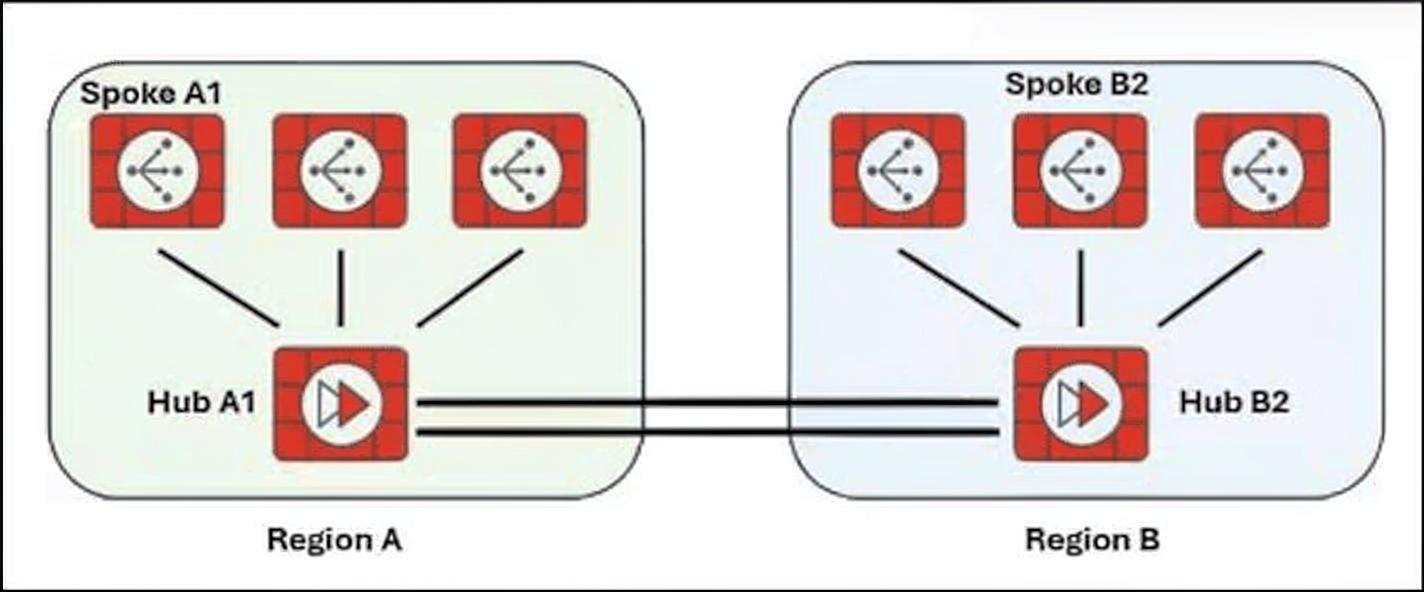
Two hub-and-spoke groups are connected through redundant site-to-site IPsec VPNs between Hub 1 and Hub 2.
Which two configuration settings are required for Spoke A1 to establish an auto-discovery VPN (ADVPN) shortcut with Spoke B2? (Choose two.)
A. On the spokes, auto-discovery-receiver must be enabled on the IPsec VPNs to the hubs.
B. On the hubs, auto-discovery-forwarder must be enabled on the IPsec VPNs between the hubs.
C. On the spokes, auto-discovery-sender must be enabled on the IPsec VPNs to the hubs.
D. On the hubs, auto-discovery-receiver must be enabled on the IPsec VPNs to the spokes.
Explanation
In an Auto-Discovery VPN (ADVPN) topology with multiple hub-and-spoke groups, enabling direct "shortcut" tunnels between spokes in different regions requires a specific division of responsibilities .
Spokes must be configured to listen for and initiate shortcut offers.
Hubs must be configured to relay shortcut information to other hubs.
Correct Options
A. On the spokes, auto-discovery-receiver must be enabled on the IPsec VPNs to the hubs.
This is correct and is the standard configuration for any spoke that needs to participate in ADVPN shortcuts . Enabling this command on the spoke's phase1 interface tells the FortiGate to listen for and accept shortcut offers from the hub . It is the mandatory prerequisite for a spoke to receive the information needed to establish a direct tunnel with another spoke.
B. On the hubs, auto-discovery-forwarder must be enabled on the IPsec VPNs between the hubs.
This is also correct. For an ADVPN shortcut to be established across different hub groups, the inter-hub tunnels must forward shortcut information . The auto-discovery-forwarder command enables the hub-to-hub VPN to pass on the shortcut details (like public IP addresses) that the spokes need to connect directly . Without this setting, the hub would not relay the necessary information across regions, preventing the shortcut from being formed.
Incorrect Options
C. On the hubs, auto-discovery-sender must be enabled on the IPsec VPNs between the hubs.
This command is typically used on the hub's interface facing the spokes to initiate shortcut offers, not on the inter-hub links . auto-discovery-sender triggers the shortcut negotiation process when it sees spoke-to-spoke traffic transiting through it. The forwarder command is the one specifically designed for hub-to-hub connections to pass shortcut messages along .
D. On the spokes, auto-discovery-sender must be enabled on the IPsec VPNs to the hubs.
This is the opposite of the required spoke configuration. In ADVPN, the hub is the one with sender enabled, acting as the controller that offers shortcut opportunities. The spokes are configured as receivers to accept and act on those offers .
Reference
Fortinet Documentation: "Example ADVPN configuration"
FCSS_SDW_AR-7.6 Exam Discussion: Hub-and-spoke ADVPN shortcut requirements
Fortinet Cookbook: "Configuring the Spoke FortiGates"
What are two functions of automation stitches? (Choose two.)
A. You can configure automation stitches on any FortiGate device in a Security Fabric environment.
B. You can configure automation stitches to execute actions sequentially by taking parameters from previous actions as input for the current action.
C. You can set an automation stitch configured to execute actions in parallel to insert a specific delay between actions.
D. You can create automation stitches to run diagnostic commands and attach the results to an email message when CPU or memory usage exceeds specified thresholds.
Explanation
Automation stitches in FortiOS are powerful tools that automate responses to security events by linking triggers with actions . They can be configured to execute actions in a specific sequence and can perform complex troubleshooting tasks, such as running diagnostic commands when system resources are under strain.
Correct Options
B. You can configure automation stitches to execute actions sequentially by taking parameters from previous actions as input for the current action.
This statement is correct. Automation stitches can be designed to run their defined actions in a specific order, where the completion of one action is required before the next begins . The set required enable CLI setting enforces this sequential execution, ensuring that one step completes before the next is triggered . While the primary function of this feature is to enforce a sequence, this is the mechanism that describes sequential action execution.
D. You can create automation stitches to run diagnostic commands and attach the results to an email message when CPU or memory usage exceeds specified thresholds.
This is a standard and well-documented use case for automation stitches . You can configure a stitch triggered by a High CPU or Conserve Mode event. This trigger activates a CLI Script action that runs diagnostic commands (diagnose debug, get system performance status), and then an Email action that sends the script's output (%%results%%) to an administrator, enabling rapid troubleshooting .
Incorrect Options
A. You can configure automation stitches on any FortiGate device in a Security Fabric environment.
This is incorrect. In a Security Fabric, automation stitches must be created on the root FortiGate . It is a key limitation that prevents distributed creation from any device in the fabric.
C. You can set an automation stitch configured to execute actions in parallel to insert a specific delay between actions.
This is incorrect. The ability to insert a delay (set delay) is available for actions, but when actions are executed in parallel, they are triggered simultaneously. The delay parameter is specifically designed for use with sequential action execution, where one action must finish before the next one begins .
Reference
Fortinet Documentation: Automation stitches creation and Security Fabric sync
Fortinet Documentation: Parallel and Sequential execution
Fortinet Documentation: CPU and Memory threshold examples
Exhibit.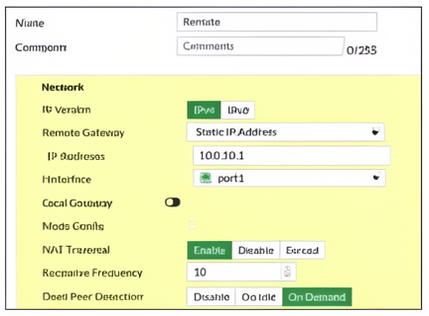
Refer to the exhibit, which contains a screenshot of some phase 1 settings.
The VPN is not up. To diagnose the issue, the administrator enters the following CLI commands on an SSH session on FortiGate:
However, the IKE real-time debug does not show any output. Why?
A. The administrator must also run the command diagnose debug enable.
B. The debug shows only error messages. If there is no output, then the phase 1 and phase 2 configurations match.
C. The log-filter setting is incorrect. The VPN traffic does not match this filter.
D. Replace diagnose debug application ike -1 with diagnose debug application ipsec -1.
Explanation
The issue is not with the VPN configuration or the filter but rather with the basic command sequence required to capture debug output on a FortiGate. Real-time debug commands on FortiGate do not start producing output simply by being turned on; the process must be explicitly started. The sequence to enable any debug is to first set the debug level, then start the output capture.
Correct Option: A
The administrator must also run the command diagnose debug enable.
This statement is correct. The diagnose debug application ike -1 command sets the IKE debug level, but it does not activate the debug flow. To actually start capturing and displaying debug messages, the administrator must first run diagnose debug enable. This is a common and fundamental step that must be remembered before any debug session, and forgetting it is the primary reason for seeing no output despite the debug level being set.
Incorrect Options
B. The debug shows only error messages. If there is no output, then the phase 1 and phase 2 configurations match.
This is incorrect. The IKE debug level -1 shows all messages, including informational and verbose ones, not just errors. If there were no output, it would mean the debug was not properly enabled or the filter is blocking the traffic, not that the configurations match perfectly.
C. The log-filter setting is incorrect. The VPN traffic does not match this filter.
This is incorrect. The dst-addr4 10.0.10.1 filter is correct because it matches the remote gateway IP address configured in the phase 1 settings shown in the exhibit. If the filter was incorrect, it would filter out the IKE messages, but the administrator would still likely see some debug output if the debug was enabled, which it is not.
D. Replace diagnose debug application ike -1 with diagnose debug application ipsec -1.
This is incorrect. The ipsec debug application is used for kernel-level IPsec operations, such as encapsulation and decapsulation of the ESP packets. For IKE negotiation issues, the ike debug is the correct tool. Replacing it would not fix the lack of output because the debug is not enabled, and it would also be the wrong tool for diagnosing the IKE phase.
Reference
Fortinet FortiGate Administration Guide – Debugging Commands and Workflow
Fortinet Knowledge Base – Troubleshooting IPsec VPN with IKE Debug
FortiGate CLI Reference – diagnose debug Commands
Which three conditions are required for two FortiGate devices to form an OSPF adjacency? (Choose three answers)
A. OSPF link costs match.
B. OSPF interface priority settings are unique.
C. OSPF interface network types match.
D. Authentication settings match.
E. OSPF router IDs are unique.
Explanation
OSPF (Open Shortest Path First) requires several parameters to match between two routers for a full adjacency to form. These parameters are verified during the exchange of Hello packets. If any of these core parameters do not match, the routers will not progress past the Two-Way state and will not become fully adjacent. The three essential conditions are matching network types, matching authentication settings, and unique router IDs.
Correct Options
C. OSPF interface network types match.
This is a fundamental requirement. OSPF has different network types, such as Broadcast, Point-to-Point, and NBMA. The network type determines how OSPF discovers neighbors and elects DR/BDR. If the network types on the connected interfaces do not match, the routers will not establish a full adjacency (they will get stuck in the Two-Way state).
D. Authentication settings match.
OSPF can use authentication (none, clear text, or MD5/SHA) to secure routing updates. For two routers to form an adjacency, the authentication settings on the connecting interfaces must be identical. A mismatch in the authentication type or password/key will cause the OSPF adjacency to fail, often shown by the "Authentication type mismatch" error in logs.
E. OSPF router IDs are unique.
Each router in an OSPF network must have a unique Router ID (RID). The Router ID is used to identify the router within the OSPF domain and is critical for DR/BDR election and link-state database representation. If two routers share the same Router ID, they will not be able to form an adjacency.
Incorrect Options
A. OSPF link costs match.
This is not a requirement for adjacency formation. OSPF cost is used for path calculation (metric) and does not affect the ability to form a neighbor relationship. Mismatched costs will simply cause the routers to calculate different path costs, but the adjacency will still form.
B. OSPF interface priority settings are unique.
This is incorrect. The priority is used for DR/BDR election, but it does not need to be unique. Multiple routers can share the same priority, and the adjacency will form. If priorities are identical, the Router ID is used as a tie-breaker.
Reference
RFC 2328 – OSPF Version 2 (Section 10.5: Receiving Hello Packets)
Fortinet FortiGate Administration Guide – OSPF Adjacency Requirements
FortiGate CLI Reference – config router ospf Configuration Parameters
Refer to the exhibit.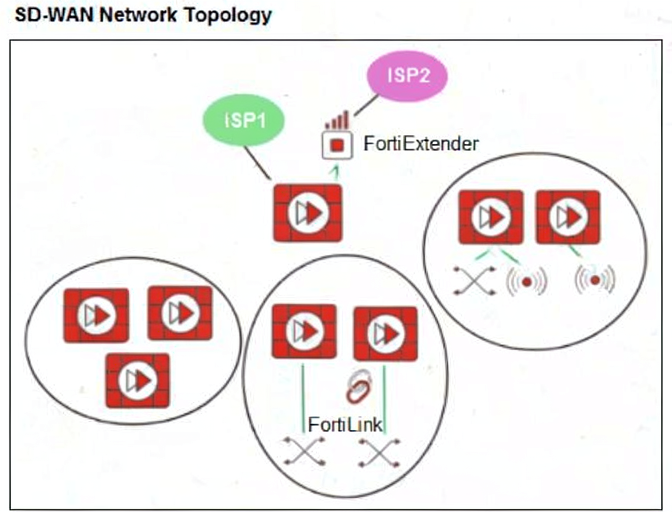
You want to configure SD-WAN on a network, as shown in the exhibit. The network contains many FortiGate devices. Some are used as next-generation firewalls (NGFWs), and some are deployed with extensions such as FortiSwitch, FortiAP, or FortiExtender.
Which factor should you consider when planning the deployment? (Choose one answer.)
A. You can build an SD-WAN topology that includes all devices. The hubs must be devices without extensions.
B. You should exclude FortiGate devices with FortiLink connections from the SD-WAN topology.
C. You should build multiple SD-WAN topologies. Each topology should contain only one type of extension.
D. You can build an SD-WAN topology that includes all devices. The hubs can be FortiGate devices with FortiExtender.
Explanation
A FortiGate with extensions like FortiSwitch, FortiAP, or FortiExtender is central to an SD-Branch architecture . These extensions integrate directly with the FortiGate, and the FortiExtender interface is recognized by FortiOS as a valid WAN interface that can be added as a member of an SD-WAN zone . This allows for a unified SD-WAN deployment across all branch devices.
Correct Option: D
You can build an SD-WAN topology that includes all devices. The hubs can be FortiGate devices with FortiExtender.
This statement is correct. FortiExtender supplements FortiGate WAN connectivity by adding LTE/5G options and is explicitly designed to be used as an SD-WAN member for primary, backup, or load-balanced WAN access . FortiSwitch and FortiAP are part of the SD-Branch architecture and do not prevent a FortiGate from functioning as a hub or participating fully in the SD-WAN topology .
Incorrect Options
A. You can build an SD-WAN topology that includes all devices. The hubs must be devices without extensions.
This is incorrect. There is no requirement that hubs in an SD-WAN topology must be devices without extensions. FortiGates with FortiExtender are fully supported as hubs.
B. You should exclude FortiGate devices with FortiLink connections from the SD-WAN topology.
This is incorrect. FortiLink connections are part of the SD-Branch solution and integrate with the FortiGate. They do not preclude a FortiGate from being included in the SD-WAN topology.
C. You should build multiple SD-WAN topologies. Each topology should contain only one type of extension.
This is incorrect. A single SD-WAN topology can include FortiGates with various extensions (FortiSwitch, FortiAP, FortiExtender) as part of a unified SD-Branch solution.
Reference
Fortinet SD-Branch Architecture: FortiGate, FortiSwitch, FortiAP, and FortiExtender integration
FortiExtender as an SD-WAN member interface
Refer to the exhibit.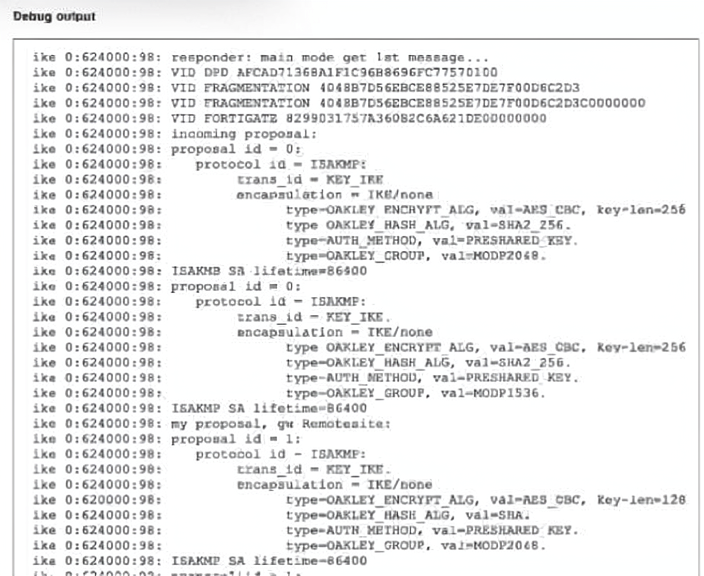
A partial output from an IKE real-time debug is shown
The administrator does not have access to (he remote gateway
Based on the debug output, which two conclusions can you draw? (Choose two.)
A. The remote peer is the initiating peer.
B. This is a phase1 negotiation.
C. There is a Diffie-Hellman group mismatch.
D. This is a phase2 negotiation
Explanation
The debug output shows the local FortiGate acting as the responder in an IKE negotiation, as indicated by the responder: main mode get 1st message... line. The output contains ISAKMP SA lifetime=86400 and proposals for encryption, hashing, and Diffie-Hellman groups, which are characteristic of Phase 1 negotiations. The debug shows the local FortiGate's proposal being listed as my proposal, confirming it is responding to a remote peer's initiation attempt.
Correct Option: A
The remote peer is the initiating peer.
This is correct. The debug output shows responder: main mode get 1st message..., which confirms that the local FortiGate is acting as the responder in this IKE exchange. In any IKE negotiation, the device that sends the first message is the initiator, and the device that receives and responds to it is the responder. Therefore, the remote peer (the one sending the initial proposal) is the initiator.
Correct Option: B
This is a Phase 1 negotiation.
This is correct. The debug output shows several indicators of a Phase 1 (IKE SA) negotiation:
The exchange is in Main Mode, which is used for Phase 1.
It includes ISAKMP SA lifetime=86400, which defines the lifetime of the IKE Security Association.
The proposals include parameters like encryption algorithms (AES-CBC), hash algorithms (SHA2_256), and Diffie-Hellman groups (MODP2048), all of which are negotiated during Phase 1.
Incorrect Option: C
There is a Diffie-Hellman group mismatch.
This is incorrect. The debug output shows that the remote peer's proposal includes MODP2048 and MODP1536, and the local FortiGate's proposal includes MODP2048. Since MODP2048 appears in both proposals, there is a common Diffie-Hellman group that both peers support. A mismatch would occur if there were no common group between the two proposals, which is not the case here.
Incorrect Option: D
This is a Phase 2 negotiation.
This is incorrect. Phase 2 (Quick Mode) negotiations are used to establish IPsec SAs for actual data traffic. Phase 2 exchanges typically occur after Phase 1 is complete and involve different parameters such as proxy IDs (local/remote subnets) and IPsec transform sets (ESP encryption/hash). The debug output shows Main Mode and ISAKMP SA parameters, which are exclusively Phase 1 elements.
Reference
Fortinet FortiGate Administration Guide – IKE Debug Output Interpretation
RFC 2409 – The Internet Key Exchange (IKE) (Main Mode vs. Quick Mode)
FortiGate Troubleshooting Guide – IPsec VPN Phase 1 and Phase 2 Debugging
| Page 4 out of 23 Pages |
| 123456789101112 |
| NSE7_FSN_AR-7.6 Practice Test Home |
The Fortinet NSE 7 Secure Networking 7.6 Architect exam is notoriously tough. It doesn't test memorization. It forces you to make complex decisions under time pressure. A weak prep strategy risks a costly failure and wasted effort. Our NSE7_FSN_AR-7.6 practice tests are built to be your definitive bridge to a passing score.

Copyright © - All Rights Reserved