
Last Updated On : 7-Sep-2026
Total 160 Questions
Advanced IPsec
A VPN tunnel is up. To monitor traffic flow, the administrator enters the following CLI commands on an SSH session on FortiGate:
# diagnose debug enablebr
# diagnose sniffer packet any ' udp and port 500 ' 4br
However, the sniffer does not show any output. Assuming default configuration values, what are two possible reasons there is no output? (Choose two answers)
A. The filter should be modified to also capture packets for TCP port 443 or UDP port 4500.
B. NAT Traversal is enabled.
C. The sniffer must be restricted to the remote peer IP address.
D. The sniffer output will be ignored because running diagnose debug enable shows only application realtime debugs.
Explanation
The diagnose sniffer packet command is used for capturing raw network traffic, not for debugging the VPN control plane. While the diagnose debug enable command is commonly used for application debugs, it is not required and does not interfere with the sniffer output. For an established VPN tunnel, IKE traffic may be using a different port than the standard UDP 500, and the ESP traffic itself is not encapsulated in UDP unless NAT-T is used.
Correct Options
A. The filter should be modified to also capture packets for TCP port 443 or UDP port 4500.
This is correct. While the default IPsec negotiation uses UDP port 500, an established VPN might have IKE traffic on UDP 4500 (NAT-Traversal) or might be configured to use TCP 443 or another TCP port. Additionally, the data traffic (ESP) is often encapsulated in UDP 4500 when NAT traversal is used. Therefore, the filter needs to be expanded to capture these ports.
B. NAT Traversal is enabled.
This is correct. When NAT Traversal is enabled and a VPN is established through a NAT device, the IKE and ESP traffic are encapsulated in UDP packets on port 4500. The IKE daemon maintains the connection and sends keepalives on this port. Therefore, a sniffer looking only at UDP port 500 will not see any traffic.
Incorrect Options
C. The sniffer must be restricted to the remote peer IP address.
This is incorrect. While it is a good troubleshooting practice to restrict the sniffer to the remote peer IP address, it is not a strict requirement. A sniffer without an IP filter would capture all UDP 500/4500 traffic and would still show output, even if it is not the desired traffic. The absence of output points to a protocol/port mismatch, not the lack of an IP filter.
D. The sniffer output will be ignored because running diagnose debug enable shows only application real-time debugs.
This is incorrect. The diagnose sniffer packet command is independent from application debugs. It functions as a packet capture tool and does not rely on diagnose debug enable to produce output. The debug enable command is used for application-level debugging (e.g., diagnose debug application ike), not for sniffing raw packets.
Reference
Fortinet FortiGate Administration Guide – VPN Traffic Sniffing and Troubleshooting
Fortinet Knowledge Base – IPsec VPN Packet Captures and Filters
FortiOS 7.2.4 and later – IKE and IPsec Debug Commands
What is the correct order of the IKEv2 request-and-response protocol?
A. Create_Child_SA, IKEAUTH, IKESAJNIT
B. Create_Child_SA, IKE_SA_INIT. IKE_AUTH
C. IKE SA INIT, IKE AUTH. Create Child SA OIKE AUTH.
D. IKE_AUTH_IKE_SA_INIT, Create_Child_SA
Explanation
The IKEv2 protocol establishes a security association (SA) through a series of request-and-response exchanges. The process is designed to be more efficient than IKEv1, combining several steps into two initial exchanges. The first Child SA is established during the IKE_AUTH exchange, making a separate CREATE_CHILD_SA exchange for the first Child SA unnecessary .
Correct Order
IKE_SA_INIT, IKE_AUTH, CREATE_CHILD_SA
This sequence is correct as defined by the IKEv2 standard .
IKE_SA_INIT Exchange: This is the first exchange. The peers negotiate cryptographic algorithms, exchange nonces, and perform a Diffie-Hellman exchange to establish a secure, but unauthenticated, IKE_SA .
IKE_AUTH Exchange: This is the second exchange. The peers authenticate each other, exchange identities, and prove knowledge of the secret corresponding to their identities. Critically, this exchange also establishes the first CHILD_SA for the IPsec tunnel .
CREATE_CHILD_SA Exchange: This is a subsequent exchange used to create additional Child SAs, rekey existing IKE or Child SAs, or modify an SA after the initial exchanges are completed .
Explanation of Incorrect Options
Create_Child_SA, IKEAUTH, IKESA INIT: This order is incorrect. IKE_SA_INIT must always be the first exchange to establish the secure channel.
IKE SA INIT, IKE AUTH, Create Child SA OIKE AUTH: This option contains a nonsensical term ("OIKE AUTH") and disrupts the established sequence.
IKE_AUTH_IKE_SA_INIT, Create_Child_SA: This option incorrectly reverses the order of the first two exchanges. IKE_AUTH cannot happen before IKE_SA_INIT.
Refer to the exhibit, which shows partial outputs from two routing debug commands.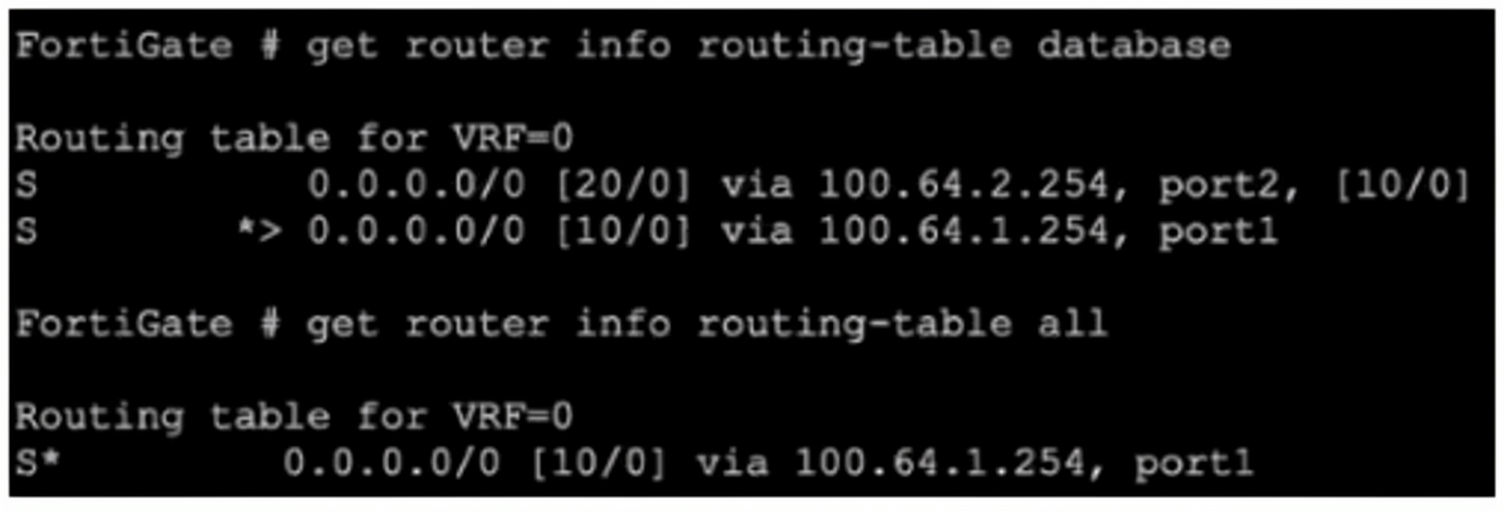
Why is the port2 default route not in the second command output?
A. The port2 interface is disabled in the FortiGate configuration.
B. The port1 default route has a higher priority value than the default route using port2.
C. The port1 default route has a lower priority value than the default route using port2.
D. The port1 default route has a lower distance than the default route using port2.
Explanation
The get router info routing-table database command displays all routes in the routing database, while get router info routing-table all shows only the routes that are installed in the kernel's forwarding table (FIB). The key difference between the two routes is the administrative distance (AD): the port1 route has [10/0] and the port2 route has [20/0]. Since the port1 route has a lower AD (10 vs 20), it is considered a "better" route and is selected as the active route, which causes the port2 route to be excluded from the forwarding table. This is a fundamental routing principle: when multiple routes to the same destination exist, the one with the lowest administrative distance is installed in the routing table.
Correct Option: D
The port1 default route has a lower distance than the default route using port2.
This is correct. Administrative distance (AD) is the primary criterion used by FortiGate to select the best route when multiple routes exist for the same destination. The port1 route has an AD of 10, while the port2 route has an AD of 20. Because 10 is lower than 20, the port1 route is installed in the routing table (get router info routing-table all), and the port2 route is not displayed as it is not selected.
Incorrect Option: A
The port2 interface is disabled in the FortiGate configuration.
This is incorrect. If the port2 interface were disabled, the route would not appear in the routing-table database output either. The fact that it is present in the database but not in the active table indicates the route exists but is not selected, not that the interface is down.
Incorrect Option: B
The port1 default route has a higher priority value than the default route using port2.
This is incorrect. Priority (in the context of SD-WAN or ECMP) is not the factor here. The output shows administrative distance [10/0] and [20/0]. The first number is the administrative distance, and the second is the metric. The lower administrative distance is what matters. There is no "priority" value shown in the command output that would be causing this behavior.
Incorrect Option: C
The port1 default route has a lower priority value than the default route using port2.
This is incorrect. The "priority" field in the route output is not shown in the command outputs. The route selection is based on administrative distance. The port1 route has a lower distance (10), not a lower "priority" value. Additionally, if priority were considered, a lower priority value typically indicates a more preferred route, which would also lead to port1 being selected, but the reasoning would still be flawed because priority is not the selection criterion here.
Reference
Fortinet FortiGate Administration Guide – Routing Concepts: Administrative Distance and Route Selection
FortiGate Troubleshooting Guide – Understanding get router info routing-table database vs all Outputs
FortiOS CLI Reference – Route Attributes and Priority Metrics
Refer to the exhibit, which shows a truncated output of a real-time RADIUS debug.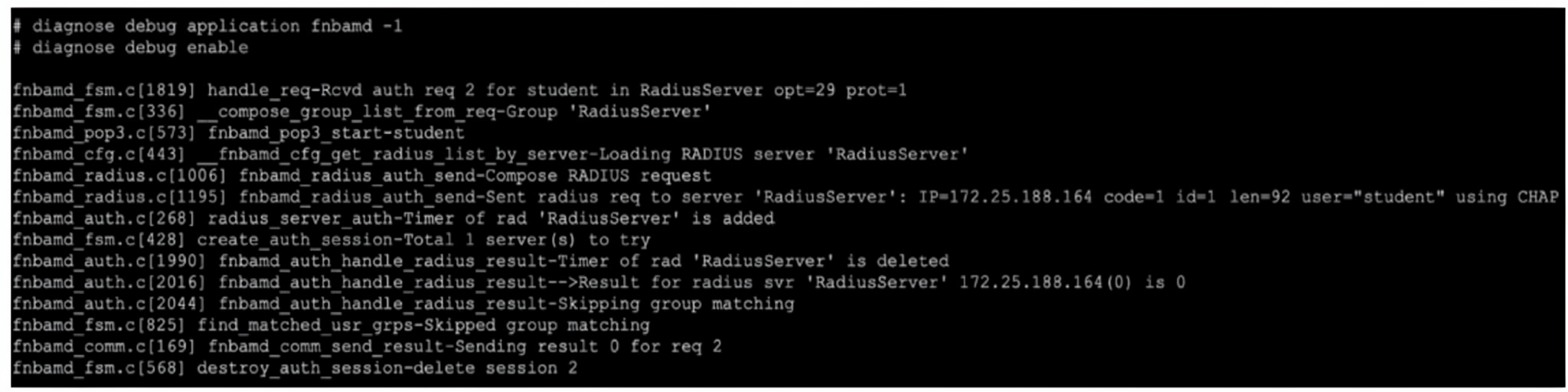
Which two statements are true? (Choose two answers)
A. The RADIUS server queried for authentication is located at IP address 172.25.188.164.
B. Authentication was unsuccessful.
C. The authentication scheme used was pop3.
D. Authentication was successful.
E. Two-factor authentication was required.
Explanation
The debug output shows a RADIUS authentication process for user student against a RADIUS server at IP 172.25.188.164 using the CHAP protocol. The key indicators are the Compose RADIUS request and Sent radius req messages. The output concludes with Result for radius svr ... is 0 and Sending result 0, which confirms the authentication was successful. The Skipping group matching message indicates group matching was not configured or required.
Correct Option: A
The RADIUS server queried for authentication is located at IP address 172.25.188.164.
This is correct. The debug output explicitly shows Sent radius req to server 'RadiusServer': IP=172.25.188.164. This confirms the FortiGate is sending the RADIUS authentication request to the RADIUS server with IP address 172.25.188.164 for the user student. The server name RadiusServer is a label for this server in the FortiGate configuration.
Correct Option: D
Authentication was successful.
This is correct. The debug output shows Result for radius svr 'RadiusServer' 172.25.188.164(0) is 0 and Sending result 0. In FortiGate debug outputs, a result code of 0 indicates success, while any non-zero value indicates failure or error. Therefore, the RADIUS authentication was successful, and the FortiGate sent the successful result back to the requesting process.
Incorrect Option: B
Authentication was unsuccessful.
This is incorrect. The debug output clearly shows the result code is 0, which as explained above, indicates success. The debug would show a non-zero value such as 1 or 2 for failure (e.g., incorrect password, server timeout, etc.). The successful authentication is also confirmed by the Sending result 0 message.
Incorrect Option: C
The authentication scheme used was pop3.
This is incorrect. The debug output shows fnbamd_pop3.c[573] fnbamd_pop3 start-student. This is a function call within the fnbamd (FortiNet Authentication Daemon) debug module. It does not indicate that the POP3 protocol was used. The actual authentication method used was CHAP, as shown by user="student" using CHAP. FortiGate can use various authentication protocols with RADIUS, including PAP, CHAP, MS-CHAP, and MS-CHAPv2.
Incorrect Option: E
Two-factor authentication was required.
This is incorrect. There is no mention or indication of two-factor authentication (2FA) in the debug output. When 2FA is required, the debug output would typically show additional steps, such as an OTP (One-Time Password) prompt or a separate authentication request. The output shows a straightforward single-factor RADIUS CHAP authentication.
Reference
Fortinet FortiGate Administration Guide – RADIUS Authentication Debugging (diagnose debug application fnbamd)
Fortinet Knowledge Base – Understanding fnbamd Debug Output and Result Codes
FortiGate CLI Reference – RADIUS Server Configuration and Authentication Protocols
You want to configure two static routes: one that references a zone and a second one that references an SDWAN member that belongs to that zone.
Which statement about this scenario is true? (Choose one answer.)
A. You cannot create static routes for individual SD-WAN members.
B. You cannot create static routes that reference an SD-WAN zone.
C. The destination subnets must be different.
D. The source subnets must be different.
Explanation
A static route referencing an SD-WAN zone creates multiple implicit routes, one for each member of that zone . The route to the zone and the route to an individual member cannot share the same destination subnet because that would create duplicate or conflicting routing entries for the same traffic.
Correct Option: C
The destination subnets must be different.
This is correct. When a static route points to an SD-WAN zone (e.g., virtual-wan-link), the FortiGate automatically installs routes for each member interface within that zone to the same destination. Therefore, creating a second static route with that same destination for one specific member would create a conflict . In short, having both a zone route and a member route for the same destination is invalid.
Incorrect Options
A. You cannot create static routes for individual SD-WAN members.
This is incorrect. SD-WAN zones and members can both be used in IPv4 and IPv6 static routes . Individual members can be referenced in static routes, but the destination must differ from any route that points to the zone they belong to.
B. You cannot create static routes that reference an SD-WAN zone.
This is incorrect. Creating static routes that reference an SD-WAN zone is a standard and expected configuration . In fact, it is the recommended way to define a default route for the SD-WAN.
D. The source subnets must be different.
This is incorrect. Static routes in FortiGate do not have a "source subnet" field. Route selection is based on the destination IP address, making this option technically invalid.
Reference
FortiGate Administration Guide: Configuring static routes for SD-WAN zones and members .
FortiGate Administration Guide: SD-WAN members and zones usage in static routes .
Exam discussion confirming that when configuring a static route for a zone and a member, the destination subnets cannot be the same .
Which statement about protocol options is true?
A. Protocol options allow administrators to configure a maximum number of sessions for each configured protocol.
B. Protocol options give administrators a streamlined method to instruct FortiGate to block all sessions corresponding to disabled protocols.
C. Protocol options allow administrators to configure the Any setting for all enabled protocols, which provides the most efficient use of system resources.
D. Protocol options allow administrators to configure which Layer 4 port numbers map to upper-layer protocols, such as HTTP, SMTP, FTP, and so on.
Explanation
Protocol Options profiles are a supporting mechanism for the actual security profiles (e.g., Antivirus, Web Filtering). They define how the FortiGate should handle specific protocols like HTTP, SMTP, or FTP. A key part of this is defining which ports to inspect for each protocol, ensuring that traffic on non-standard ports receives the correct inspection .
Correct Option: D
Protocol options allow administrators to configure which Layer 4 port numbers map to upper-layer protocols, such as HTTP, SMTP, FTP, and so on.
This is correct. Protocol Options allow for "Protocol port mapping," where the default TCP port for protocols like HTTP (port 80) or SMTP (port 25) can be modified to inspect any port with flowing traffic . This is essential when applications are running on non-standard ports .
Incorrect Options
A. Protocol options allow administrators to configure a maximum number of sessions for each configured protocol.
This is incorrect. Protocol Options profiles do not provide a mechanism to set a session limit per protocol. They are focused on the inspection and handling of traffic, not session limits.
B. Protocol options give administrators a streamlined method to instruct FortiGate to block all sessions corresponding to disabled protocols.
This is incorrect. Disabling a protocol within a Protocol Options profile does not block all sessions on that port. It simply tells the FortiGate not to perform protocol-specific inspection for that traffic. The traffic would still be subject to other firewall policies and security profiles.
C. Protocol options allow administrators to configure the Any setting for all enabled protocols, which provides the most efficient use of system resources.
This is incorrect. While the Any setting for protocols can be configured, enabling it for all protocols would generally increase resource consumption, not make it the most efficient. It forces the FortiGate to inspect all ports for all enabled protocols, which uses more CPU and memory .
Reference
Fortinet Administration Guide: Protocol Options and Protocol Port Mapping
Fortinet Discussion Forums: Protocol Options Functionality
In which two slates is a given session categorized as ephemeral? (Choose two.)
A. A UDP session with only one packet received
B. A UOP session with packets sent and received
C. A TCP session waiting for the SYN ACK
D. A TCP session waiting for FIN ACK
Explanation
In FortiOS, sessions are categorized as ephemeral when they represent short-lived, transient connections that do not require long-term state tracking. These sessions are typically created for protocols that are connectionless or for TCP sessions that have not yet completed the three-way handshake. Ephemeral sessions are subject to shorter timeouts and are aged out more aggressively to conserve system resources.
Correct Options
A. A UDP session with only one packet received.
This is correct. UDP is a connectionless protocol, and by default, FortiGate treats a UDP session with traffic flowing in only one direction as ephemeral. These sessions are subject to a short timeout (typically 60 seconds) and are removed quickly to free up session table space. When traffic is detected in both directions, the session transitions to a non-ephemeral state with a longer timeout.
C. A TCP session waiting for the SYN ACK.
This is correct. A TCP session that has sent a SYN packet but has not yet received the SYN-ACK (i.e., the three-way handshake is incomplete) is considered ephemeral. These sessions are placed in the TCP_SYN_SENT state and are subject to the tcp-halfopen-timer (default 10 seconds). If the handshake is not completed within this timeout, the session is removed.
Incorrect Options
B. A UDP session with packets sent and received.
This is incorrect. When UDP traffic is seen in both directions (bidirectional), the session is considered established and is no longer classified as ephemeral. It transitions to a longer timeout (typically 180 seconds for UDP) and is treated as a more stable session that requires state tracking.
D. A TCP session waiting for FIN ACK.
This is incorrect. A TCP session in the FIN_WAIT state (waiting for FIN-ACK) is in the process of graceful termination. This session has already completed the three-way handshake and is considered fully established. It is not ephemeral and is subject to standard TCP timeouts. Ephemeral sessions are only for those that have not yet completed the handshake or for unidirectional UDP flows.
Reference
Fortinet FortiGate Administration Guide – Session Timeouts and Ephemeral Sessions
FortiGate Troubleshooting Guide – Session Table Management and Ephemeral vs Non-Ephemeral Sessions
FortiOS CLI Reference – config system session-ttl (UDP and TCP timeout configurations)
| Page 7 out of 23 Pages |
| 123456789101112 |
| NSE7_FSN_AR-7.6 Practice Test Home |
The Fortinet NSE 7 Secure Networking 7.6 Architect exam is notoriously tough. It doesn't test memorization. It forces you to make complex decisions under time pressure. A weak prep strategy risks a costly failure and wasted effort. Our NSE7_FSN_AR-7.6 practice tests are built to be your definitive bridge to a passing score.

Copyright © - All Rights Reserved