
Last Updated On : 7-Sep-2026
Total 160 Questions
Rules and routing
Which of the following regarding protocol states is true? (Choose one answer)
A. proto_state=00 indicates that UDP traffic flows in both directions.
B. proto_state=01 indicates an established TCP session.
C. proto_state=10 indicates an established TCP session.
D. proto_state=01 indicates one-way ICMP traffic.
Explanation
In a FortiGate session entry (diagnose sys session list), the proto_state field indicates the state of the session based on the protocol used . For TCP sessions, the value 01 corresponds to the ESTABLISHED state, which means the three-way handshake (SYN, SYN-ACK, ACK) has been completed, and a bidirectional connection is established .
Correct Option
B. proto_state=01 indicates an established TCP session.
This statement is correct. FortiGate tracks TCP session states using a specific numbering system. The value proto_state=01 specifically maps to the ESTABLISHED state, confirming the TCP session is fully connected and traffic can flow in both directions .
Incorrect Options
A. proto_state=00 indicates that UDP traffic flows in both directions.
This is incorrect. For UDP, proto_state=00 means that only one direction of UDP traffic has been seen, indicating a unidirectional flow . UDP traffic that has been seen in both directions is represented by proto_state=01 .
C. proto_state=10 indicates an established TCP session.
This is incorrect. proto_state=10 is not a standard value for a TCP session state in FortiOS . The proto_state for TCP is a two-digit value, but the commonly recognized state values are 00, 01, 02, 03, etc. .
D. proto_state=01 indicates one-way ICMP traffic.
This is incorrect. ICMP is a stateless protocol. For ICMP sessions, the proto_state is always 00, regardless of whether traffic is one-way or two-way .
Reference
Fortinet Support – Session Parameters (proto_state values for TCP, UDP, and ICMP)
FortiGate Troubleshooting Guide – Session Table Interpretation (TCP states and UDP states)
Refer to the exhibits.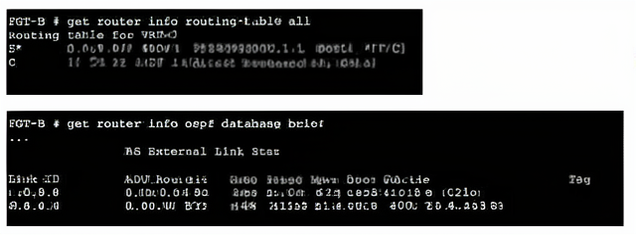
An administrator Is expecting to receive advertised route 8.8.8.8/32 from FGT-A. On FGT-B, they confirm that the route is being advertised and received, however, the route is not being injected into the routing table.
What is the most likely cause of this issue?
A. A batter route to the 8.8.8.8/32 network exists in the routing table.
B. FGT-B is configured with a prefix list denying the 8.8.8.8/32 network to be injected into the routing table.
C. The administrator has misconfigured redistribution of routes on FGT-A.
D. FGT-B is configured with a distribution list denying the 8.8.8.8/32 network to be injected into the routing table.
Explanation
The get router info routing-table all output shows that no route for 8.8.8.8/32 exists in the routing table. However, the get router info ospf database brief output clearly shows the route is present in the OSPF database (Link ID 8.8.8.8 with ADV Router 0.0.0.112). This indicates the route is being received via OSPF but is being filtered out before installation into the routing table. The most likely mechanism for this is a prefix list configured under the OSPF process to deny the specific prefix from being added to the routing table.
Correct Option: B
FGT-B is configured with a prefix list denying the 8.8.8.8/32 network to be injected into the routing table.
This is the most likely cause. In OSPF, a prefix list can be applied to incoming routes to filter which routes are installed in the routing table. The OSPF database retains the route because it is still being advertised and received by the OSPF process, but the prefix list prevents it from being installed in the kernel routing table. This matches the symptoms exactly: the route is in the OSPF database but absent from the routing table.
Incorrect Option: A
A better route to the 8.8.8.8/32 network exists in the routing table.
This is incorrect. The routing table output shows no route for 8.8.8.8/32. If there were a better (more specific or lower administrative distance) route, it would be displayed in the routing table. The absence of any route for that destination rules out this possibility.
Incorrect Option: C
The administrator has misconfigured redistribution of routes on FGT-A.
This is incorrect. The OSPF database on FGT-B shows the route with ADV Router 0.0.0.112, indicating it is being advertised and received correctly. If redistribution were misconfigured on FGT-A, the route would not appear in the OSPF database at all.
Incorrect Option: D
FGT-B is configured with a distribution list denying the 8.8.8.8/32 network to be injected into the routing table.
While a distribution list could also filter routes, the question asks for the most likely cause. In FortiOS, prefix lists are the more commonly used and recommended method for filtering OSPF routes, especially when applied to the routing table injection process. Distribution lists are more commonly associated with route filtering in distance-vector protocols like RIP. Given that a prefix list is the standard tool for this task in OSPF, it is the most probable reason.
Reference
Fortinet FortiGate Administration Guide – OSPF Route Filtering with Prefix Lists
FortiGate Troubleshooting Guide – OSPF Database vs Routing Table Discrepancies
FortiOS CLI Reference – config router ospf (prefix-list and distribute-list configuration)
You are checking an enterprise network and see a suspicious packet with the MAC address 00:09:0f:09:18:81.
Which two statements about the suspicious packet are correct? (Choose two.)
A. The suspicious packet corresponds to a port with a physical index equal to 2.
B. The suspicious packet is related to a cluster configured with the FortiGate Session Life Support Protocol (FGSP).
C. The suspicious packet is related to a cluster that has VDOMs enabled.
D. The suspicious packet is related to a cluster with a group-id value lower than 255.
Explanation
The suspicious MAC address 00:09:0f:09:18:81 is a FortiGate virtual MAC address, specifically assigned by the FortiGate Clustering Protocol (FGCP) for High Availability (HA) clusters . The presence of the OUI 00:09:0f identifies it as belonging to Fortinet , while the :09: segment and the specific structure confirm it is part of the FGCP's virtual MAC address range . By analyzing the last octet (81 in hexadecimal), the correct conclusions about the cluster configuration can be drawn.
Correct Option: C
The suspicious packet is related to a cluster that has VDOMs enabled.
This statement is correct. In the FGCP virtual MAC address format, the high bit of the last octet is used to indicate the virtual cluster ID . The last octet of the MAC address is 81 (hex), which is 1000 0001 in binary. The leading 1 indicates that virtual clustering is in use, which is a feature that requires VDOMs to be enabled on the FortiGate cluster .
Correct Option: D
The suspicious packet is related to a cluster with a group-id value lower than 255.
This statement is correct. The Fortinet documentation specifies that for HA group IDs in the range of 0 to 255, the virtual MAC address prefix is 00:09:0f:09: . The :09: segment in the suspicious address (00:09:0f:09:18:81) confirms the cluster uses this standard prefix, which corresponds to a group-id value lower than 255 . Group IDs beyond 255 use a different MAC address prefix (e0:23:ff:fc) .
Incorrect Option: A
The suspicious packet corresponds to a port with a physical index equal to 2.
This statement is incorrect. The physical interface index is derived from the lower 7 bits of the last octet . For the last octet 81 (1000 0001 in binary), the remaining bits are 000 0001, which is equal to the decimal value 1. This corresponds to a physical index of 1 (the second interface in the index order), not 2 .
Incorrect Option: B
The suspicious packet is related to a cluster configured with the FortiGate Session Life Support Protocol (FGSP).
This statement is incorrect. The MAC address structure shown is specifically associated with the FGCP for HA virtual clustering . FGSP is a separate protocol used for session synchronization across standalone units and does not use this virtual MAC address format .
Reference
Fortinet Documentation: Extended HA VMAC address range and group-id ranges
Fortinet Documentation: How the virtual MAC address is determined
Fortinet FortiOS Handbook: HA Virtual MAC Address Structure and VDOM Partitioning
Refer to the exhibit.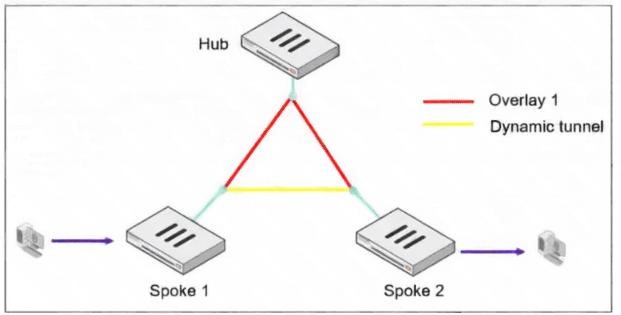
Based on the exhibit, what is the first message with which Spoke 1 replies to the hub, instructing it to bring up the dynamic tunnel when a client generates traffic destined for Spoke 2? (Choose one answer.)
A. Shortcut query
B. Shortcut reply
C. Shortcut offer
D. Shortcut forward
Explanation
The ADVPN shortcut establishment process begins when a client generates traffic from Spoke 1 to Spoke 2. The traffic initially passes through the hub, which detects the inter-spoke communication and sends a Shortcut Offer to Spoke 1. This offer contains connection details to enable a direct tunnel. In the full messaging flow, Spoke 1's first reply to the hub after receiving this offer is the Shortcut Query. This query acknowledges the offer and requests further information needed to establish the direct dynamic tunnel with Spoke 2.
Correct Option
A. Shortcut query
This is correct based on the standard ADVPN message exchange sequence. After Spoke 1 receives a "shortcut offer" from the hub, it responds with a "shortcut query". This query contains Spoke 1's WAN IP address and other parameters for the dynamic tunnel negotiation. The hub then forwards this query to Spoke 2, which replies with a "shortcut reply" that is forwarded back to Spoke 1.
Incorrect Options
B. Shortcut reply
The "shortcut reply" message is sent by Spoke 2 back to the hub in response to the forwarded "shortcut query," not by Spoke 1 as the first reply.
C. Shortcut offer
The "shortcut offer" is the first message sent by the hub to Spoke 1, not the first message with which Spoke 1 replies to the hub.
D. Shortcut forward
This is not a standard ADVPN control message in the messaging flow. While the hub "forwards" the shortcut query to Spoke 2 and the shortcut reply back to Spoke 1, "shortcut forward" is not an actual ADVPN protocol message type.
Reference
Exam discussion confirming ADVPN shortcut messaging flow
Fortinet documentation showing the IKE debug output for SHORTCUT-QUERY messages
ADVPN sequence of messages: Offer → Query → Forward → Reply → Forward → Negotiation
In the SAML negotiation process, which section does the Identity Provider (IdP) provide the SAML attributes utilized in the authentication process to the Service Provider (SP)?
A. SP Login dump
B. Authentication Response
C. Authentication Request
D. Assertion dump
Explanation
In the SAML authentication process, the Identity Provider (IdP) sends the user's identity and group attributes to the Service Provider (SP) within a SAML assertion . This assertion is the core security token that the SP relies on to grant access. It is delivered from the IdP to the user's browser, which then forwards it (as an HTTP POST) to the SP's assertion consumer service (ACS) URL . In the context of a FortiGate's diagnostic output, this message is displayed as an "Assertion dump" .
Correct Option: D
Assertion dump
The SAML assertion, seen in debug outputs as an "Assertion dump", is the message that contains the actual user attributes like username and group-name . It is the IdP's way of telling the SP who the user is and what groups they belong to, which the SP then uses for authorization decisions .
Incorrect Options
A. SP Login dump
This is not a standard term in SAML debug outputs. While debug logs for SAML can be extensive, the specific message containing attributes is the assertion.
B. Authentication Response
"Authentication Response" is a generic term that can describe the broader SAML response message. However, the specific part of that response carrying the user attributes is the assertion itself, which is displayed as an "Assertion dump" in FortiGate diagnostics .
C. Authentication Request
The "Authentication Request" (AuthnRequest) is sent from the SP to the IdP to initiate the authentication process . It does not contain user attributes, as the user has not yet authenticated at this stage.
Refer to the exhibit.
An administrator has configured a firewall policy to use proxy-based inspection mode. What could explain the messages observed in the debug flow output?
A. At least one protocol port under Protocol Options has been mapped to Any.
B. SSL deep inspection is not configured.
C. The FTP protocol has not yet been mapped to port 211 under Protocol Options.
D. FortiGate does not have enough free memory to perform proxy-based inspections.
Explanation
The debug output shows the traffic is using a non-standard port (211) for FTP, but the FortiGate is falling back to the FTP session helper instead of performing the expected proxy-based inspection. This occurs because Protocol Options mapping only works with proxy-based inspection, and for a non-standard port to be inspected by the proxy, the port must first be explicitly mapped under Protocol Options . Since port 211 has not been mapped to FTP in the Protocol Options profile, the FortiGate can't recognize it as FTP traffic for proxy-based inspection and reverts to the session helper as a fallback mechanism .
Correct Option: A
At least one protocol port under Protocol Options has been mapped to Any.
This is correct. The debug output shows the FortiGate is using the FTP session helper (run helper-ftp(dir=original)) instead of proxy-based inspection. This happens because the traffic is FTP on a non-standard port (211) that has not been mapped under Protocol Options. If a port is mapped to "Any," it forces FortiGate to inspect all ports in proxy mode, which would explain the messages observed . Mapping a protocol port to "Any" means that traffic on any port will be subjected to proxy-based inspection for that protocol .
Incorrect Options
B. FortiGate does not have enough free memory to perform proxy-based inspections.
This is incorrect. The debug output shows no indications of conserve mode or memory exhaustion. The messages are about session handling and helper invocation, not memory-related errors .
C. The FTP protocol has not yet been mapped to port 211 under Protocol Options.
This is incorrect as a cause for the observed behavior. While port 211 is not mapped, the "Any" setting in Protocol Options would actually cause the traffic to be inspected by the proxy, not fall back to the session helper. The port mapping configuration is not what's causing the session helper to be used .
D. SSL deep inspection is not configured.
This is incorrect. The traffic in the debug output is FTP traffic, not SSL/TLS traffic. SSL deep inspection is irrelevant to FTP traffic handling and does not explain why the FTP session helper is being used instead of proxy-based inspection .
Reference
Protocol options configuration: Protocol port mapping only works with proxy-based inspection, and ports can be modified to inspect any port with flowing traffic
The run helper-ftp message in debug flow indicates the FortiGate is using the session helper instead of proxy-based inspection when FTP traffic uses a non-standard port that hasn't been mapped under Protocol Options
In which two ways does FortiGate utilize the Internet Service Database (ISDB) within firewall policies and SD-WAN rules? (Choose two.)
A. The ISDB limits access by URL and domain.
B. The ISDB works in proxy mode only, allowing the analysis of packets at Layers 3 and 4 of the OSI model.
C. FortiGate has a predefined list of IP addresses and ports for specific applications downloaded from FortiGuard.
D. The ISDB can be used to block the IP addresses and ports of an application predefined by FortiGuard.
Explanation
The Internet Service Database (ISDB) is a predefined, regularly updated collection of public IP addresses and service ports that FortiGate uses to identify traffic from specific Internet applications and services . It is a powerful tool that allows you to create security policies and SD-WAN rules based on the application itself, rather than having to manage individual IP addresses or ports.
Correct Options
C. FortiGate has a predefined list of IP addresses and ports for specific applications downloaded from FortiGuard.
This is a core function of the ISDB. The database is a comprehensive public IP address database that combines IP address ranges, IP owners, and service port numbers for various internet services . This data originates from the FortiGuard service system and is regularly updated, allowing you to use these entries as criteria in your policies just like any other address object .
D. The ISDB can be used to block the IP addresses and ports of an application predefined by FortiGuard.
This is a primary use case for the ISDB. Administrators can create firewall policies that block or allow traffic destined for specific internet services by selecting the appropriate ISDB object. For instance, you can create a policy to deny access to a specific service like Microsoft Update by using the corresponding ISDB entry in the destination field of the policy . This provides granular control over outbound traffic.
Incorrect Options
A. The ISDB limits access by URL and domain.
This is incorrect. The ISDB operates based on IP addresses, IP owners, and port numbers, not by URLs or domain names . URL and domain-based filtering are functions of FortiGuard Web Filtering and DNS filtering, which are separate security features.
B. The ISDB works in proxy mode only, allowing the analysis of packets at Layers 3 and 4 of the OSI model.
This is incorrect. The ISDB is used for policy matching based on Layer 3 (IP addresses) and Layer 4 (TCP/UDP ports) information, and it works in both flow-based and proxy-based inspection modes . It is a policy object that can be used in firewall policies, SD-WAN rules, and traffic shaping policies regardless of the inspection mode .
Reference
Fortinet ISDB Introduction: ISDB is a public IP/service database from FortiGuard .
Fortinet Administration Guide: Using ISDB objects in policies and SD-WAN rules .
Fortinet Support: Geographic-based ISDB for granular control in policies .
| Page 5 out of 23 Pages |
| 123456789101112 |
| NSE7_FSN_AR-7.6 Practice Test Home |
The Fortinet NSE 7 Secure Networking 7.6 Architect exam is notoriously tough. It doesn't test memorization. It forces you to make complex decisions under time pressure. A weak prep strategy risks a costly failure and wasted effort. Our NSE7_FSN_AR-7.6 practice tests are built to be your definitive bridge to a passing score.

Copyright © - All Rights Reserved