
Last Updated On : 12-Oct-2026
Total 91 Questions
FortiManager Deployment and Administration
According to the National Institute of Standards and Technology (NIST) cybersecurity framework, incident
handling activities can be divided into phases.
In which incident handling phase do you quarantine a compromised host in order to prevent an adversary
from using it as a stepping stone to the next phase of an attack?
A. Containment
B. Analysis
C. Eradication
D. Recovery
Explanation:
This question assesses your understanding of the NIST incident response framework, which structures incident handling into distinct phases. The scenario describes an active defensive measure—quarantining a compromised host—to halt an adversary's lateral movement. This action directly aligns with the phase dedicated to limiting the scope and impact of an active security incident.
✔️ Correct Option: A. Containment
The Containment phase is designed to stop the incident from causing further damage. Quarantining a compromised host prevents the adversary from using it as a pivot point to access other systems, preserving evidence while limiting blast radius. This is the critical step where immediate action is taken to isolate the threat before any remediation begins.
❌ Incorrect Option: B. Analysis
The Analysis phase (often termed Detection & Analysis) focuses on identifying whether an incident has occurred, determining its scope, and gathering forensic data. While critical for understanding the threat, this phase precedes active response actions like quarantine. Isolating a host is a response step that occurs after analysis confirms a breach.
❌ Incorrect Option: C. Eradication
The Eradication phase involves removing the root cause of the incident, such as deleting malware, closing backdoors, or patching vulnerabilities. Quarantine is a containment measure that must be executed before eradication to ensure the adversary cannot disrupt the cleanup process or re-establish access while you are removing threats.
❌ Incorrect Option: D. Recovery
The Recovery phase focuses on safely restoring affected systems to normal operations, monitoring for signs of regression, and validating that the incident has been fully resolved. Quarantine is a defensive action taken during the active incident response phase; recovery assumes containment and eradication have already been successfully completed.
🔧 Reference:
→ NIST Special Publication 800-61 Rev. 2 (Computer Security Incident Handling Guide)
This document outlines the four-phase incident response lifecycle: Preparation; Detection & Analysis; Containment, Eradication & Recovery; and Post-Incident Activity. It confirms that the Containment phase specifically focuses on limiting the damage and preventing adversaries from expanding their foothold, with quarantine being a primary containment technique.
Refer to Exhibit:
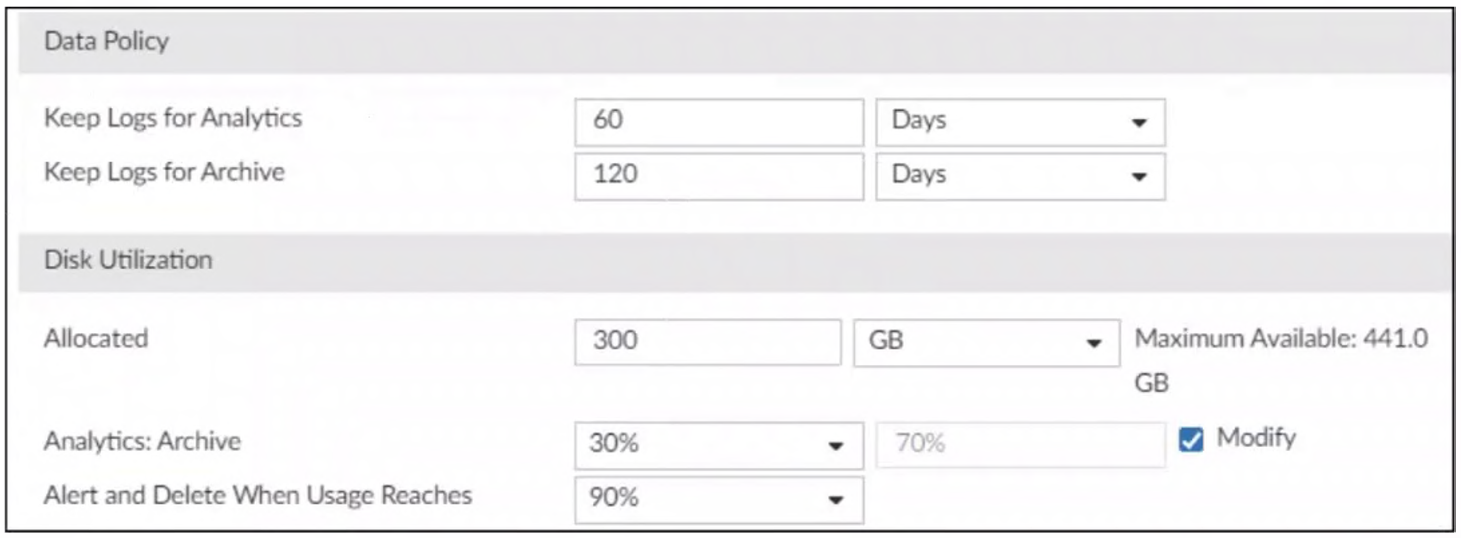
You are tasked with reviewing a new FortiAnalyzer deployment in a network with multiple registered logging
devices. There is only one FortiAnalyzer in the topology.
Which potential problem do you observe?
A. The disk space allocated is insufficient.
B. The analytics-to-archive ratio is misconfigured.
C. The analytics retention period is too long.
D. The archive retention period is too long.
Explanation:
This question evaluates your ability to interpret FortiAnalyzer storage settings and data policies. It focuses on the relationship between log retention days and the physical disk space percentage allocated for Analytics versus Archive logs.
✅ Correct Option:
✅ B. The analytics-to-archive ratio is misconfigured.:
In the exhibit, logs are kept for Analytics for 60 days and Archive for 120 days, suggesting a 1:2 ratio. however, the disk utilization is set to 30% for Analytics and 70% for Archive. This mismatch typically causes older Analytics logs to be deleted or archived prematurely before the 60-day target is reached because the allocated 30% disk space is insufficient for that duration.
❌ Incorrect options:
❌ A. The disk space allocated is insufficient.:
The exhibit shows 300 GB allocated out of a maximum available 441 GB. While total storage needs depend on daily log volume, there is no evidence here that the 300 GB itself is a "problem" compared to the total available capacity; the primary visible conflict is the logical distribution between the two data types.
❌ C. The analytics retention period is too long.:
A 60-day retention for Analytics is a common administrative requirement for reporting and forensic analysis. There is no standard Fortinet guideline stating 60 days is inherently "too long" unless the daily log rate is extremely high, but the configuration conflict here lies in the disk percentage ratio, not the day count itself.
❌ D. The archive retention period is too long.:
Similar to analytics, 120 days for Archive is a standard policy for compliance and long-term storage. Setting a 120-day period is not a configuration "problem" in isolation; the issue is that the disk allocation must be properly balanced to support the specific retention periods defined in the Data Policy section.
🔧 Reference:
→ FortiAnalyzer Data Policy and Storage Management
This official documentation explains how disk quotas and retention periods interact to manage log databases.
Your company is doing a security audit To pass the audit, you must take an inventory of all software and
applications running on all Windows devices
Which FortiAnalyzer connector must you use?
A. FortiClient EMS
B. ServiceNow
C. FortiCASB
D. Local Host
Explanation:
This question tests your understanding of endpoint visibility within Fortinet’s Security Fabric. To pass a security audit requiring a full inventory of software on Windows devices, you need a connector that collects detailed endpoint telemetry, specifically installed applications, and forwards it to FortiAnalyzer for reporting.
🟢 Correct Option:
A. FortiClient EMS
FortiClient EMS collects detailed endpoint telemetry, including installed software and application inventory from Windows devices. It centralizes this data and integrates with FortiAnalyzer to provide audit-ready reports. This makes it the correct connector for meeting requirements where full visibility of endpoint software is necessary for compliance and security audits.
🔴 Incorrect Options:
B. ServiceNow
ServiceNow is designed for IT service management workflows such as incident tracking and asset records. It does not natively collect real-time software inventory from Windows endpoints, so it cannot fulfill the requirement for accurate audit-level endpoint application visibility.
C. FortiCASB
FortiCASB focuses on monitoring and securing SaaS and cloud application usage. It provides visibility into cloud environments, not locally installed software on Windows endpoints, making it unsuitable for endpoint software inventory collection.
D. Local Host
Local Host refers to the FortiAnalyzer system itself. It does not function as a connector for gathering endpoint data. It cannot collect or provide software inventory from Windows devices, so it does not meet the audit requirement.
🔧 Reference:
→ FortiClient EMS Software Inventory
Confirms that FortiClient collects installed application data from endpoints, which EMS manages and makes available for integration with FortiAnalyzer reporting.
Refer to Exhibit:
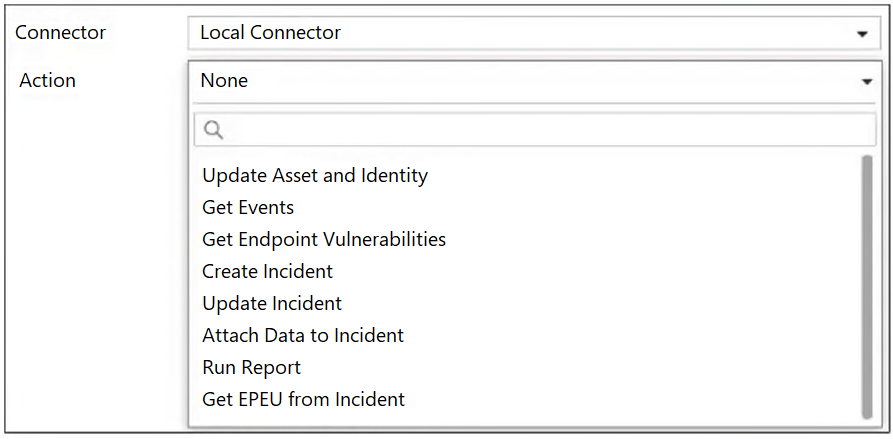
A SOC analyst is designing a playbook to filter for a high severity event and attach the event information to
an incident.
Which local connector action must the analyst use in this scenario?
A. Get Events
B. Update Incident
C. Update Asset and Identity
D. Attach Data to Incident
Explanation:
This question tests your knowledge of FortiAnalyzer's Local Connector actions used within playbook automation. The scenario specifically requires a two-step logic: filtering a high-severity event and then attaching that event's information to an existing incident. Understanding which action serves the "attach" function is essential for SOC playbook design.
✔️ Correct Answer:
D. Attach Data to Incident
This action is purpose-built to link and attach event data to an existing incident within a FortiAnalyzer playbook. When a high-severity event is filtered, "Attach Data to Incident" enables the analyst to associate that event's details directly to the relevant incident record — fulfilling both the filtering and attachment requirements described in the scenario.
❌ Incorrect Answers:
A. Get Events
This action retrieves event data from FortiAnalyzer but does not attach anything to an incident. It is used earlier in a playbook workflow to fetch or query events based on conditions. While it may precede the correct action in a full playbook, it alone does not satisfy the attachment requirement of this scenario.
B. Update Incident
This action modifies existing fields within an incident record, such as status, severity, or assignee. It does not attach event information to an incident. Updating an incident's attributes is a different operation from linking or associating event data to it as a related object.
C. Update Asset and Identity
This action is used to modify asset or identity records stored in FortiAnalyzer's database. It has no relevance to attaching event data to incidents. It serves a different purpose in playbooks focused on asset enrichment or identity management workflows, not event-to-incident correlation.
🔧 Reference:
→ FortiAnalyzer 7.6.3 Administration Guide – Connector Actions
Confirms that the Local Connector is the default connector for FortiAnalyzer and lists all predefined actions available for use within playbooks, including Attach Data to Incident.
→ FortiAnalyzer 7.0.0 New Features – Attach Connector Actions to Incidents
Demonstrates a real playbook example using the Local Connector with the Attach Data to Incident action to link connector results directly to an incident record.
Which three end user logs does FortiAnalyzer use to identify possible IOC compromised hosts? (Choose three answers)
A. Web filter logs1
B. Email filter logs
C. DNS filter logs2
D. Application filter logs
E. IPS logs
Explanation:
This question tests which log sources FortiAnalyzer uses to identify possible compromised hosts through IOC matching. The correct choices are the sources that best align with end-user web and DNS activity plus security-event detection.
✅ Correct Option A: Web filter logs
Web filter logs help FortiAnalyzer correlate malicious URLs, blocked requests, and suspicious browsing behavior with IOC data. This makes them a valid source for spotting hosts that may have contacted known malicious infrastructure.
✅ Correct Option C: DNS filter logs
DNS filter logs show domain lookups, which are especially useful for detecting contact with malicious domains or domain-generation activity. FortiAnalyzer uses DNS-related activity as part of IOC-based compromise detection.
✅ Correct Option E: IPS logs
IPS logs capture signature-based detections of malicious or exploit-related traffic. They help identify hosts that may already be showing compromise-related behavior, so they fit IOC analysis better than the other distractors.
❌ Option B: Email filter logs
This is not one of the main log sources used in the standard compromised-host IOC detection flow described in the documentation. FortiAnalyzer’s IOC checks are centered on web, DNS, and traffic-related activity rather than email filtering logs.
❌ Option D: Application filter logs
Application filter logs are not identified as a primary source for compromised-host detection in the IOC workflow. FortiAnalyzer relies on web, DNS, and traffic/security activity to correlate indicators and flag suspicious hosts.
🔧 Reference:
→
Indicators of Compromise
— Confirms the IOC workflow and the log sources FortiAnalyzer evaluates.
→
Viewing Compromised Hosts
— Confirms FortiAnalyzer checks web filter, DNS, and traffic logs for compromised hosts.
Which two best practices should be followed when exporting playbooks in FortiAnalyzer? (Choose two answers)
A. Disable playbooks before exporting them.
B. Include the associated connector settings.
C. Move playbooks between ADOMs rather than exporting playbooks and re-importing them.
D. Ensure the exported playbook’s names do not exist in the target ADOM.
Explanation:
This question tests the documented migration workflow for FortiAnalyzer playbooks across ADOMs. It validates that you know the pre-export safety step (disabling to prevent unintended runs) and the import prerequisite (unique naming), both required to avoid automation conflicts, duplicate executions, or import errors during and after the transfer.
✔️ Correct Option: A. Disable playbooks before exporting them.
Disabling a playbook stops it from triggering while you export it and prevents it from running immediately after import, which avoids duplicate or unexpected executions during migration. Fortinet explicitly recommends disabling before export as a protective step, then re-enabling only after you’ve verified connectors, variables, and targets in the destination ADOM.
✔️ Correct Option: D. Ensure the exported playbook’s names do not exist in the target ADOM.
If a playbook with the same name already exists in the target ADOM, the import can fail or overwrite existing automation. Checking name uniqueness beforehand guarantees a clean import, preserves any existing playbooks, and prevents confusion when multiple similarly named automations exist in the same ADOM.
❌ Incorrect Option: B. Include the associated connector settings.
Playbook export files do not bundle connector configurations or credentials. Connectors are ADOM-level objects and must be created, authorized, and mapped again in the target ADOM after import. Attempting to “include” them won’t transfer settings and is not listed as a best practice.
❌ Incorrect Option: C. Move playbooks between ADOMs rather than exporting and re-importing them.
Playbooks are bound to their ADOM and cannot be moved directly between ADOMs through a move operation. The supported method is to export the playbook from the source ADOM and then import it into the target ADOM, adjusting any ADOM-specific references afterward.
🔧 Reference:
→ Importing and exporting playbooks — Confirms the recommendation to disable playbooks before export, the requirement that names must be unique in the target ADOM, and notes that connector settings are handled separately from the exported playbook file.
Refer to the exhibits.
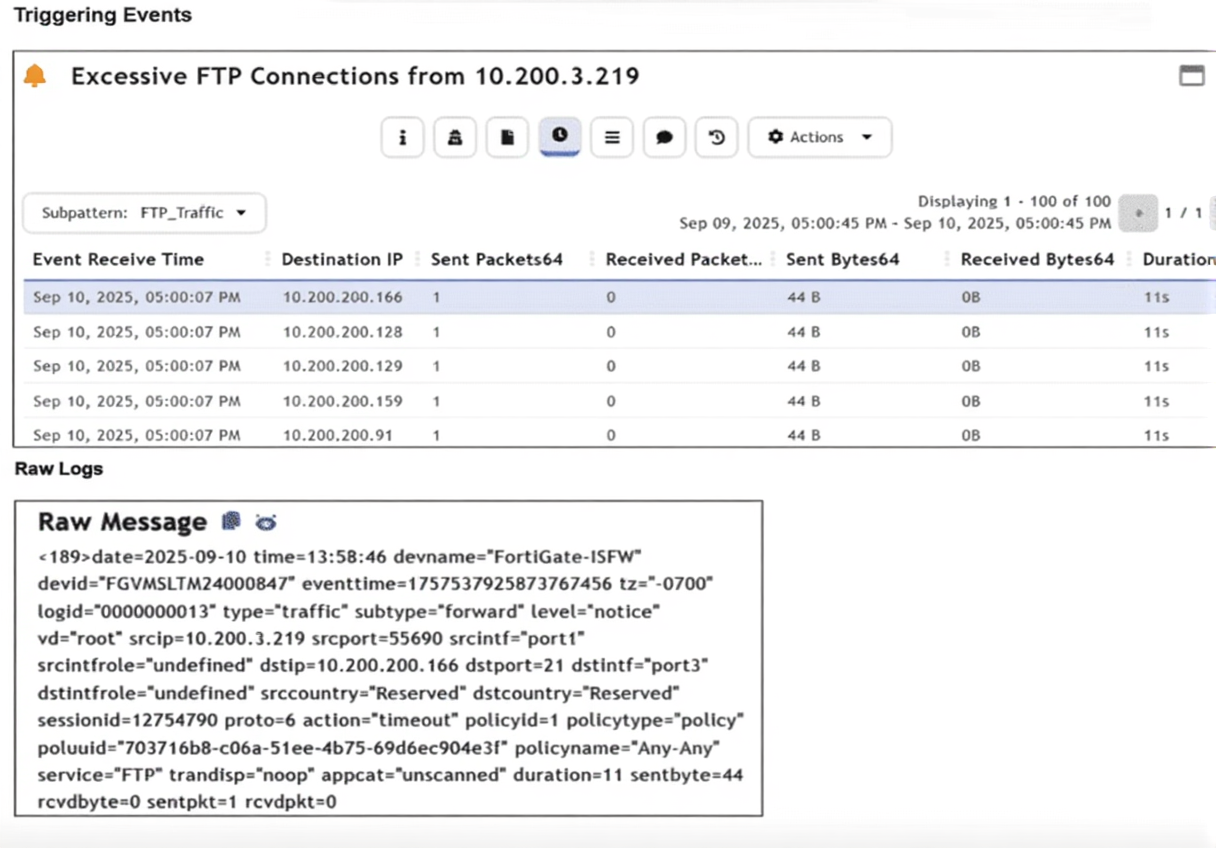
Assume that the traffic flows are identical, except for the destination IP address. There is only one FortiGate
in network address translation (NAT) mode in this environment.
Based on the exhibits, which two conclusions can you make about this FortiSIEM incident? (Choose two
answers)
A. The client 10.200.3.219 is conducting active reconnaissance.
B. FortiGate is not routing the packets to the destination hosts.
C. The destination hosts are not responding.
D. FortiGate is blocking the return flows.
Explanation:
This question tests your ability to analyze FortiSIEM incident data, including traffic logs and event patterns, to determine the nature of a security event. The exhibits show multiple FTP connection attempts from source IP 10.200.3.219 to various destination IPs within the 10.200.200.0/24 network. Each connection shows 1 sent packet (44 bytes) with 0 received packets and a duration of 11 seconds before timing out. The raw log confirms the action as "timeout" with no return traffic, indicating the destination hosts are not acknowledging the connection attempts.
✔️ Correct Option: A. The client 10.200.3.219 is conducting active reconnaissance.
The pattern of FTP connection attempts from a single source to multiple destination IPs (10.200.200.166, 10.200.200.128, 10.200.200.129, 10.200.200.159, 10.200.200.91) within a short timeframe is characteristic of active reconnaissance. The client is systematically probing the network to identify which hosts have FTP services available, a common precursor to further attack activities.
✔️ Correct Option: C. The destination hosts are not responding.
The raw log clearly shows the action as "timeout" with sentbyte=44 and rcvdbyte=0, sentpkt=1 and rcvdpkt=0. This indicates the FortiGate sent the initial SYN packet to the destination host, but no response was received from the destination, causing the session to time out after 11 seconds. The absence of return packets confirms the destination hosts are not responding to the FTP connection attempts.
❌ Incorrect Option: B. FortiGate is not routing the packets to the destination hosts.
The raw log shows the traffic was processed through policyid=1 with policyname="Any-Any" and the action recorded as "timeout". The FortiGate successfully forwarded the initial packet (sentpkt=1) to the destination; otherwise, the log would show a different action such as "deny" or the session would not have been created. Routing is functioning correctly, but the destination is not responding.
❌ Incorrect Option: D. FortiGate is blocking the return flows.
There is no evidence in the logs that the FortiGate is blocking return traffic. The raw log shows rcvdbyte=0 and rcvdpkt=0, indicating no return packets were received at all. If the FortiGate were blocking return flows, it would have received them but denied them, which would be reflected in the logs with a "deny" action or would show rcvdbyte values. The "timeout" action confirms the FortiGate is waiting for a response that never arrives from the destination hosts.
🔧 Reference:
→ FortiSIEM Administration Guide: Incident Investigation and Traffic Analysis
Explains how to interpret traffic logs and incident patterns in FortiSIEM, including identifying reconnaissance behavior through multiple connection attempts to different destinations and analyzing timeout actions.
→ FortiGate Log Reference: Traffic Log Fields
Documents the "action" field in traffic logs, where "timeout" indicates the session ended due to lack of response from the destination, with sentbyte and rcvdbyte fields showing the volume of successful transmission and reception.
| Page 3 out of 13 Pages |
| 1234567 |
| NSE7_SOC_AR-7.6 Practice Test Home |
The Fortinet NSE 7 - Security Operations 7.6 Architect exam is notoriously tough. It doesn't test memorization. It forces you to make complex decisions under time pressure. A weak prep strategy risks a costly failure and wasted effort. Our NSE7_SOC_AR-7.6 practice tests are built to be your definitive bridge to a passing score.

Copyright © - All Rights Reserved