
Last Updated On : 12-Oct-2026
Total 91 Questions
Logging, Reporting, and Analytics
While monitoring your network, you discover that one FortiGate device is sending significantly more logs to
FortiAnalyzer than all of the other FortiGate devices in the topology.
Additionally, the ADOM that the FortiGate devices are registered to consistently exceeds its quota.
What are two possible solutions? (Choose two.)
A. Increase the storage space quota for the first FortiGate device.
B. Create a separate ADOM for the first FortiGate device and configure a different set of storage policies.
C. Reconfigure the first FortiGate device to reduce the number of logs it forwards to FortiAnalyzer.
D. Configure data selectors to filter the data sent by the first FortiGate device.
Explanation:
This question tests your knowledge of FortiAnalyzer log management and ADOM quota optimization. When one FortiGate generates excessive logs, it can exceed storage quotas and affect other devices in the same ADOM. The goal is to manage storage efficiently and prevent a single device from overwhelming resources.
🟢 Correct Options:
B. Create a separate ADOM for the first FortiGate device and configure a different set of storage policies
Creating a separate ADOM allows you to isolate the high-volume FortiGate, applying tailored storage quotas and retention policies without impacting other devices. This ensures the device’s excessive logging does not cause the main ADOM to exceed its storage limits and maintains overall system stability.
C. Reconfigure the first FortiGate device to reduce the number of logs it forwards to FortiAnalyzer
Adjusting the logging configuration on the FortiGate (e.g., reducing debug or verbose logs, or excluding low-priority events) decreases the log volume sent to FortiAnalyzer. This directly reduces storage consumption and prevents the ADOM quota from being exceeded.
🔴 Incorrect Options:
A. Increase the storage space quota for the first FortiGate device
FortiAnalyzer quotas are applied per ADOM, not per individual device. Increasing storage for a single device is not supported; storage management must be handled at the ADOM level or by separating devices into different ADOMs.
D. Configure data selectors to filter the data sent by the first FortiGate device
Data selectors are used for reporting and analysis, not for reducing the volume of logs received from devices. They do not limit or filter incoming logs, so they cannot prevent ADOM quota issues caused by excessive logging.
🔧 Reference:
→ FortiAnalyzer ADOM Storage Management
Confirms strategies for managing high-volume log devices, including creating separate ADOMs and adjusting device logging to control storage usage.
Which of the following are critical when analyzing and managing events and incidents in a SOC? (Choose two answers)
A. Accurate detection of threats
B. Immediate escalation for all alerts
C. Rapid identification of false positives
D. Periodic system downtime for maintenance
Explanation:
This question tests SOC fundamentals for event and incident handling. Effective SOC operations depend on high-fidelity detection to surface real threats and on quickly filtering noise (false positives) to focus analyst time on genuine incidents. Indiscriminate escalation and planned downtime are not core analytical priorities.
✔️ Correct Option: A. Accurate detection of threats
Reliable detection ensures real malicious activity is identified promptly, reducing dwell time and risk. Accurate rules, correlation, and tuning improve true-positive rates and form the basis for downstream triage and response.
✔️ Correct Option: C. Rapid identification of false positives
Quickly recognizing and suppressing false positives reduces alert fatigue, frees analyst capacity, and improves mean time to respond. Efficient triage workflows and tuning help distinguish benign activity from genuine threats.
❌ Incorrect Option: B. Immediate escalation for all alerts
Escalating every alert overwhelms higher tiers and creates noise. Alerts must be triaged and validated first; only confirmed or high-severity incidents should be escalated according to severity and playbooks.
❌ Incorrect Option: D. Periodic system downtime for maintenance
Scheduled downtime is an operational necessity but not a critical factor for analyzing and managing events/incidents. The SOC should maintain continuous monitoring; maintenance windows are planned to minimize impact on detection and response.
🔧 Reference:
→ Security Operations (SOC) — FortiAnalyzer 7.6.0 — Highlights SOC detection, automation, and incident workflows aimed at accurate threat identification.
→ Reducing false positives — FortiWeb Administration Guide — Discusses tuning to reduce false positives, improving signal-to-noise for SOC analysis.
Which two statements about the FortiAnalyzer Fabric topology are true? (Choose two.)
A. Downstream collectors can forward logs to Fabric members.
B. Logging devices must be registered to the supervisor.
C. The supervisor uses an API to store logs, incidents, and events locally.
D. Fabric members must be in analyzer mode.
Explanation:
The FortiAnalyzer Fabric topology creates a hierarchical setup where a supervisor FortiAnalyzer coordinates multiple member units for centralized log management, analysis, and reporting across large environments—think of it as a team leader directing collectors and analyzers to handle massive log volumes efficiently without overwhelming a single device.
✅ Correct Answers: B and D
B. Logging devices must be registered to the supervisor
Absolutely right—this is a core requirement. Logging devices like FortiGates connect directly to the Fabric supervisor (not individual members) for authorization and management. The supervisor acts as the central registry, ensuring all logs flow through the proper hierarchy and maintaining visibility across the entire topology.
D. Fabric members must be in analyzer mode
Spot on again. Members in the Fabric operate specifically in Analyzer mode to process, store temporarily, and forward logs/events up the chain to the supervisor. This mode enables the analytics and sync capabilities essential for Fabric operation—Collector mode alone won't cut it here.
❌ Incorrect Answers:
A. Downstream collectors can forward logs to Fabric members
This doesn't align with standard Fabric design. Collectors typically send logs upstream to the supervisor or designated analyzers, not laterally between Fabric members. A common misconception is assuming full mesh forwarding, but the topology follows a structured supervisor-rooted flow to avoid loops and ensure centralized control.
C. The supervisor uses an API to store logs, incidents, and events locally
Not quite—while APIs facilitate communication between members and the supervisor, local storage on the supervisor happens through its native database, not explicitly "an API to store." The supervisor receives synced data via Fabric protocols, but this phrasing oversimplifies and misstates the storage mechanism. Folks sometimes mix this up with Fabric API calls for management, not storage.
📚 Reference
https://docs.fortinet.com
Refer to the exhibit.
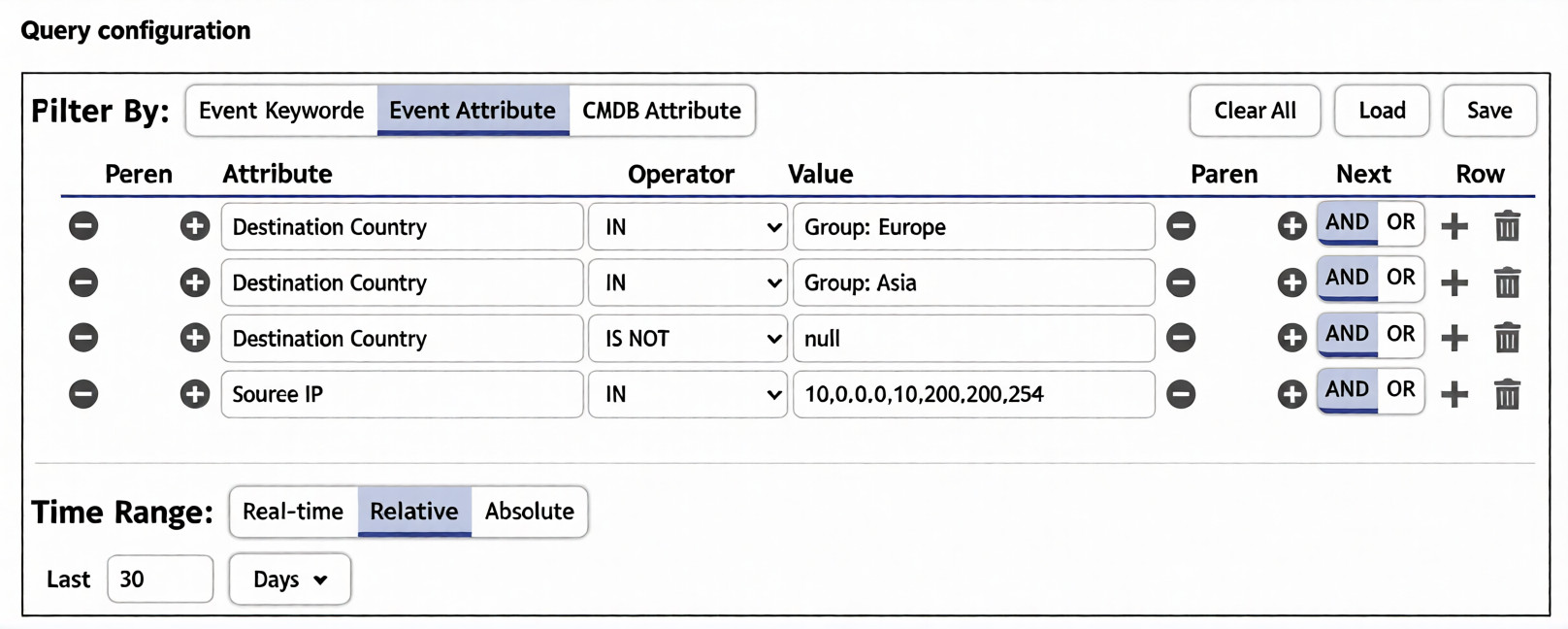
You are trying to find traffic flows to destinations that are in Europe or Asia, for hosts in the local LAN
segment. However, the query returns no results. Assume these logs exist on FortiSIEM.
Which three mistakes can you see in the query shown in the exhibit? (Choose three answers)
A. The null value cannot be used with the IS NOT operator.
B. The time range must be Absolute for queries that use configuration management database (CMDB) groups.
C. There are missing parentheses between the first row (Group: Europe) and the second row (Group: Asia).
D. The Source IP row operator must be BETWEEN 10.0.0.0, 10.200.200.254.
E. The logical operator for the first row (Group: Europe) must be OR.
Explanation:
The query intends to match LAN hosts (10.0.0.0–10.200.200.254) talking to destinations in Europe or Asia while excluding null countries. It returns nothing because the logic requires Destination Country to be in both Europe and Asia simultaneously, the Europe/Asia conditions aren’t grouped, and the IP range is expressed as an IN list instead of a BETWEEN range.
✅ Correct Option: C. Missing parentheses between Europe and Asia rows
The Europe and Asia conditions must be wrapped in parentheses to form a single block: (Destination Country IN Group: Europe OR Destination Country IN Group: Asia). Without parentheses, the AND chain applies across the whole filter incorrectly.
✅ Correct Option: D. Source IP operator must be BETWEEN
“Source IP IN 10.0.0.0,10.200.200.254” matches only those two literal IPs. Use BETWEEN 10.0.0.0, 10.200.200.254 to include the full LAN range so any host in that subnet is captured.
✅ Correct Option: E. First row logical operator must be OR
The Europe row connects to the next condition with AND, demanding Destination Country be in both Europe and Asia at once—an impossible match. Change the Next operator on the Europe row to OR so the query matches Europe or Asia.
❌ Incorrect Option: A. The null value cannot be used with the IS NOT operator
FortiSIEM’s structured filter supports “IS NOT null” to filter out empty Destination Country values; this syntax is valid and not the cause of zero results.
❌ Incorrect Option: B. Time range must be Absolute for CMDB groups
CMDB-based country groups work with Relative, Absolute, or Real-time windows. Using Relative “Last 30 Days” does not break CMDB group evaluation and isn’t the reason the query fails.
🔧 Reference:
→ FortiSIEM Analytics — Structured Search Filters — Covers BETWEEN for IP ranges, grouping conditions with parentheses, and using AND/OR to combine criteria.
→ FortiSIEM CMDB Groups in Queries — Shows country groups (e.g., Group: Europe, Group: Asia) used with IN, and combining them with OR inside parentheses.
When configuring a FortiAnalyzer to act as a collector device, which two steps must you perform? (Choose two.)
A. Enable log compression.
B. Configure log forwarding to a FortiAnalyzer in analyzer mode.
C. Configure the data policy to focus on archiving.
D. Configure Fabric authorization on the connecting interface.
Explanation:
This question evaluates the essential steps for deploying a FortiAnalyzer in Collector mode as part of a distributed Security Operations setup. In Collector mode, the device focuses on receiving logs from network devices and securely forwarding them to a central FortiAnalyzer operating in Analyzer mode for in-depth analysis, reporting, and incident management.
✔️ Correct Option:
B. Configure log forwarding to a FortiAnalyzer in analyzer mode.
This step is mandatory because the Collector’s core responsibility is to forward raw logs (in binary format) to the Analyzer. Proper log forwarding configuration ensures logs are uploaded efficiently, offloading heavy processing from remote sites and enabling centralized analysis and reporting on the Analyzer.
D. Configure Fabric authorization on the connecting interface.
Fabric authorization is required to establish secure, authenticated communication within the Security Fabric. It allows the Collector to receive logs from connected Fortinet devices such as FortiGate and ensures only authorized Collectors can forward data to the Analyzer, maintaining security and trust in the architecture.
❌ Incorrect options:
A. Enable log compression.
Log compression is an optional performance or storage optimization. While it can reduce bandwidth or disk usage, it is not a required step when setting up Collector mode functionality.
C. Configure the data policy to focus on archiving.
Collectors automatically archive logs locally before forwarding. However, creating a specific data policy focused solely on archiving is not a mandatory requirement for enabling basic Collector operations.
🔧 Reference:
→ Configuring the Collector
Confirms setting up log forwarding to the Analyzer and checking storage policy as key configuration tasks.
→ Collectors and Analyzers
Explains how Collectors forward logs to Analyzers in a distributed deployment for better performance.
→ Security Fabric authorization information for FortiOS
Details the need for Fabric authorization to enable secure integration and log forwarding between devices.
Which FortiAnalyzer feature uses the SIEM database for advance log analytics and monitoring?
A. Threat hunting
B. Asset Identity Center
C. Event monitor
D. Outbreak alerts
Explanation:
This question tests your understanding of which FortiAnalyzer features leverage the SIEM database. The SIEM database stores normalized logs used for advanced analytics, correlation, and security monitoring. Among the options, Threat Hunting is explicitly designed to utilize this database for investigation purposes.
✔️ Correct Option:
A. Threat hunting
✔️ The Threat Hunting dashboard is specifically designed to provide a log count chart and a SIEM log analytics table. It allows analysts to perform advanced queries and investigations directly on the normalized data stored in the SIEM database, making it the correct choice for this question.
❌ Incorrect Options:
B. Asset Identity Center
❌ While this feature uses the SIEM database to populate asset and identity information from normalized logs (e.g., from VMware or EMS connectors), its primary purpose is asset management and correlation, not "advanced log analytics and monitoring" as asked in the question.
C. Event monitor
❌ The Event Monitor is used to view events generated by event handlers. Although it relies on log data, its function is to display triggered events rather than to perform advanced analytics directly on the SIEM database tables.
D. Outbreak alerts
❌ Outbreak Alerts provide comprehensive reports on emerging threats using intelligence from FortiGuard. While they utilize log data, this feature is a licensed service focused on delivering threat intelligence packages, not direct SIEM database analytics.
🔧 Reference:
→ FortiAnalyzer New Features: FortiSoC GUI reorganization – Confirms the Threat Hunting dashboard provides a "SIEM log analytics table."
→ FortiAnalyzer Administration Guide: Using the template - Endpoint security vulnerability report – Provides context that reports and analytics can be based on the "SIEM database (siemdb)."
Which three factors does the FortiSIEM rules engine use to determine the count when it evaluates the aggregate condition COUNT (Matched Events) on a specific subpattern? (Choose three answers)
A. Group By attributes
B. Data source
C. Time window
D. Search filter
E. Incident action
Explanation:
This question tests understanding of how FortiSIEM evaluates aggregate conditions using the COUNT function. The engine considers the context of events, including which sources, attributes, and timeframes are relevant, to calculate accurate counts for correlation and alerting. Only options that define event scope and grouping are valid.
🟢 Correct Option A: Group By attributes
Group By attributes define how matched events are grouped for counting. The COUNT function evaluates occurrences within each group, allowing granular tracking and correlation across attributes such as IP address, user, or device, which ensures precise incident detection.
🟢 Correct Option B: Data source
The data source specifies which device or log type the events originate from. COUNT only considers events from the defined sources, ensuring that unrelated events do not inflate the aggregate count, maintaining accuracy in correlation rules.
🟢 Correct Option C: Time window
The time window limits the events considered for the aggregate count to a specific duration. Only events occurring within this window are counted, which prevents stale or irrelevant data from triggering false positives.
🔴 Incorrect Option D: Search filter
Search filters narrow event selection but are applied before aggregation. While they affect which events are matched, they do not directly determine how COUNT evaluates events in subpatterns.
🔴 Incorrect Option E: Incident action
Incident actions define what happens when a rule triggers (e.g., alerts, scripts) and do not influence the calculation of COUNT for matched events.
🔧 Reference:
→ FortiSIEM Rules Engine
– Confirms that COUNT uses Group By attributes, Data Source, and Time Window to evaluate matched events.
| Page 5 out of 13 Pages |
| 2345678 |
| NSE7_SOC_AR-7.6 Practice Test Home |
The Fortinet NSE 7 - Security Operations 7.6 Architect exam is notoriously tough. It doesn't test memorization. It forces you to make complex decisions under time pressure. A weak prep strategy risks a costly failure and wasted effort. Our NSE7_SOC_AR-7.6 practice tests are built to be your definitive bridge to a passing score.

Copyright © - All Rights Reserved