
Last Updated On : 7-Sep-2026
Total 45 Questions
Network security
What is the main OT component for monitoring and controlling industrial processes? (Choose one answer)
A. Programmable Logical Controller (PLC)
B. Supervisory Control and Data Acquisition (SCADA)
C. Industrial Control System (ICS)
D. Industrial Internet of Things (IIoT)
Explanation:
An Industrial Control System (ICS) is the overarching term that encompasses the hardware, software, networks, and control systems used to monitor and control industrial processes. It includes all components and technologies used in industrial automation, such as SCADA systems, Distributed Control Systems (DCS), Programmable Logic Controllers (PLC), and Human-Machine Interfaces (HMI).
C. Industrial Control System (ICS) – ICS is the main OT component for monitoring and controlling industrial processes. It is a collective term that includes the people, policies, procedures, and equipment used to manage and automate industrial operations. ICS is the broadest category that covers all other components mentioned in the options.
❌ Why Other Options Are Incorrect:
A. Programmable Logical Controller (PLC) – A PLC is a specific type of industrial computer used to control machinery and processes. While it is a critical component within an ICS, it is only one part of the larger ICS framework, not the main overall component.
B. Supervisory Control and Data Acquisition (SCADA) – SCADA is a type of ICS used for large-scale, geographically dispersed infrastructure, such as power grids and pipelines. It is a subset of ICS, not the overarching term.
D. Industrial Internet of Things (IIoT) – IIoT refers to the network of smart sensors, devices, and machines connected to the internet for data exchange and analytics. It is a modern evolution of industrial technology but is not the main component for monitoring and controlling industrial processes. It enhances ICS rather than being the core itself.
📚 References:
NIST Special Publication 800-82 Rev. 2 – Guide to Industrial Control Systems (ICS) Security – Defines ICS as the overarching term for systems used to monitor and control industrial processes.
You want to improve the security of your OT network and therefore deploy a FortiGate device with the OT signatures database. Which two statements about this database are true? (Choose two answers)
A. You must install a valid OT security service license.
B. You must import the OT signatures database manually.
C. The OT signatures database is enabled by default.
D. You must set exclude-signatures to none in the console line interface.
Explanation:
When deploying a FortiGate device with the OT signatures database to improve OT network security, there are specific requirements and default behaviors regarding the signatures.
A. You must install a valid OT security service license – The OT signatures database is part of the FortiGuard OT Security Service, which requires a valid license subscription. Without a valid license, the OT signatures database will not be available or updated, and the FortiGate will not be able to identify OT protocols.
C. The OT signatures database is enabled by default – Once the FortiGate is licensed for the OT Security Service, the OT signatures database is enabled by default. No additional manual enabling is required; the signatures are automatically available in the Application Control profile for use in firewall policies.
❌ Why Other Options Are Incorrect:
B. You must import the OT signatures database manually – This is incorrect. The OT signatures database is automatically downloaded and updated through FortiGuard when a valid license is active. There is no need to manually import the database; it is managed by the FortiGate's FortiGuard update system.
D. You must set exclude-signatures to none in the console line interface – This is incorrect. The exclude-signatures command is used to exclude specific signatures from an Application Control profile, not to enable the OT signatures database. Setting it to "none" does not affect the availability of the OT signatures database and is not required for OT protocol detection.
📚 References:
FortiOS 7.6 Administration Guide – OT Security – Explains that a FortiGuard OT Security Service license is required to use the OT signatures database.
In the Purdue model, at which level are physical assets like the Industrial Internet of Things (IIoT) placed? (Choose one answer)
A. At Level 5 only
B. At Level 1 only
C. Above Level 4
D. Below Level 3.5
Explanation:
The Purdue Enterprise Reference Architecture (PERA) model, commonly used in OT/ICS network design, defines hierarchical levels for industrial control systems:
* Level 0 – Physical processes (sensors, actuators)
* Level 1 – Basic control (PLCs, RTUs)
* Level 2 – Supervisory control (HMIs, SCADA)
* Level 3 – Operations management (MES, Historians)
* Level 3.5 – DMZ / Industrial Demilitarized Zone
* Level 4 – Enterprise network (business systems, ERP)
* Level 5 – Corporate WAN / Internet
D. Below Level 3.5 – Physical assets like the Industrial Internet of Things (IIoT) are placed below Level 3.5, typically at Levels 0–2. IIoT devices such as smart sensors, actuators, and edge gateways reside in the field network (Level 0–1) or control network (Level 2), which are below the Level 3.5 DMZ. They communicate with control systems and are considered part of the operational technology (OT) network, not the enterprise IT network (Levels 4–5).
❌ Why Other Options Are Incorrect:
A. At Level 5 only – Level 5 represents the corporate WAN or internet, which is used for external connectivity. IIoT devices are physical assets in the field, not corporate-level systems.
B. At Level 1 only – While some IIoT devices may be at Level 1 (control level), many IIoT sensors and actuators are at Level 0 (physical process) or Level 2 (supervisory control). The statement "only Level 1" is too restrictive.
C. Above Level 4 – Levels above 4 are enterprise and corporate networks, which are IT systems. IIoT devices are OT assets and are not placed above Level 4.
📚 References:
* Purdue Enterprise Reference Architecture (PERA) – Defines the hierarchical structure used to separate physical processes, control systems, operations, and enterprise networks in industrial environments.
You want to protect OT devices that are not updated against known vulnerabilities so you apply virtual patching to the firewall policies. What must you check to confirm that the OT devices are virtually patched? (Choose one answer)
A. The output of the CLI command get virtual-patch profile
B. The OT View page
C. The output of the CLI command get rule otvp status
D. The Asset Identity List page
Explanation:
Virtual patching in FortiGate protects OT devices against known vulnerabilities by applying IPS signatures to firewall policies without requiring the devices themselves to be updated. To confirm that OT devices are virtually patched, you should check the OT View page in the FortiGate GUI.
B. The OT View page – The OT View page provides a comprehensive dashboard for monitoring OT assets, their risk levels, and the security measures applied to them, including virtual patching status. It displays which devices are protected by virtual patching, the number of vulnerabilities mitigated, and overall OT security posture. This is the primary interface for confirming virtual patching effectiveness.
❌ Why Other Options Are Incorrect:
A. The output of the CLI command get virtual-patch profile – This command does not exist in FortiOS. The correct CLI commands for virtual patching are related to IPS or OT security, but there is no get virtual-patch profile command.
C. The output of the CLI command get rule otvp status – This command does not exist in FortiOS. There is no get rule otvp status command for checking virtual patching status. This is a distractor option.
D. The Asset Identity List page – The Asset Identity List page shows discovered devices and their metadata (IP, MAC, OS, etc.). While it identifies OT assets, it does not display virtual patching status or vulnerability mitigation information. The OT View page is the correct location for that information.
📚 References:
FortiOS 7.6 Administration Guide – OT View – Explains that the OT View page provides visibility into OT assets, virtual patching status, and vulnerability protection.
Refer to the exhibit.
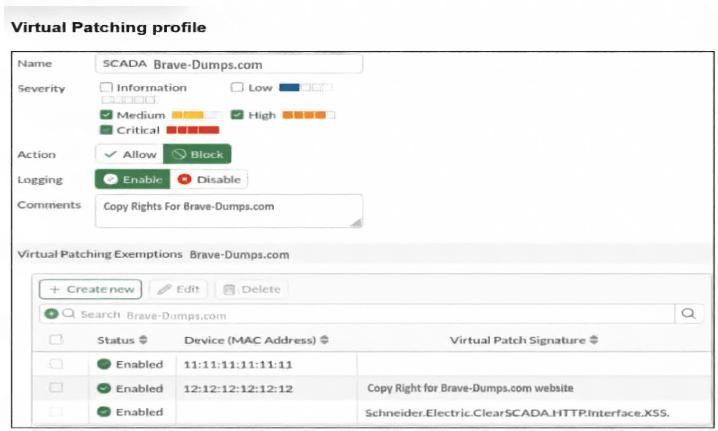
A Virtual Patching profile is shown. You have recently updated your SCADA system and would like to apply
the SCADA virtual patching profile. Which two statements about this profile are correct? (Choose two
answers)
A. Only the vulnerability Schneider.Electric.ClearSCADA.HTTP.Interface.XSS is still present.
B. Low severity signatures are not blocked for the device with the MAC address 12:12:12:12:12.
C. This profile blocks critical severity signatures for all the devices.
D. The device with the MAC address 11:11:11:11:11 is considered to have no vulnerabilities.
Explanation:
The Virtual Patching profile shown in the exhibit defines how virtual patching is applied to OT devices based on their MAC addresses and the severity of vulnerabilities.
B. Low severity signatures are not blocked for the device with the MAC address 12:12:12:12:12 – In the profile settings, the Severity section has Low checked, and the Action is set to Allow. This means that for devices associated with this profile, low severity signatures are allowed and are not blocked. Since the device with MAC address 12:12:12:12:12 is listed under this profile, low severity signatures are not blocked for that device.
D. The device with the MAC address 11:11:11:11:11 is considered to have no vulnerabilities – The Virtual Patching Exemptions section shows the device with MAC address 11:11:11:11:11 has Status = Enabled but has no Virtual Patch Signature listed. This indicates that the device is enabled for virtual patching but does not have any specific vulnerabilities associated with it. Therefore, it is considered to have no known vulnerabilities that require virtual patching.
❌ Why Other Options Are Incorrect:
A. Only the vulnerability Schneider.Electric.ClearSCADA.HTTP.Interface.XSS is still present – This is incorrect. The exhibit shows that the profile has exemptions listed, but it does not indicate that this is the only vulnerability present. The profile may have other vulnerabilities not shown in the exhibit, and there is no data to confirm exclusivity.
C. This profile blocks critical severity signatures for all the devices – This is incorrect. The Severity section shows Low is checked, and the Action is set to Allow. Critical severity signatures are not checked in the Severity section, meaning they are not being allowed. However, the profile does not block critical severity signatures for all devices because the profile applies only to devices listed in the exemptions, not all devices globally.
📚 References:
* FortiOS 7.6 Administration Guide – Virtual Patching – Explains how severity levels and actions determine whether vulnerabilities are blocked or allowed for OT devices.
Refer to the exhibit
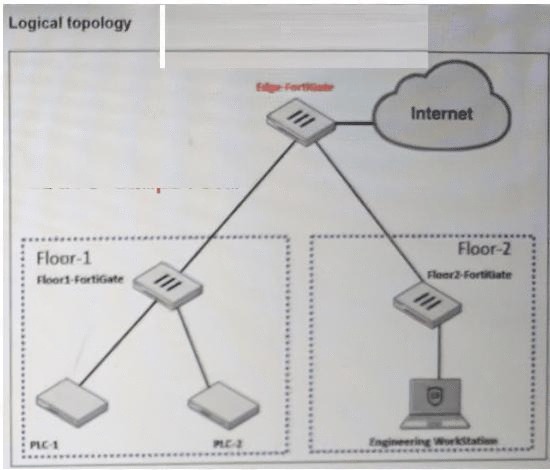
A partial OT network is shown. You have encountered many disconnections in the links and want to improve
the availability of this network. Which action can you perform? (Choose one answer)
A. You can implement HA clusters.
B. You can implement SD-WAN at Floor-1-FortiGate and Floor-2-FortiGate.
C. You can implement parallel redundancy protocol.
D. You can implement VDOMs in Edge-FortiGate.
Explanation:
The OT network shown in the exhibit has experienced many disconnections in the links, indicating a need for improved network availability and resilience. In operational technology (OT) environments, network redundancy is critical to ensure continuous operation.
C. You can implement parallel redundancy protocol – Parallel Redundancy Protocol (PRP) is a network redundancy protocol defined by IEC 62439-3 that provides seamless failover by transmitting duplicate packets over two independent, parallel networks. PRP is specifically designed for OT and industrial environments where high availability is required, and it allows for zero recovery time in the event of a link failure. This is the most appropriate action for improving link availability in the OT network shown.
❌ Why Other Options Are Incorrect:
A. You can implement HA clusters – High Availability (HA) clusters provide device-level redundancy, such as two FortiGate devices in active-passive mode. While HA improves device availability, it does not address link-level redundancy or protect against disconnections in the network links themselves. The issue described is link disconnections, not device failure.
B. You can implement SD-WAN at Floor-1-FortiGate and Floor-2-FortiGate – SD-WAN is typically used for WAN connectivity and optimizing traffic between multiple WAN links. In this OT network, the connections appear to be within a local industrial network, including floor-level switches and PLCs. SD-WAN is not the appropriate solution for improving link availability within an OT network.
D. You can implement VDOMs in Edge-FortiGate – VDOMs (Virtual Domains) are used to logically partition a single FortiGate into multiple virtual firewalls for segmentation and multi-tenancy. They do not improve network link availability or address disconnections.
📚 References:
* IEC 62439-3 – Parallel Redundancy Protocol (PRP) – Defines PRP as a standard for zero-loss network redundancy in industrial automation networks.
Which industrial protocol does not support VLANs? (Choose one answer)
A. [Not clearly visible in the exhibit]
B. Ethernet over industrial protocol
C. EtherCAT
D. Modbus over TCP
Explanation:
EtherCAT (Ethernet for Control Automation Technology) is a real-time industrial Ethernet protocol that operates at the data link layer and is optimized for high-speed, deterministic communication. It does not natively support VLANs (Virtual Local Area Networks).
C. EtherCAT – EtherCAT uses a specific frame structure that is processed on the fly by each device in the network. It does not support standard IEEE 802.1Q VLAN tagging because the protocol's frame format is proprietary and does not accommodate VLAN headers. Additionally, EtherCAT operates using a master-slave architecture with minimal processing overhead, and VLAN functionality is not part of its specification.
❌ Why Other Options Are Incorrect:
B. Ethernet over industrial protocol – Ethernet/IP (Ethernet Industrial Protocol) is based on standard Ethernet and supports VLANs. It uses TCP/IP and UDP/IP, which are compatible with VLAN tagging.
D. Modbus over TCP – Modbus TCP operates on top of standard TCP/IP and runs over standard Ethernet. It fully supports VLANs because it uses conventional IP networking, which is VLAN-compatible.
A. [Not clearly visible in the exhibit] – Since the option is not clearly visible, it cannot be evaluated. However, based on the information provided, EtherCAT is the correct answer among the visible options.
📚 References:
* EtherCAT Technology Group – EtherCAT Specification – Confirms that EtherCAT does not support VLAN tagging in its frame structure.
| Page 2 out of 7 Pages |
| 1234 |
| NSEI_OTS_AR-7.6 Practice Test Home |
The Fortinet NSE I - OT Security 7.6 Architect exam is notoriously tough. It doesn't test memorization. It forces you to make complex decisions under time pressure. A weak prep strategy risks a costly failure and wasted effort. Our NSEI_OTS_AR-7.6 practice tests are built to be your definitive bridge to a passing score.

Copyright © - All Rights Reserved