
Last Updated On : 7-Sep-2026
Total 45 Questions
The difference between a near pass and a confident pass isn't just knowing the material, it's mastering the Fortinet NSE I - OT Security 7.6 Architect exam experience. Our Fortinet NSEI_OTS_AR-7.6 practice test is engineered to close the gap between your current knowledge and the 2026 exam's demands. With every question, you receive detailed, expert verified explanations that break down not just the correct answer, but also the reasoning behind every incorrect option.
Don't just study. Practice NSEI_OTS_AR-7.6 with purpose. Start your journey to a first-time pass today.
By replicating the exact style, complexity, and format of the real Fortinet NSE I - OT Security 7.6 Architect exam questions, we ensure you walk into the exam with complete confidence.
Network security
Refer to the exhibit
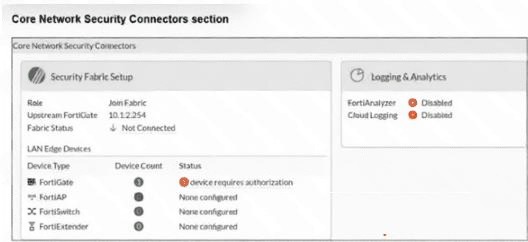
The Core Network Security Connectors page of the FortiGate-2 device is shown. Which statement is
correct? (Choose one answer)
A. FortiGate-2 serves as Fabric Root.
B. You must enable Security Fabric Connection on the FortiGate-2 interface.
C. You must configure the FortiAnalyzer settings on FortiGate-2.
D. FortiGate-2 is not authorized on the root FortiGate.
Explanation
D. FortiGate-2 is not authorized on the root FortiGate. – This is correct. The exhibit clearly shows that FortiGate-2 has a Role of "Join Fabric" and an Upstream FortiGate of 10.1.2.254, indicating that it is attempting to connect to the root FortiGate at that IP address. However, the Fabric Status is "Not Connected," and under LAN Edge Devices > FortiGate, the status shows "device requires authorization." In the Fortinet Security Fabric, a downstream FortiGate must be explicitly authorized by the root FortiGate before the fabric connection becomes active. Therefore, FortiGate-2 has not yet been authorized on the root FortiGate.
Why Other Options Are Incorrect:
A. FortiGate-2 serves as Fabric Root: Incorrect. The Role field explicitly states "Join Fabric," not "Root." A Fabric Root would have the root role and would not have an Upstream FortiGate configured. Therefore, FortiGate-2 is a downstream device rather than the fabric root.
B. You must enable Security Fabric Connection on the FortiGate-2 interface: Incorrect. The Upstream FortiGate IP, 10.1.2.254, is already populated, and the device is attempting to establish the fabric connection. This indicates that the Security Fabric connection settings have already been configured on FortiGate-2. The issue is the pending authorization on the root FortiGate, not a missing connection configuration on FortiGate-2.
C. You must configure the FortiAnalyzer settings on FortiGate-2: Incorrect. FortiAnalyzer provides logging, reporting, and analytics and is separate from the Security Fabric connection process. Although FortiAnalyzer is disabled in the exhibit, it is not a prerequisite for establishing the Security Fabric connection. The downstream FortiGate must instead be authorized by the root FortiGate.
References:
Fortinet NSE I - OT Security 7.6 Architect Study Guide, Module: Security Fabric Setup – Explains that a downstream FortiGate joining the Security Fabric appears on the root FortiGate with a status such as "device requires authorization" and must be authorized by the administrator to complete the fabric connection.
Refer to the exhibit.
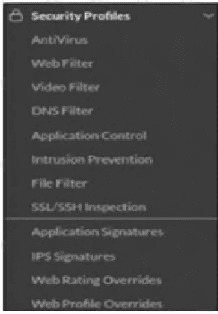
A. You must enable Virtual Patching in the Feature Visibility section.
B. You must have a ruggedized FortiGate allowing the virtual patching feature.
C. You must enable OT signatures.
D. You must have a valid OT security service license.
Explanation
A. You must enable Virtual Patching in the Feature Visibility section.
– This is correct. In FortiOS, certain security features, including Virtual Patching, are not visible by default in the Security Profiles section. They must first be enabled under System > Feature Visibility before they appear as configurable options in firewall policies. Virtual Patching for OT environments uses IPS signatures designed to protect vulnerable OT devices against known vulnerabilities. Since the question states that Virtual Patching is not available, the most likely cause is that it has not been enabled in Feature Visibility.
Why Other Options Are Incorrect:
B. You must have a ruggedized FortiGate allowing the virtual patching feature:
Incorrect. Virtual Patching is not a hardware-dependent feature that requires a ruggedized FortiGate specifically. It is a software-based IPS capability available on supported FortiGate models. Ruggedized FortiGates are designed for harsh industrial environments but do not exclusively provide Virtual Patching functionality.
C. You must enable OT signatures:
Incorrect. OT signatures are part of the Virtual Patching solution, but enabling OT signatures alone does not make the Virtual Patching profile appear in the Security Profiles section. OT signatures are configured as part of the applicable IPS or Virtual Patching configuration. The absence of the profile from the Security Profiles list is a feature visibility issue, so the feature must first be enabled through Feature Visibility.
References:
Fortinet NSE I - OT Security 7.6 Architect Study Guide, Module: Virtual Patching – Explains that Virtual Patching uses IPS signatures to protect vulnerable OT devices without requiring vendor patches and that the feature must be enabled through Feature Visibility before it can be configured in firewall policies.
Refer to the exhibit.
A. Offline IDS on FortiGate_Level3.
B. IPS on FortiGate_Level5.
C. Virtual patching on FortiGate_Level2.
D. OT signature on FortiGate_Level5.
Explanation
B. IPS on FortiGate_Level5 and D. OT signature on FortiGate_Level5. – These are correct.
In the Purdue Model, Level 5 (Enterprise/Corporate) is the primary entry point for external traffic into the OT network. Deploying IPS at this boundary provides active threat prevention, inspecting all north-south traffic and blocking known exploits before they reach critical OT assets. Simultaneously, enabling OT signatures on the same FortiGate ensures that industrial protocols (Modbus, DNP3, S7, etc.) are deeply inspected for OT-specific attacks, such as command injection or unauthorized register writes. Together, these controls create a strong first line of defense at the outermost layer, optimizing protection by preventing threats from ever entering the lower Purdue Levels (0–4).
❌ Why Other Options Are Incorrect
A. Offline IDS on FortiGate_Level3. – Incorrect. Offline IDS is passive (monitoring only) and does not actively block threats. The question asks for optimized protection, which requires active prevention (IPS), not passive detection.
C. Virtual patching on FortiGate_Level2. – Incorrect. Virtual patching protects vulnerable devices (PLCs, RTUs) using IPS signatures but is better placed at Level 3.5 or Level 3, closer to the devices. Deploying it at Level 2 is less optimal because it does not prevent threats from entering the wider OT network at the perimeter.
📚 References
Fortinet NSE I - OT Security 7.6 Architect Study Guide, Module: Purdue Model – IPS and OT signatures should be deployed at the Level 5 boundary to inspect all traffic entering the OT network.
Refer to the exhibit.
A. A log is provided for each IEC command.
B. A log is provided for each Modbus command.
C. OT signatures are enabled.
D. All OT protocols are blocked.
Explanation:
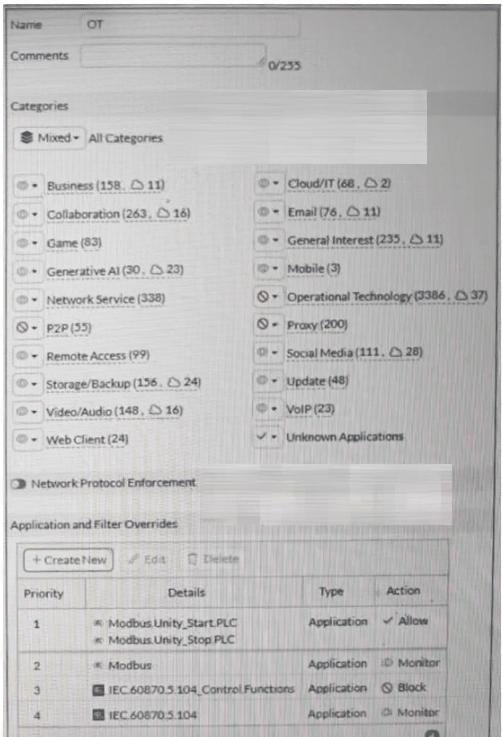
B. A log is provided for each Modbus command – The override rules show that Modbus Unity_Start_PLC is set to Monitor (Priority 1). The Monitor action logs the traffic without blocking it, so every Modbus Unity_Start_PLC command generates a log entry. Therefore, a log is provided for each Modbus command that matches this override.
D. All OT protocols are blocked – The default action for all applications in the profile is set to Block unless explicitly overridden. The category list shows OT applications under "Operational Technology (3386, ☑ 37)" and the overrides show Modbus and IEC 60870.5.104 entries. Any OT protocol not explicitly allowed or monitored will be blocked by the default application action. Since only specific Modbus and IEC commands are allowed or monitored, all other OT protocols are blocked.
❌ Why Other Options Are Incorrect:
A. A log is provided for each IEC command – This is incorrect. The override for IEC 60870.5.104 is set to Monitor (Priority 4), so a log is provided for IEC 60870.5.104 commands. However, IEC 60870.5.104_Control_Functions is set to Block (Priority 3), so no log is provided for those commands. Since not all IEC commands are monitored, this statement is false.
C. OT signatures are enabled – The exhibit does not show any configuration related to OT signatures. OT signatures are a separate feature that must be explicitly enabled in the Application Sensor profile settings. The partial profile shown only displays application overrides and category counts, not signature settings. This cannot be confirmed from the exhibit.
📚 References:
FortiOS 7.6 Administration Guide – Application Control – Explains that Monitor action logs traffic, while Block action silently drops traffic without logging.
Refer to the exhibit.
.jpeg)
A partial Application Sensor profile is shown. When you apply this profile in firewall policy, which two
statements are correct? (Choose two answers)
A. OT signatures are enabled.
B. All OT protocols are monitored.
C. Modbus write commands are blocked.
D. A log is provided for each Modbus read holding registers command.
Explanation:
The Application Sensor profile shown in the exhibit defines how OT (Operational Technology) applications are handled when applied to a firewall policy. The configuration includes application overrides with specific actions for Modbus traffic.
C. Modbus write commands are blocked – The override rule at Priority 2 shows Modbus set to Block. This is a general Modbus rule that applies to all Modbus commands not explicitly matched by a higher-priority override. Since the higher-priority rule (Priority 1) is limited to "Modbus, Read/Modifying Requests" (which includes read commands), the Priority 2 block rule catches everything else, including write commands. Therefore, Modbus write commands are blocked.
D. A log is provided for each Modbus read holding registers command – The override rule at Priority 1 shows "Modbus, Read/Modifying Requests" with Action set to Allow. When an application is allowed rather than monitored, the system still generates a log for the traffic because the application is being recognized and allowed by the Application Sensor profile. Additionally, "Read/Modifying Requests" includes read holding registers commands, so these commands are allowed and logged. Since the rule is set to Allow, the traffic is permitted, and a log entry is created for each matching command.
❌ Why Other Options Are Incorrect:
A. OT signatures are enabled – The exhibit does not show any configuration related to OT signatures. OT signatures are a separate feature that must be explicitly enabled in the Application Sensor profile settings under the "OT Signatures" section. The partial profile shown only displays categories and overrides, not signature settings. This cannot be confirmed from the exhibit.
B. All OT protocols are monitored – This is incorrect. The profile shows overrides for Modbus, but many OT protocols, such as IEC 60870.5.104, DNP3, and S7, are not shown. Additionally, the default action for the Operational Technology category is not specified in the exhibit. Without explicit Monitor actions for all OT protocols, it cannot be assumed that all OT protocols are monitored.
📚 References:
FortiOS 7.6 Administration Guide – Application Control – Explains that Allow action permits traffic and generates logs, while Block action denies traffic.
As the first step in your OT network protection plan, you must identify the OT protocols that the FortiGate device supports. Which two configurations must you implement on this FortiGate device? (Choose two answers)
A. You must enable Device detection on all the interfaces.
B. You must implement an Application Control security profile that monitors OT.
C. You must enable the OT signatures.
D. You must implement an Intrusion Prevention security profile that monitors OT.
Explanation:
To identify the OT protocols that the FortiGate device supports as the first step in an OT network protection plan, you need to enable the features that allow FortiGate to discover and recognize OT devices and their protocols. The following two configurations are required:
A. You must enable Device detection on all the interfaces – Device detection allows FortiGate to passively discover devices on the network by analyzing traffic and collecting information such as IP addresses, MAC addresses, hostnames, and operating systems. This is essential for identifying OT devices and their communication patterns before applying security policies.
C. You must enable the OT signatures – OT signatures are a specific set of Application Control signatures that detect and identify OT protocols, such as Modbus, IEC 60870.5.104, DNP3, S7, and others. Enabling OT signatures allows FortiGate to recognize and classify OT protocol traffic, which is the foundation for monitoring and protecting OT networks.
❌ Why Other Options Are Incorrect:
B. You must implement an Application Control security profile that monitors OT – While an Application Control profile with OT signatures enabled is required, the action itself is enabling OT signatures (Option C). Implementing a monitoring profile is a subsequent step after OT signatures are enabled. The question specifically asks for the configurations to identify which protocols are supported, not to monitor or enforce policies.
D. You must implement an Intrusion Prevention security profile that monitors OT – IPS (Intrusion Prevention System) profiles are used to detect and block known vulnerabilities and exploits, not to identify or discover OT protocols. While IPS can be used for OT security, it is not the first step for identifying supported protocols. Application Control with OT signatures is the correct mechanism for protocol identification.
📚 References:
FortiOS 7.6 Administration Guide – Device Detection – Explains how device detection discovers devices and their operating systems on the network.
Refer to the exhibit
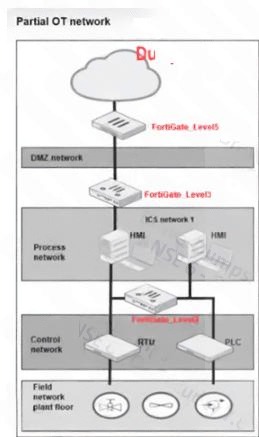
A partial OT network is shown. In this OT network, you must add additional security measures to detect OT
protocols and, therefore, increase the traffic visibility. Which security sensor must you implement to detect
the OT protocols in this network? (Choose one answer)
A. Device detection on all the FortiGate interfaces.
B. Inline IDS on FortiGate_Level3.
C. Application sensor set to monitor on all the FortiGate devices.
D. IPS sensor on FortiGate_Level5.
Explanation:
To detect OT protocols and increase traffic visibility across the OT network, you need to implement an Application Control sensor that is set to Monitor mode on the FortiGate devices. This allows the FortiGate to passively identify and log OT protocols without blocking or interfering with traffic.
C. Application sensor set to monitor on all the FortiGate devices – An Application Control security profile with an Application sensor is required to detect and identify OT protocols such as Modbus, IEC 60870.5.104, DNP3, and S7. By setting the sensor to Monitor mode, the FortiGate devices will log detected OT traffic without applying any blocking actions. This provides increased visibility across all segments of the network, including the control network, process network, and field network.
❌ Why Other Options Are Incorrect:
A. Device detection on all the FortiGate interfaces – Device detection is used to discover and identify devices, such as by MAC address and OS fingerprinting, but does not specifically detect or identify OT protocols. While useful for asset inventory, it does not provide the protocol-level visibility required for OT protocol detection.
B. Inline IDS on FortiGate_Level3 – Inline IDS (Intrusion Detection System) is typically associated with IPS profiles, not Application Control. Additionally, placing inline IDS only on FortiGate_Level3 would miss OT traffic on other segments, such as Level 5 and the field network, limiting visibility. Application sensors should be applied across all devices for comprehensive coverage.
D. IPS sensor on FortiGate_Level5 – An IPS sensor is used to detect and block known vulnerabilities and exploits, not to identify OT protocols. It does not provide OT protocol classification or increased visibility into OT traffic. Application Control with OT signatures is the correct tool for protocol detection.
📚 References:
* FortiOS 7.6 Administration Guide – Application Control – Explains that Application Control profiles with OT signatures detect and identify OT protocols.
| Page 1 out of 7 Pages |
| 1234 |
The Fortinet NSE I - OT Security 7.6 Architect exam is notoriously tough. It doesn't test memorization. It forces you to make complex decisions under time pressure. A weak prep strategy risks a costly failure and wasted effort. Our NSEI_OTS_AR-7.6 practice tests are built to be your definitive bridge to a passing score.

Copyright © - All Rights Reserved