
Last Updated On : 18-Oct-2026
Total 36 Questions
The difference between a near pass and a confident pass isn't just knowing the material, it's mastering the Fortinet NSE 5 - FortiWeb 8.0 Administrator exam experience. Our Fortinet NSE5_FWB_AD-8.0 practice test is engineered to close the gap between your current knowledge and the 2026 exam's demands. With every question, you receive detailed, expert verified explanations that break down not just the correct answer, but also the reasoning behind every incorrect option.
Don't just study. Practice NSE5_FWB_AD-8.0 with purpose. Start your journey to a first-time pass today.
By replicating the exact style, complexity, and format of the real Fortinet NSE 5 - FortiWeb 8.0 Administrator exam questions, we ensure you walk into the exam with complete confidence.
Web Application and API Security
A third-party penetration test reveals that users can bypass login controls through a mobile API. Your current FortiWeb configuration includes zero trust network access (ZTNA) profiles and cookie security, but API protection and client management are not enabled. The security team asks you to recommend the most effective way to close this gap. Which FortiWeb adjustment would best prevent future unauthorized API access?
A. Switch to a reverse-proxy mode to bypass cookie-based controls.
B. Enable API protection and client management to enforce identity checks on mobile API traffic.
C. Replace ZTNA with bot protection to reduce false positives.
D. Log only API traffic and rely on FortiAnalyzer for future alerts.
Explanation:
The vulnerability described (bypassing login controls through a mobile API) is fundamentally an identity and authentication issue. Mobile clients can be authenticated using JSON Web Tokens (JWT), a standard (RFC 7519) for transmitting authentication information between parties . FortiWeb's Mobile API Protection module directly addresses this by validating whether the request carries a valid JWT token header and taking appropriate action when the token is missing or invalid . To further restrict access, API Gateway features enable API key verification, allowing you to create API users and groups and verify that the key belongs to a valid user . This ensures only authenticated, authorized mobile clients can access the API.
❌ Why Other Options Are Ineffective
A. Switch to reverse-proxy mode:
Changing the deployment mode is a topological adjustment. While it can provide authentication offloading features , it is not the direct solution to enforcing JWT token validation or API client identity checks . It addresses how traffic is processed, not the missing authentication logic itself.
C. Replace ZTNA with bot protection:
While Bot Protection is vital for mitigating malicious automation (e.g., scraping, credential stuffing) , the core issue is unauthorized access via a valid mobile application, not distinguishing human users from bots. Bot protection would not enforce identity checks for legitimate mobile clients.
D. Log only API traffic:
Logging is a passive function. It provides visibility into unauthorized access attempts but does not actively prevent them, leaving the vulnerability unpatched.
A FortiWeb administrator wants to create a machine learning (ML)-based bot detection system. Which three actions must the administrator take to build and activate this ML model? (Choose three.)
A. Collect traffic samples for training.
B. Verify the model manually on test data only.
C. Apply Bayesian analysis to the model output.
D. Build the detection model using collected data.
Explanation:
To build and activate the ML bot detection model, the administrator must oversee a process that involves three distinct stages, not perform manual algorithmic analysis. The system handles the complex computations automatically .
A. Collect traffic samples for training.
This is the essential first stage. The system gathers samples of user behavior, splitting them into a training set (75%) and a testing set (25%) to build and validate the model .
B. Verify the model manually on test data only.
While this option's phrasing is slightly imprecise, it correctly identifies the model building stage. During this phase, the system automatically uses the testing sample set to verify the model's accuracy. The administrator's manual action is to initiate this build process and then review the resulting accuracy metrics (Training Accuracy, Cross-Validation Value, Testing Accuracy) to decide if the model is valid .
D. Build the detection model using collected data.
This describes the core of the model building stage. Using the collected samples, the system employs the Support Vector Machine (SVM) algorithm to self-learn user behavior profiles and constructs the mathematical detection model .
Why other options are incorrect:
C. Apply Bayesian analysis to the model output.
This is incorrect. FortiWeb's bot detection uses the SVM algorithm, not Bayesian analysis .
References:
Fortinet Documentation: "FortiWeb uses SVM (Support Vector Machine) algorithm to build up the bot detection model" .
The official process is defined as having three stages: sample collecting, model building, and model running
A FortiWeb administrator sees the following request:
GET /api/v1/data HTTP/1.1
Host: example.com
Authorization: ApiKey abc123def456
The API key belongs to a user in group B who is authorized to access only /api/v1/reports.
What should the administrator do to prevent this unauthorized access?
A. Restrict access to /api/v1/data using user group–based access control.
B. Block /api/v1/data for all user groups to avoid policy confusion.
C. Move the user to group A so they can access both endpoints.
D. Allow all valid API keys to access any API endpoint.
Explanation:
This scenario represents a classic Broken Object Level Authorization (BOLA) or unauthorized privilege escalation attempt at the API layer. The user possesses a valid credential (a legitimate API key), but they are attempting to access a resource path (/api/v1/data) that they do not have the authorization to view, as their group (Group B) is strictly restricted to /api/v1/reports.
Why Choice A is correct: FortiWeb provides granular API Gateway and Web Access Control capabilities. To remediate this, the administrator should implement User Group-Based Access Control (or Role-Based Access Control). By mapping API keys to specific user groups and binding those groups to precise URL protection rules/path matches, FortiWeb can validate not just that the API key is valid, but that the identity tied to that key has the explicit privilege to execute the requested HTTP method on that specific URI path.
Why the other options are incorrect:
B is incorrect because blocking the endpoint for all user groups would cause a denial of service for legitimate users (e.g., administrative groups or Group A users) who actually require access to /api/v1/data.
C is incorrect because arbitrarily moving the user to a higher-privileged group violates the security principle of least privilege. If the user is only supposed to see reports, they should not be granted access to raw data.
D is incorrect because allowing all valid API keys to access any endpoint completely eliminates authorization controls, leaving the API vulnerable to data exposure.
Reference
FortiWeb 8.0 Administration Guide: API Protection > API Access Control / User-Group Based Authentication
Section Overview: Configuring Access Control Rules allows administrators to define path-based permissions and map them to specific authenticated User Groups or API protection profiles to enforce strict authorization boundaries.
Refer to the exhibit.
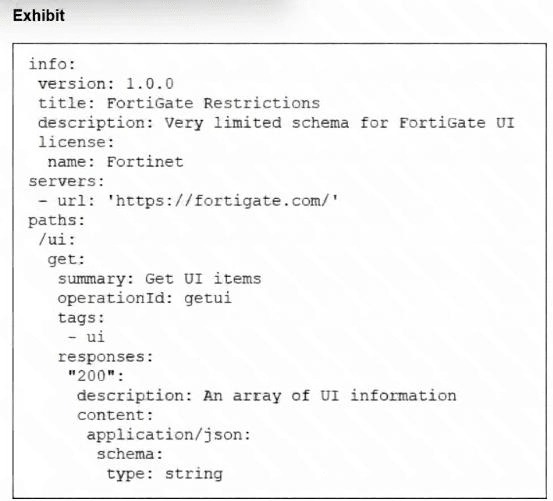
What does the exhibit show?
A. The FortiGate UI interface in HTML.
B. A sample response returned by the FortiGate API at https://fortigate.com/ui.
C. The result of a show ui details command on a FortiWeb server.
D. An API schema file.
Explanation:
The exhibit shows an OpenAPI Specification (formerly known as Swagger) document written in YAML format. This is a standard machine-readable schema file used to define, document, and describe RESTful API endpoints, their parameters, authentication requirements, and expected responses.
Key indicators in the file confirm this:
openapi: 3.0.1 – Explicitly declares this as an OpenAPI 3.0.0+ specification.
info: – Contains metadata about the API (title, description, version).
servers: – Defines the base URL where the API is hosted (https://fortigate.com/).
paths: – Maps out the available endpoint (/uri) and its HTTP method (get), along with operation details, tags, and response structures.
This file is use
responses: – Describes the expected HTTP response codes and content types (e.g., 200 OK with application/json).
This file is used by tools like Swagger UI or Postman to generate interactive API documentation and client SDKs. It is not a live response, a UI interface, or a CLI command output.
❌ Why Other Options Are Incorrect
A. The FortiGate UI interface in HTML. – Incorrect. This is a structured YAML file, not an HTML document. It describes an API, not a graphical user interface.
B. A sample response returned by the FortiGate API at https://fortigate.com/ui. – Incorrect. The file defines the structure of a response, not an actual response payload. A live response would contain data like {"data": "ui_info"}, not a schema definition.
C. The result of a show ui details command on a FortiWeb server. – Incorrect. FortiWeb CLI commands produce text-based output in a tabular or key-value format, not an OpenAPI YAML specification.
📚 Reference
OpenAPI Specification (OAS) – The file format shown is the industry standard for describing RESTful APIs, as defined by the OpenAPI Initiative.
Refer to the exhibit.
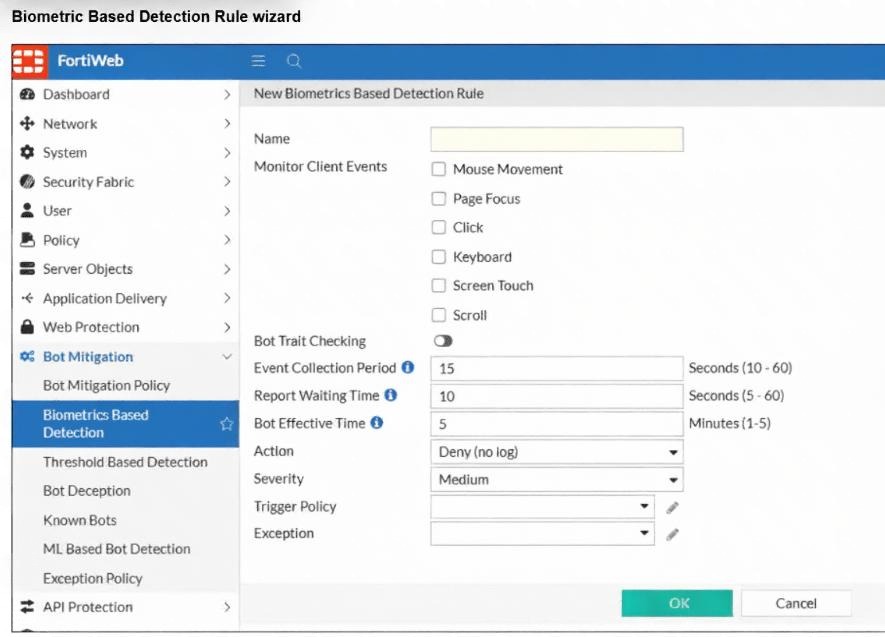
You are a FortiWeb administrator reviewing the biometrics-based detection rule shown in the exhibit. Your
goal is to configure a rule that detects bots that avoid typical human interactions like using a mouse or
clicking. You also want to log the detection event and apply a high-severity alert.
Based on the current configuration, which settings should you change to meet this goal?
A. Select Screen Touch and Page Focus , set the severity to Low , and keep action as Deny (no log) .
B. Select Keyboard and Scroll , change the action to Alert , and set the severity to High .
C. Select Mouse Movement and Click , change the action to Alert , and set the severity to High .
D. Do not select any client events to monitor, enable Bot Trait Checking , keep the current severity, and keep the action as Deny (no log) .
✅ Explanation
The administrator's goal has three specific requirements:
Detect bots that avoid human interactions – The rule must monitor the client events that typical human users perform. Mouse Movement and Click are the most fundamental human interactions. Bots that lack genuine user input will not generate these events, triggering the detection rule. Selecting these options correctly identifies the intended bot behavior.
Log the detection event – The current Action is set to Deny (no log), which means the detection is blocked but no log entry is generated. To meet the logging requirement, the administrator must change the action to Alert. The Alert action generates a log entry without blocking the request, or optionally, the administrator could set it to Deny with logging enabled. However, among the given options, Alert is the correct choice to fulfill the logging requirement.
Apply a high-severity alert – The current Severity is set to Medium. The administrator must change this to High to meet the requirement for a high-severity alert. This ensures the event is properly prioritized in logs and monitoring systems.
❌ Why Other Options Are Incorrect
A. Select Screen Touch and Page Focus, set severity to Low, and keep action as Deny (no log).
Screen Touch and Page Focus are not the primary human interactions targeted for bot detection; Mouse Movement and Click are more relevant.
Severity Low and Deny (no log) fail to meet both the high-severity alert and logging requirements.
B. Select Keyboard and Scroll, change action to Alert, and set severity to High.
While this option correctly changes Action to Alert and Severity to High, the selected client events (Keyboard and Scroll) are less reliable indicators. Many legitimate automated scripts (e.g., API clients or headless browsers) may trigger these events, while bots that simply scrape content may never generate keyboard or scroll events. Mouse Movement and Click are more definitive for detecting non-human interaction.
D. Do not select any client events to monitor, enable Bot Trait Checking, keep the current severity, and keep action as Deny (no log).
Selecting no client events renders the rule ineffective, as there is no behavioral trigger.
Keeping Severity as Medium and Action as Deny (no log) fails both the high-severity and logging objectives.
📚 Reference
FortiWeb 8.0 Administrator Guide – Bot Mitigation: Biometrics-Based Detection rules monitor client-side events like mouse movement, clicks, keyboard inputs, and scrolling to differentiate human users from automated bots. The detection action can be set to Alert (log only), Deny (block with log), or Deny (no log) (block without logging). Severity levels (Low, Medium, High) are used for alert prioritization in SIEM and log analysis workflows.
You have configured parameter validation, file security, and machine learning (ML) anomaly detection for a web form, but some server-side request forgery tests are still succeeding. You need to advise the team on what to prioritize next to improve SSRF protection without compromising other parts of the application. Which recommendation would best strengthen FortiWeb’s ability to block remaining SSRF attempts?
A. Disable ML anomaly detection and rely solely on parameter inspection.
B. Review and refine input validation logic, as SSRF may be exploiting backend behavior or bypassing weak filters.
C. Offload all server-side request forgery (SSRF) protection to FortiGate and remove FortiWeb from the API flow.
D. Apply HTTPS inspection at the transport layer, which FortiWeb does not use to block SSRF.
✅ Explanation:
This is the most effective next step because SSRF attacks succeed by manipulating user-supplied URLs to make the server fetch unauthorized internal resources. Parameter validation is explicitly documented as FortiWeb's primary defense against SSRF—it enforces strict rules on URL parameters to ensure they only point to trusted domains and block requests to internal addresses like 169.254.169.254.
Why other options are incorrect:
A. Disable ML anomaly detection and rely solely on parameter inspection.
This is the opposite of a sound strategy. ML anomaly detection works as a second layer to verify whether an anomaly is a real attack, complementing input validation rather than competing with it. Disabling it would weaken protection.
C. Offload all SSRF protection to FortiGate and remove FortiWeb from the API flow.
This removes the dedicated WAF from the path, eliminating the very features designed to handle SSRF (input validation, protected hostnames, and ML-based detection). The correct approach is to strengthen FortiWeb's policies, not bypass them.
D. Apply HTTPS inspection at the transport layer, which FortiWeb does not use to block SSRF.
HTTPS inspection addresses encryption and visibility, not the application-layer URL validation that SSRF exploits. FortiWeb blocks SSRF through input validation rules and Protected Hostname policies—not transport-layer inspection.
How should a FortiWeb administrator configure behavior-based bot detection to identify traffic from nonhuman users?
A. Set request rate limits and enable mouse movement tracking.
B. Block all traffic that doesn’t come from known devices.
C. Disable JavaScript execution for anonymous users.
D. Create IP blocklists based on login failures.
✅ Explanation:
To effectively identify nonhuman traffic, an administrator should use FortiWeb's behavior-based detection features. The most direct method is to configure threshold-based detection (such as rate limits that catch abnormal request frequencies) and biometrics-based detection, which analyzes client-side interactions like mouse movement to differentiate bots from humans .
Why other options are incorrect:
B. Block all traffic that doesn’t come from known devices.
This is an overly broad approach that lacks practical implementation in FortiWeb's behavior-based features. It would also cause significant false positives by blocking legitimate users accessing from unknown or new devices.
C. Disable JavaScript execution for anonymous users.
This would break the functionality of biometrics and bot deception features, which rely on JavaScript to collect client behavior data . It also does not help identify bots—it simply degrades the user experience.
D. Create IP blocklists based on login failures.
This is a reactive measure that addresses brute-force attempts, not a proactive behavior-based bot detection strategy. It does not identify sophisticated bots that mimic human behavior without triggering login failures.
Reference:
FortiWeb's behavior-based bot mitigation includes biometrics-based detection monitoring mouse movements, clicks, keyboard inputs, and scrolling to distinguish humans from bots . Threshold-based detection monitors suspicious behaviors occurring at abnormal rates .
| Page 1 out of 6 Pages |
| 123 |
The Fortinet NSE 5 - FortiWeb 8.0 Administrator exam is notoriously tough. It doesn't test memorization. It forces you to make complex decisions under time pressure. A weak prep strategy risks a costly failure and wasted effort. Our NSE5_FWB_AD-8.0 practice tests are built to be your definitive bridge to a passing score.

Copyright © - All Rights Reserved