
Last Updated On : 7-Sep-2026
Total 59 Questions
The difference between a near pass and a confident pass isn't just knowing the material, it's mastering the Fortinet NSE 6 - FortiNAC-F 7.6 Administrator exam experience. Our Fortinet NSE6_FNC_AD-7.6 practice test is engineered to close the gap between your current knowledge and the 2026 exam's demands. With every question, you receive detailed, expert verified explanations that break down not just the correct answer, but also the reasoning behind every incorrect option.
Don't just study. Practice NSE6_FNC_AD-7.6 with purpose. Start your journey to a first-time pass today.
By replicating the exact style, complexity, and format of the real Fortinet NSE 6 - FortiNAC-F 7.6 Administrator exam questions, we ensure you walk into the exam with complete confidence.
Concepts and initial configuration
An administrator wants to create a conference manager administrator account but would like to limit the number of conference accounts that can be generated to 30. Which statement about conference accounts is true?
A. In FortiNAC-F, conference accounts can be limited by multiples of 25, so the conference administrator could create 50 accounts.
B. The administrator can set a maximum of 30 conference accounts in the administrative profile for the conference manager.
C. The conference account limit is defined in the onboarding conference portal.
D. Conference account limits are defined in the conference guest and contractor template.
Explanation:
In FortiNAC-F 7.6, the maximum number of conference accounts is configured in the Guest/Contractor template when the Visitor Type is set to Conference.
The template includes a setting called Max Number Of Accounts. When enabled, the administrator can enter the maximum total number of conference accounts that can be created using that template. Therefore, if the requirement is to allow only 30 conference accounts, the administrator can configure the conference template with a maximum of 30 accounts.
Why the other options are incorrect:
A. Incorrect. FortiNAC-F does not require conference-account limits to be configured in multiples of 25. A specific maximum such as 30 can be entered in the template.
B. Incorrect. An administrator profile controls what a conference manager or sponsor is permitted to do and which guest/contractor templates they can use. It does not directly define the maximum number of conference accounts.
C. Incorrect. The onboarding conference portal is not where the maximum account limit is configured.
D. Correct. The Guest/Contractor template contains the Max Number Of Accounts setting specifically for the Conference visitor type.
Fortinet Reference:
Fortinet FortiNAC-F 7.6.0 Documentation → Create templates → Max Number Of Accounts. Fortinet states that this setting is available when the Visitor Type is Conference and limits the total number of accounts that can be created with that template.
Refer to the exhibit.
Given this topology, and a layer 3 registration network configuration, which IP address would be designated
in the DHCP relay configuration for the registration network?
A. 192.168.10.254
B. 192.168.100 75
C. 192.168.100.20
D. 192.168.200.10
Explanation:
In a Layer 3 FortiNAC-F registration network, DHCP broadcasts from endpoints in the Registration VLAN cannot directly reach FortiNAC-F because the endpoints and FortiNAC service interface are on different Layer 3 networks. A DHCP relay/helper is therefore configured on the registration network to forward the DHCP requests to the FortiNAC-F Service Interface (port2).
Fortinet specifically states that, in a Layer 3 implementation, DHCP relays must be configured on each isolation network and point back to the FortiNAC isolation/service interface. FortiNAC-F uses port2 to provide services such as DHCP, DNS, and the captive portal to isolated endpoints.
From the exhibit:
Registration VLAN: 192.168.10.x/24
Registration VLAN gateway: 192.168.10.254
Corporate DHCP: 192.168.100.75
FortiNAC-F port1: 192.168.100.20
FortiNAC-F port2: 192.168.200.10
Therefore, the DHCP relay for the Registration VLAN must forward DHCP requests to 192.168.200.10.
Why the Other Options Are Incorrect:
A. 192.168.10.254 – Incorrect
This is the default gateway of the Registration VLAN. The DHCP relay would typically be configured on this routing device/interface, but this address is not the DHCP relay destination.
B. 192.168.100.75 – Incorrect
This is the corporate DHCP server. For FortiNAC-F Layer 3 isolation/registration, FortiNAC provides DHCP addressing to isolated endpoints through its service interface rather than directing these registration clients to the normal corporate DHCP server. Fortinet requires at least one FortiNAC DHCP scope for an isolation VLAN.
C. 192.168.100.20 – Incorrect
This is FortiNAC-F port1, which is the production/management-facing interface. Layer 3 isolation services use port2, the FortiNAC Service Interface.
D. 192.168.200.10 – Correct
This is the FortiNAC-F port2/service interface. The DHCP relay for the Registration VLAN should point to this address.
Reference:
Fortinet FortiNAC-F 7.6 Deployment Guide → Determine FortiNAC Service Configuration (Network Type): for Layer 3 implementations, DHCP relays on isolation networks point back to the FortiNAC isolation interface.
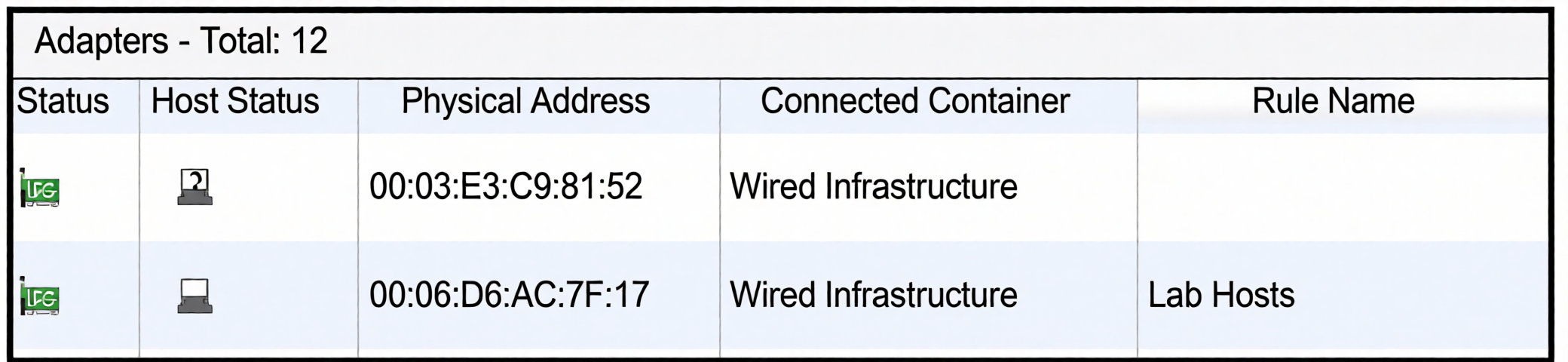
While discovering network infrastructure devices, a switch appears in the inventory topology with a question mark (?) on the icon. What would cause this?
A. The wrong SNMP community string was entered during discovery.
B. The SNMP ObjectlD is not recognized by FortiNAC-F.
C. A read-only SNMP community siring was used.
D. SNMP is not enabled on the switch.
Explanation:
In FortiNAC-F 7.6, a question mark (?) icon on a network device in the topology indicates that FortiNAC has discovered the device but cannot identify or model it based on its SNMP Object Identifier (OID).
Fortinet's 7.6 documentation explicitly states that when an SNMP device is added to the topology but cannot be identified by its OID, it is displayed with a question mark icon. FortiNAC provides a Set Device Mapping option to manually map the unknown device.
Why the other options are incorrect
❌ The wrong SNMP community string was entered during discovery.
A wrong community string prevents successful SNMP communication or credential validation. It does not specifically produce the "?" device icon as the condition described here. FortiNAC provides credential validation for SNMP settings.
❌ A read-only SNMP community string was used.
Read-only SNMP access is sufficient for device modeling. Fortinet states that only read privileges are required for device modeling, although devices FortiNAC controls require appropriate read/write privileges.
❌ SNMP is not enabled on the switch.
If SNMP is disabled, FortiNAC cannot communicate with the device through SNMP. The question-mark condition specifically corresponds to a device whose OID is not recognized, rather than simply SNMP being disabled.
Exam takeaway
? icon → FortiNAC discovered the device but cannot identify/model it → check the SNMP OID/device mapping.
If the OID is unknown, FortiNAC-F 7.6 allows you to right-click the device and select Set Device Mapping.
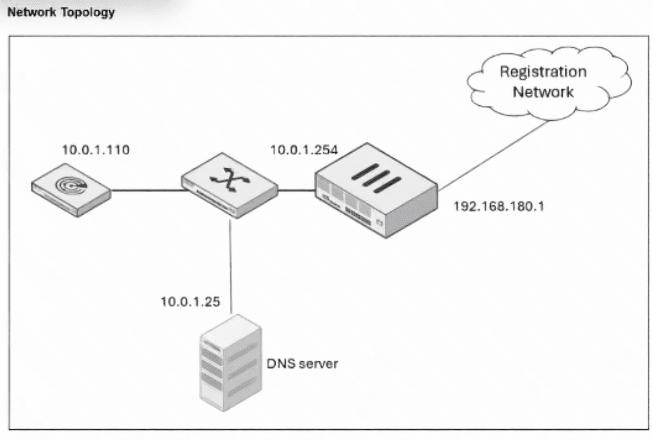
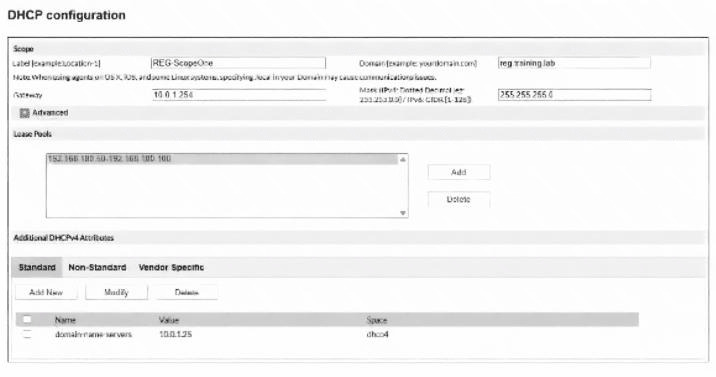
An administrator has configured the DHCP scope for a registration isolation network, but the isolation process
isn ' t working.
What is the problem with the configuration?
A. The domain name server designation is incorrect.
B. The label uses a system-reserved value.
C. The lease pool does not contain a complete subnet.
D. The gateway defined for the scope is incorrect.
Explanation:
The problem is the Gateway configured in the DHCP scope.
From the exhibits:
Registration network: 192.168.180.0/24
Registration network gateway/router interface: 192.168.180.1
DHCP lease pool: 192.168.180.50 – 192.168.180.100
Configured DHCP scope gateway: 10.0.1.254
DNS server: 10.0.1.25
The DHCP clients receiving addresses from the 192.168.180.0/24 registration network need a default gateway that belongs to that subnet. Based on the topology, that gateway should be 192.168.180.1, not 10.0.1.254.
Fortinet's FortiNAC-F 7.6 documentation defines the Gateway field of a Layer 3 DHCP scope as the default gateway for the client lease pool. It also specifically warns not to use the default gateway for FortiNAC's port2 interface.
Why the Other Options Are Incorrect
A. The domain name server designation is incorrect. — Incorrect
The topology shows the DNS server at 10.0.1.25, and the DHCP configuration specifies 10.0.1.25 as the domain-name-server. Therefore, the DNS setting matches the topology.
B. The label uses a system-reserved value. — Incorrect
The scope label shown is REG-ScopeOne. FortiNAC-F reserves prefixes such as REG_, REM_, AUTH_, DE_, ISOL_, VPN_, and HUB_ for Layer 3 DHCP scope labels. REG-ScopeOne uses a hyphen (-), not the reserved REG_ prefix, so this is not the problem.
C. The lease pool does not contain a complete subnet. — Incorrect
A DHCP lease pool does not have to contain every usable address in the subnet. FortiNAC-F allows the administrator to specify a starting and ending IP address representing only the addresses that should be available for DHCP assignment. Thus, a range such as 192.168.180.50–192.168.180.100 is valid.
D. The gateway defined for the scope is incorrect. — Correct
The configured gateway 10.0.1.254 does not belong to the 192.168.180.0/24 network used by the DHCP lease pool. According to the topology, the correct client gateway is 192.168.180.1.
Reference
Fortinet FortiNAC-F 7.6 Configuration Wizard → Configure scopes: the Gateway setting is the default gateway for the client lease pool.
When configuring isolation networks in the configuration wizard, why does a layer 3 network typo allow for mora than ono DHCP scope for each isolation network typo?
A. The layer 3 network type allows for one scope for each possible host status.
B. Configuring more than one DHCP scope allows for DHCP server redundancy
C. There can be more than one isolation network of each type
D. Any scopes beyond the first scope are used if the initial scope runs out of IP addresses.
Explanation:
In FortiNAC, isolation networks are used to quarantine or redirect hosts based on their compliance or registration status.
When configured as Layer 3 isolation networks, FortiNAC can assign different DHCP scopes depending on the host’s status (e.g., unregistered, unhealthy, or quarantined).
This design allows administrators to apply different policies and IP ranges for each host state, ensuring proper segmentation and control.
Other options explained:
B. DHCP server redundancy → Incorrect
Redundancy is not the reason. Redundancy is handled at the DHCP server level, not by FortiNAC isolation network configuration.
C. More than one isolation network of each type → Incorrect
The wizard defines one isolation network per type, but Layer 3 allows multiple scopes within that type.
D. Extra scopes used if IPs run out → Incorrect
Scopes are tied to host status, not overflow handling.
Reference
FortiNAC 7.6 Administration Guide → Section on Isolation Networks and DHCP Scopes.
NSE6_FNC_AD-7.6 Exam Objectives → Domain: Network Access Control – Isolation Networks.
An organization has FortiNAC-F deployed and is using Layer 3 isolation networks across multiple sites with firewalls. At a minimum, which three protocols must be allowed between the isolation networks and FortiNAC-F? (Choose three.)
A. DDNS
B. NTP
C. HTTP/HTTPS
D. DNS
E. DHCP
Explanation:
When FortiNAC-F uses Layer 3 isolation networks across multiple sites with firewalls in between, the isolated endpoints are placed into a different subnet/VLAN behind a firewall or Layer 3 switch. For FortiNAC to successfully manage these isolated devices and guide them through the registration/compliance process, the following three protocols are minimally required to be allowed from the isolation network back to the FortiNAC-F server:
C. HTTP/HTTPS (Ports 80/443):
This is critical. When an endpoint is isolated, it needs to be redirected to the FortiNAC captive portal for registration or to download remediation agents. The endpoint must be able to reach the FortiNAC web server via HTTP (for redirection) and HTTPS (for secure portal pages, agent downloads, and API communication). Without this, the user cannot complete the registration process.
D. DNS (Port 53):
The isolated endpoint needs to resolve the FortiNAC server's hostname (e.g., portal.company.com) to an IP address. Additionally, the endpoint may need DNS to resolve external update servers for antivirus or OS patches during the remediation process. Without DNS, the captive portal redirection will fail or be extremely slow.
E. DHCP (Ports 67/68):
When an endpoint is moved into a Layer 3 isolation VLAN, it must obtain a new IP address via DHCP from the scope you configured in the isolation network settings. FortiNAC itself does not have to be the DHCP server, but the DHCP requests from the isolated endpoint must be able to reach the legitimate DHCP server that serves that isolation subnet, and the DHCP Offer must reach the endpoint. Firewalls must permit DHCP relay or direct DHCP broadcast forwarding between the isolation VLAN and the DHCP server.
Why the other options are incorrect:
A. DDNS (Dynamic DNS):
FortiNAC does not require Dynamic DNS for isolation functionality. While FortiNAC can update DNS records as an optional integration, it is not a mandatory protocol for endpoints to successfully register or remediate in an isolated network.
B. NTP (Network Time Protocol):
While NTP is highly recommended for certificate validation, accurate logging, and portal session timers, it is not strictly required at a minimum for connectivity between the isolation network and FortiNAC-F. The endpoint can still reach the captive portal and obtain an IP address without NTP. Time synchronization is a best practice, not a mandatory protocol for basic Layer 3 isolation communication.
Reference:
FortiNAC 7.6 Administration Guide > Deployment > "Layer 3 Isolation Requirements" – Explicitly lists the required firewall rules between isolation VLANs and the FortiNAC server, noting that DHCP, DNS, and HTTP/HTTPS are the minimum essential protocols.
FortiNAC 7.6 Administration Guide > Ports and Protocols Reference – Details the required ports for endpoint-to-server communication during isolation.
An administrator wants FortiNAC-F to return a group of user-defined RADIUS attributes in RADIUS responses. Which condition must be true to achieve this?
A. The requesting device must support RFC 5176.
B. Inbound RADIUS requests must contain the Calling-Station-ID attribute.
C. The device models in the inventory view must be configured for proxy-based authentication.
D. RADIUS accounting must be enabled on the FortiNAC-F RADIUS server configuration.
Explanation:
FortiNAC-F can use RADIUS Attribute Groups to return a collection of standard, vendor-specific, or user-defined/custom RADIUS attributes in RADIUS responses such as Access-Accept.
For FortiNAC-F to process and return these attribute groups, the incoming RADIUS request must include the Calling-Station-Id attribute. Fortinet specifically states that if Calling-Station-Id is missing, RADIUS attributes will not be returned.
Why the Other Options Are Incorrect
A. The requesting device must support RFC 5176. — Incorrect
RFC 5176 relates to Dynamic Authorization, including Change of Authorization (CoA) and Disconnect-Request messages. It is not required simply for FortiNAC-F to return attribute groups in an Access-Accept response.
B. Inbound RADIUS requests must contain the Calling-Station-ID attribute. — Correct
This is an explicit Fortinet requirement. The Calling-Station-Id identifies the endpoint and allows FortiNAC-F to properly process logical-network information and determine which RADIUS attribute groups should be returned.
C. The device models in the inventory view must be configured for proxy-based authentication. — Incorrect
Fortinet states that devices using RADIUS Attribute Groups must be configured for Local RADIUS Authentication, not proxy-based authentication.
D. RADIUS accounting must be enabled on the FortiNAC-F RADIUS server configuration. — Incorrect
Accounting is important for some functions, particularly CoA-related functionality, but it is not the prerequisite for returning RADIUS Attribute Groups in normal authentication responses.
Reference
Fortinet FortiNAC-F 7.6 Administration Guide → RADIUS > Attribute Groups states two key requirements:
Device models must use Local RADIUS Authentication.
The inbound RADIUS request must contain Calling-Station-Id; otherwise, the configured RADIUS attributes are not returned.
| Page 1 out of 9 Pages |
| 12345 |
The Fortinet NSE 6 - FortiNAC-F 7.6 Administrator exam is notoriously tough. It doesn't test memorization. It forces you to make complex decisions under time pressure. A weak prep strategy risks a costly failure and wasted effort. Our NSE6_FNC_AD-7.6 practice tests are built to be your definitive bridge to a passing score.

Copyright © - All Rights Reserved